Showing posts with label C#. Show all posts

Thursday, August 09, 2018

Probably the best language to learn now is Python


Of course, you want the most popular and the most valuable.

According to the Institute of Electrical and Electronics Engineers (IEEE) , it is Python, the clear winner.

Here are the top ten in its rankings:


Why Python?

The answer appears to the fact that it iss now used for embedded applications and because it has beefed up its repertoire related to AI and Machine learning. It is for this reason R language (somewhat speccialized) has seen some decline.

Microsoft C# is still handing there at 5 and probably its place will be solid 5 for all types of programming - Web, desktop and Mobile. SQL is also there but does not show up as top 10 which is understandable given its area of usage.

Well here is the first 20. Find if your favorite is here


Well, you may want to know the basis for the ranking. You can get to know here.

You can find a lot of posts on R and Python on this site.


You can find a lot of Python and R posts in my blogs.

Friday, December 29, 2017

Begin to design UI for Universal Windows Projects

Here are more links in my posts to XAML after you read this beginner post.

http://hodentek.blogspot.com/search?q=xaml

XAML is a XML based language that Microsoft developed to create a applications the easy way. XAML is declarative that means that whatever you declare up front is what you get. There is no more secret to it.Universal Windows Projects use this language to build applications.

In this slideshow I show a step-by-step procedure to create an application with XAML which has just a button that displays Hello. It has some color and size to it. Although you will be seeing 18 or more slides once you grasp the spirit, you would do it under a minute.

In order to work with XAML you need Visual Studio 2017 Community. The good news is it is free. What is more BLEND, its comprehensive designer also installed at the same time. You may also need Windows SDK for Windows 10 which can be found on the Internet. There are various versions.

In developing on Windows Platform be sure to use the intellisense feature that takes out all the mystery out and gives you a very practical and intelligent way to work with design.

In this slideshow I show a step-by-step procedure to create an application with XAML which has just a button that displays Hello. It has some color and size to it. Although you will be seeing 18 or more slides once you grasp the spirit, you would do it under a minute.

So let us get on with this slideshow.


Sunday, November 26, 2017

Windows 10 and Universal Windows App

UWP is an app for the Windows 10 and Windows 10 runs on a number of hardware devices: PC, tablet, Xbox, HoloLens, Surface Hub etc. UWP with just one API set and one app package and one store can reach all screen sizes from the smallest to the largest.

It can support different modes of interaction;
touch
mouse + key board
pen
game controller

Programming UWP apps is very flexible, just not limited to C# and XAML. You can use JavaScript(& HTML). You could also use Unity or MonoGame. You can mix them as well.

You will create just one project for (any) every device you want to address.

Let me enumerate the features:
  • Common API surface across all devices
  • Extension SDKs to do specific stuff on chosen device
  • Apps packaged using .AppX packaging format and distributed from store
  • One store for all devices
  • Adaptive controls and input are supported(Keyword Responsive design)
Go on, monetize your app!

Tuesday, July 26, 2016

JavaScript is number 1, but R is catching up

JavaScript is number 1  and then there ar others that follow:

Java
PHP
Python
C#
C++
Ruby
CSS,
C
etc.

R has moved from 17th to 13th Place according to RedMonk's biannual programming language rankings. TypeScript a subset of JavaScript a la Microsoft is another language on rapid move.

On what does RedMonk base this ranking?
Language usage on StackOverflow and GitHub.

More info here:
http://www.infoworld.com/article/3096812/application-development/iot-spurs-surprise-surge-in-assembly-language-popularity.html

On Thiobe index JavaScript is not the top, C++ is. My guess is IoT drives the language use in the future and if that is true then C++ will get the greatest grade.

http://www.infoworld.com/article/3096812/application-development/iot-spurs-surprise-surge-in-assembly-language-popularity.html

In 2015 JavaScript had just moved from 9 to 7 on the Thiobe Index:
http://hodentekhelp.blogspot.com/2015/01/how-popular-is-javascript.html

Wednesday, February 03, 2016

Microsoft Azure IoT Hub goes GA

With Azure IoT hub which became generally available(GA) you can be assured of reliable bi-di communication; connect to millions of assets; can operate with wide range of OSs and protocols and of course guaranteed to be secure. Azure IoT hub provides a complete set of services such as connecting, provisioning; monitoring and updating.

AzureIOTonGA

If you are looking for getting a good handle may be you should start with this tutorial. You do not need to have a device, but you will get the hang of it using a simulated device. The tutorial is well structured and clearly delineated. You have a choice of programming help, C#, Java or Node.JS.
  • Create an IOT Hub
  • Create a device Identity
  • Get or receive messages sent by device to cloud
  • Create a simulated device app
  • Run applications
Watch this video targeted for developers:


Azure IOT Hub documentation is here.


Friday, July 24, 2015

Windows 8.1 and Windows Phone 8.1 apps with Visual Studio 2015 Community


In my previous post I made a premature remark regarding Windows Phone apps. I remarked, "For developing Windows Phone applications you may need to install a different version of Visual Studio.
"
I was wrong.

Well, it turned out that some of the software support is not installed by default and you need to install them clicking on the link you find for many of the templates like 'Windows, Python, F#, etc.".
I tried to install support for Visual C++ under other languages and the following was displayed.


MissingTools.png

I clicked Install to install the necessary components.

MissingTools_1.png

Well you need to close the IDE which allowed you to come to the above. Click Continue. The following features will be installed.

MissingTools_2.png

Clacking Next brings up the next window. Note that you need an additional 2GB space.

MissingTools_3.png
 
Now you are ready to update your tools. Click Update. Here is an intermediate state of installation.
 
 
MissingTools_5.png

The install is completed.

The next time you launch VS 2015 Community you will see the following:


MissingTools_6.png

This effectively adds all Windows 8.1 and Windows Phone 8.1 templates for all languages including JavaScript.

This installation updates Visual Studio 2015 Community in Control Panel|.| Programs.

Here are some more details:

Visual Basic templates now available include the new and classic as shown.

VB_win01.png

These are the Windows 8 related templates (Windows 8, Windows Phone 8.1, Silverlight). Note that the scroll is only halfway. There are many more templates.

VB_win01_W8.png
 
These are the Windows Classic Desktop templates.
VB_win01_Classic.png
 
to be continued..


Thursday, July 23, 2015

Details of installed project templates in Visual Studio 2015 Community

After installing Visual Studio 2015 launch the application to display the start page.


StartPage.png

Click on New Project to open the New Project window as shown.

NewProj_01

It is displaying Visual Basic separately from other languages and the reason for this might be that Visual Basic was used recently, or perhaps this is the default New Project page in VS 2015 Community.

The number and types of Visual Basic templates are as shown here:

NewProj_01_VB

Visual Basic templates are fewer than C# project templates because there are templates for Android and iOS in C#.

NewProj_01_C#

For Android there are application templates for Wearable and WebView.

NewProj_01_Android

For iOS as well, Apple Watch template project is available.

NewProj_01_iOS

However for iOS Mobile applications templates use Xamarin. Forms.


NewProj_01_iOSMobile

Both Type Script and JavaScript project templates requires Tools for Apache Cardova which you can get by choosing the option.

For Python templates you need to install Python tools for Visual Studio and install Tools for F# for F# templates.

In C++ you can install support for both Android as well as iOS. Of course for MFC and Extensibility project templates you can install the requires tools. However for Windows templates -Windows 8.1 and WindowsPhone 8.1 can be installed.

I am not sure how these are going to change after the debut of Windows 10, perhaps a new version or an update. For developing Windows Phone applications you may need to install a different version of Visual Studio.

Xamarin is going to play a key role in cross-platform development using Microsoft Visual Studio and perhaps you may want to read more about Xamarin and its resources here:

Android Apps with Visual Studio
http://hodentek.blogspot.com/2015/03/android-apps-using-visual-studio-part-1.html
C# Universal Coder
http://hodentek.blogspot.com/2014/01/master-c-and-become-universal-coder.html
Cross-Platform Apps
http://hodentek.blogspot.com/2014/07/cross-platform-app-development-part-1.html

Monday, July 20, 2015

Move on to Visual Studio 2015 RTM / Community

You have been using Visual Studio 2013 or non-rtm versions of Visual Studio 2015. Now Visual Studio 2015 RTM is available and the Visual Studio 2015 Community edition is free. Visual Studio Community is free for individual developers, open source projects, academic research, education, and small professional teams.

All Visual Studio 2015 items shown below can be downloaded from this link.

VS2015RTM01.png

Download button for the Visual Studio 2015 Community is here.


VS2015RTM02.png

It has everything you need for productive programming:
  • Flexibility- PC, tablet, smartphone OK
  • Designers, editors, debuggers, profilers all in one place
  • Extensive extensions makes you reach out
  • Multiple language support, C#, VB, F#, C++, Python, HTML, JavaScript and more
  • Support Windows Desktop Programs, Universal Windows Platform, iOS, and Android
  • Develop for web with ASP.NET, Node.js, Python etc with several frameworks(AngularJS, jQuery, Django, etc)


Friday, March 13, 2015

Android apps using Visual Studio? - Part 3

Now that Xamarin is installed take a look at the WebView template. Created AndyWebView project using the WebView Template. There are a few others.


This is what you will be seeing in the Solution Explorer.

This is all like in all VS templates.

Here is the exploded view of the folders:

The Object Explorer shows more on the 'Mono.Android' items here:


Mind you, this is only a part of the listing.

This project does not build for the following reason:

Xamarin.Android for Visual Studio requires Business account or greater. Please log in with your Xamarin account to proceed.

Well, well my starter kit is no good. I am not ready to shell down
Business edition $83/month for Business Edition
and $158/month for Enterprise edition

That's a lot to just write in my blog posts.

I will stick to IntelXDK for now or plain vanilla Visual Studio 2015 Express if it makes a debut.
If you want to pursue developing for Android and iOS read more here regarding XAMARIN and MonoDevelop:

http://www.monodevelop.com/download/

Thursday, March 12, 2015

Android apps using Visual Studio? - Part 2

 
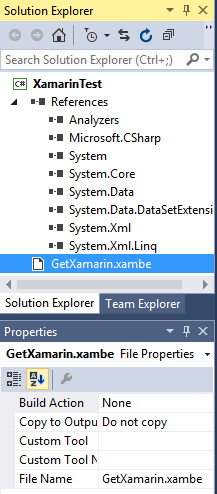
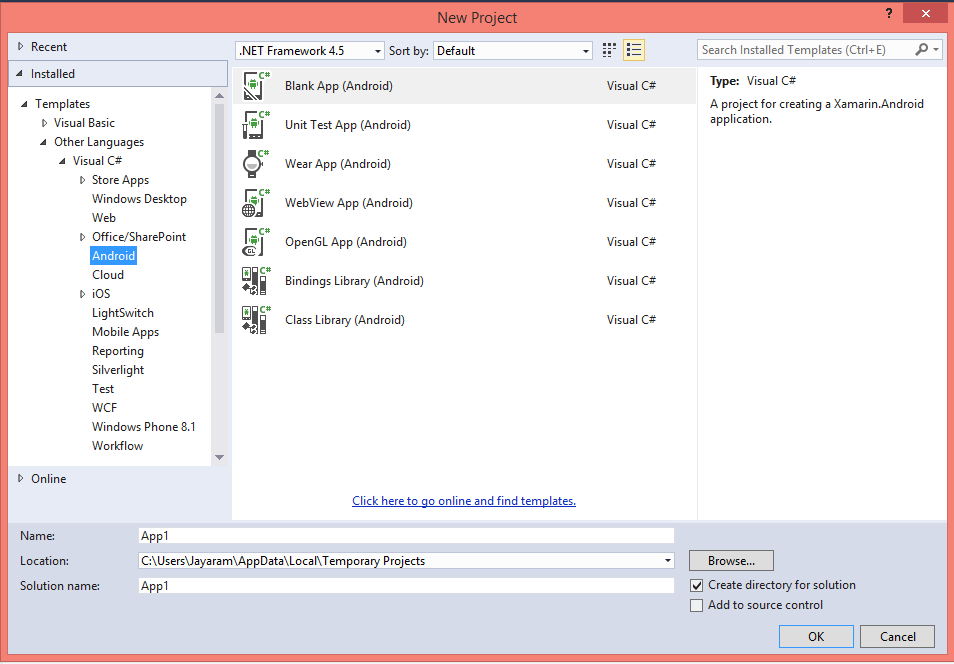
You can create an Android app in Visual Studio 2015 CTP6. Such as XamarinTest as in the next image (Please refer to the first image in Part 1).


XamarinApp01

There are only two items in the Solution Explorer as shown:


XamarinApp02
 
 
In order to proceed you need Xamarin and when you access to learn more about Xamarin you will be taken to the Xamarin site here:
http://xamarin.com/platform?utm_source=visualstudio&utm_medium=referral&utm_content=platform&utm_campaign=installer
 
The details of what Xamarin download gives you are shown here:
 
XamarinApp03

You need to provide some info before you can download.
Double click the Xamarinisntaller.exe to begin installing Xamarin (installs with Admin rights). It first tries to locate the Android SDK location and finds it on the computer here: (Note a few screens before the next image are not shown here)
 
Xamarinapp06

In order to proceed further any running Visual Studio instance needs to be closed and the installer closes the Visual Studio if you ask it to force it.
 
 
There are lot more requirements shown here when you proceed to install hitting Next button.

XamarinApp07
 
You need to agree for more terms next to proceed. If you do agree the download of the above starts as shown:

XamarinApp08
 
You may have to close out IE browsers as Java requires it. You get a series of messages that browser is closed while installing JDK but you will see the browsers are still open and unless you close it yourself, the program is unable to close browsers.
 
 
 Xamarin studio 5.7.2 (windows installer kicks in) gets installed. Finally after a while you get the final screen that allows you create 'amazin' apps.

XamarinApp09
 
 
The installation  has installed the following items to your programs as seen in control panel:

XamarinApp10
The installation continues without the JDK warnings to close the browsers.
Android SDK form 22_r3 gets installed. Many other versions of Android SDK (4.4.2,etc) gets installed. Installation is quite slow. The Android NDK r8d is admittedly slow.
 
Now if you launch Visual Studio 2015 CTP6 and try to create an Android app you will see few more items as shown.
 
 
Xamarin Studio also gets installed. Which one do you use, Xamarin Studio or Visual Studio 2015 CTP6? 

That's all for now


Thursday, January 29, 2015

What is TIOBE Index?

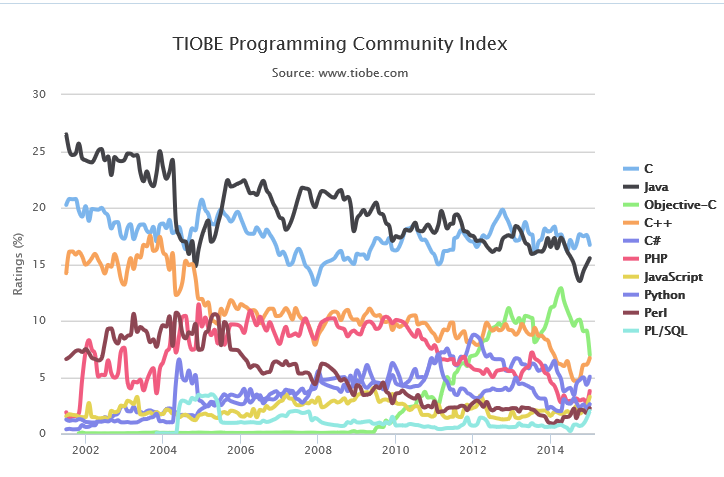
TIOBE index provides a measure for the popularity of programming languages as mined from search engines. It includes many browser results as well as covers many programming languages. The index is published every month and for the month of January you can find it here:
http://www.tiobe.com/index.php/content/paperinfo/tpci/index.html

Programming languages C and Java are the top dogs and Javascript jumped from 9 to 7 in January 2015 and C# steady from 2014 to 2015 at 5.

TIOBE Index is calculated by the query +"Language> programming" to the search engines.
Get more info on TIOBE here:
http://www.tiobe.com/index.php/content/products/tics/TICS_framework.html


Wednesday, June 04, 2014

Creating a Azure Mobile Service application

This is quite easy as I am just describing a sample application on Windows Azure Mobile Services.

How to create a service?

Follow these links:

http://hodentek.blogspot.com/2014/05/get-started-with-windows-azure-mobile.html
http://hodentekmsss.blogspot.com/2014/05/create-windows-azure-mobile-service-and.html

Now once you create a service, you would like to use it. How?

This post explains the process using a sample created by Microsoft.
------------------------------------------------------------
This application  follows the sample on Microsoft Azure Mobile Services. You can directly create the 'app' on Windows Azure Mobile Services portal. After you create the application you can download the code to your computer. You then open the application (the downloaded code) in Visual Studio 2013. The suggested version is the following:

http://www.visualstudio.com/downloads/download-visual-studio-vs#d-express-windows-8

Note that although the URL above may suggest Windows 8, the page it takes you to is for Visual Studio Express 2013 with Update for Windows 8.

There was already installed on the machine the VS software with the following details:

Microsoft Visual Studio Express 2013 for Windows

Version 12.0.30501.00 Update 2

Microsoft .NET Framework

Version 4.5.51641

Windows Azure Mobile Services Tools 1.1

Windows Azure Mobile Services Tools

The following pertains to the Sample App: TodoList

With this app you can add an entry (encrypted) to your Todo list maintained on your mobile services with a simple UI as shown:

When you run the downloaded application (as explained in this post) you will display the UI using the Simulator in VS2013.


You type in a Todoitem (whatever it is, it is of type 'text') and click Save

The added item appears with a checkbox under Query and Update Data


Place check mark and click Refresh

That is all it is designed to do.

How do you create this app?

In order to acomplish this, you should first login to your mobile service. My previous post shows how you can create a service for free(for now).

Here is where I start on my mobile service


Click on Name of service to display the following:


Click on CREATE A NEW WINDOWS STORE APP

The following page is displayed:


I did not get the tools as I already had one installed.

Go to Step 2 and create a table to store you todo list. Click on Create TodoItem Table. It creates a named table on the service. You don't see the table, though.

In Step 3, you can choose JavaScript or C#. I have tried both but the C# choice, when run, throws a bunch of exceptions. Herein follows after choosing JavaScript.

Click Download and you can download a zip pakage to your computer. Extract files and access the Visual Studio Solution from VS2013Express for Windows Update 2 (preferably with elevated permissions). I will discuss the details in my next post.

When you run the app you will see what was shown in my earlier screen shots.

Well if you can save todolist items to mobile service you can save Customer Info, Contact List, and Hobbies etc.

Now how does this look on the mobile service portal. This shows how it is entered.


You can create a new table here clicking on the Data tab of the mobile service as shown.


This is a Windows 8 App and you cannot deploy it to Windows Phone 8.1 although you can access the data on the mobile services using its URL.


Tuesday, June 03, 2014

Apple introduces SWIFT, a new programming language

It is a part of the Xcode IDE (now in beta) SWIFT is teh programming language for Cocoa frameworks of OS X and iOS. It is supposed to be very fastand designed for safety with lightning fast intractivity according to Apple.

It goes one step beyond Objective_C Apple's preferred language in terms of being light and agile.
This is what Apple says about SWIFT,

"Swift is an innovative new programming language for Cocoa and Cocoa Touch. Writing code is interactive and fun, the syntax is concise yet expressive, and apps run lightning-fast. Swift is ready for your next iOS and OS X project — or for addition into your current app — because Swift code works side-by-side with Objective-C."

Read mode here:
https://developer.apple.com/swift/

You can download teh programming language from here:
https://itunes.apple.com/us/book/the-swift-programming-language/id881256329?mt=11

It is safe as unsafe code is avoided at the outset by,
  • Initializing variables before they are used
  • Arrays and integers are checked for overflow
  • Memory is managed automatically
Syntax is made easy by three character keywords
The speed comes about by using the high-performance LLVM compiler.

SWIFT code is transformed into optimized native code that can be used for any of Apple devices Mac, iPhone or iPad. Swift inherits the best of language features frrom C and Objective-C. It has obejct oriented features like classes, generics, etc.

With the release of iOS 8 and Yosemite later in the year SWIFT created apps can easily find their way to APP store and Mac App Store.

Is there a similarity of thought processes in  Apple and Microsoft. I would say yes.

With the release of Windows OS 8.1, Microsoft established one platform for both Windows 8.1 and Windows Phone 8.1 App development and as this post is typed apps written for both from VS 2013 Update 2 are making their way to the Windows App Store.

Sunday, May 18, 2014

Get started with Windows Azure Mobile Services

It is incredibly easy to add a backend to your connected client application using Windows Azure Mobile Services (WAMS).

With WAMS you can provide a secure and scalable backend to power your apps not only on Windows but many other platforms such as iOS, Android etc. Storing data and authenticating users is effortless and you can even send push notifications. As to programming languages you can use Node.JS or C#.

There are several data storage options as well, on-premises or Azure SQL Satabase, blob storage, table storage and MongoDB.

Here is a small sample of customers leverging this service.

When you create a Windows Azure Mobile Service you can also create a (free) backend SQL Database as well.

Follow this link to create your first Windows Azure Mobile Service.

Friday, April 04, 2014

Oracle Data Provider ODP.NET is available in two flavors

Oracle Data Provider for .NET (ODP.NET) is a free, high performance ADO-NET complinat data access provider. Using this .NET Developers can access Oracle databases using .NET Languages. ODP.NET supports all ADO.NET and .NET Framework features.

You can download it from here:
http://www.oracle.com/technetwork/topics/dotnet/utilsoft-086879.html

In the download look for Oracle Data Provider for .NET and is part of the Oracle Data Access Components (ODAC)12.1.


ODP.NET is available in two forms:
  • ODP.NET Unmanaged Driver --Some librabries compiled to machine code rather than .NET code
  • ODP.NET 12.1 Managed Driver - Completly compiled to .NET Byte code and runs inside Common Language Runtime
These two are comparable to JDBC thick and thin clients.

The managed driver is really 'thin' comprising of just two dlls with less than 10MB size. It is totally self-contained requiring no other Oracle client networking hooks.

However this does not support connecting to Oracle database via Server Explorer in Visual Studio Express Edition.

Read this complete article for using the Managed Provider:
http://www.oracle.com/technetwork/issue-archive/2014/14-mar/o24odp-2147205.html?msgid=3-9850712152

Sunday, January 05, 2014

Master C# and become a Universal Coder

Is this the coming of age of C#?

Of course with your C# mastery and XAMARIN Studio you can become a Universal coder. The apps are written entirely in C# but your target platform could be Windows, Mac, Android and iOS. Isn't that cool? You can have your favorite .NET libraries and still use stuff for platform specific libraries, and have a good mash. If you have not tried XAMARIN try it now and join the 0.5B developers World wide. Down load a free version here which is really bare bones.

http://xamarin.com/

The free version gives you:

Xamarin Studio and deploying to Device(s) or deploying to App Store(s) capabilities. Perhaps the app size is limited and if you want unlimited appsize, prepare to shell out $299/year in buying a subscription. The top end costs $1899/year.

Here is the product line-up, you choose.


Monday, November 18, 2013

What are you waiting for, get on to the Cloud and start developing with Visual Studio

On Nov 13 Microsoft announced Visual Studio online. Here is the announcement
Here is a screen shot from the site. There is a new portal that goes with it as well.


You guessed it right, you can get started for FREE. Of course it is free for MSDN users. You will see some screen shots at the bottom of this post.

The line-up of Online offering according to this source is as follows:

•Hosted source control, work-item and agile-planning services (in other words, the key capabilities of Team Foundation Service on Windows Azure)
•A hosted build service
•Elastic load testing service
•Application Insights -- a service that provides information such as health, availability, performance and usage of applications
•"Monaco" -- a coding environment "for the cloud, in the cloud," which provides a subset of Visual Studio features inside a variety of browsers for "targeted Azure development scenarios." The first of these scenarios is for editing Azure Web Sites directly from inside any "modern" browser, on any device (Windows-based or not). Microsoft has been working on Monaco for three years, execs said, and already has used the Monaco technology for some of its other cloud-based developer offerings, including the Office 365 "Napa" development tools, to SkyDrive file editing.

It is very easy to start even if you do not have a subscription for Windows Azure.

I have one and I could do it in no time at all. Here are some easy steps I took to create a VS project online. Probably you will hear a lot more from me in the comign days. Right now I am somewhat busy.

After signing up look up Visual Studio Online marked Preview

 
I am impatient, I clicked Quick Create with the lightning icon after giving an account name. I got a URL for this

 
I clicked Create Account.  Very quickly an account was created.

 
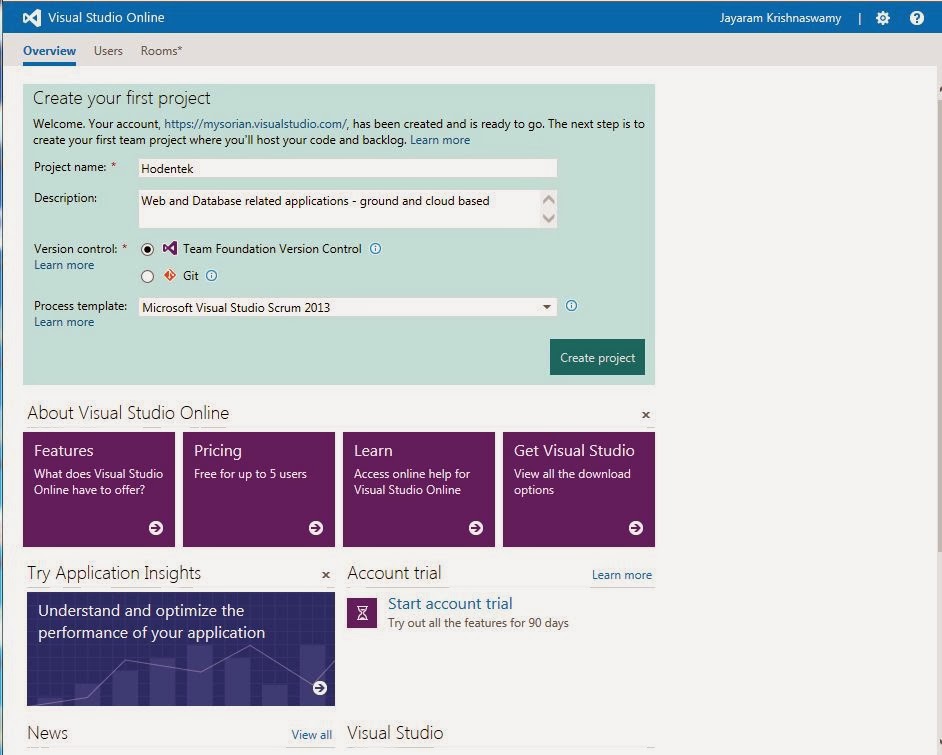
I clicked on Browse to create a project and provided some details..

 
Clicked on Create Project. The project got created.
 
 
Now you can connect to it using Visual Studio, Eclipse or XCode.
 
What is unusual is that this required java to develop (Not C#, not even C++).
 
What a shame?
 
Read this article by Mary Jo Foley on ZDNet here. Here is a summary of Mary Jo's article:
Summary: What's the former technical lead on Eclipse Java development tools been doing at Microsoft for the past three years? Building a browser-based development toolset.


DMCA.com Protection Status