Showing posts with label Visual Studio 2015 CTP6. Show all posts
Tuesday, March 17, 2015
Friday, March 13, 2015
Android apps using Visual Studio? - Part 3
Now that Xamarin is installed take a look at the WebView template. Created AndyWebView project using the WebView Template. There are a few others.
This is what you will be seeing in the Solution Explorer.
This is all like in all VS templates.
Here is the exploded view of the folders:
Mind you, this is only a part of the listing.
This project does not build for the following reason:
Xamarin.Android for Visual Studio requires Business account or greater. Please log in with your Xamarin account to proceed.
Well, well my starter kit is no good. I am not ready to shell down
Business edition $83/month for Business Edition
and $158/month for Enterprise edition
That's a lot to just write in my blog posts.
I will stick to IntelXDK for now or plain vanilla Visual Studio 2015 Express if it makes a debut.
If you want to pursue developing for Android and iOS read more here regarding XAMARIN and MonoDevelop:
http://www.monodevelop.com/download/
This is what you will be seeing in the Solution Explorer.
This is all like in all VS templates.
Here is the exploded view of the folders:
The Object Explorer shows more on the 'Mono.Android' items here:
This project does not build for the following reason:
Xamarin.Android for Visual Studio requires Business account or greater. Please log in with your Xamarin account to proceed.
Well, well my starter kit is no good. I am not ready to shell down
Business edition $83/month for Business Edition
and $158/month for Enterprise edition
That's a lot to just write in my blog posts.
I will stick to IntelXDK for now or plain vanilla Visual Studio 2015 Express if it makes a debut.
If you want to pursue developing for Android and iOS read more here regarding XAMARIN and MonoDevelop:
http://www.monodevelop.com/download/
Thursday, March 12, 2015
Android apps using Visual Studio? - Part 2
You can create an Android app in Visual Studio 2015 CTP6. Such as XamarinTest as in the next image (Please refer to the first image in Part 1).

XamarinApp01
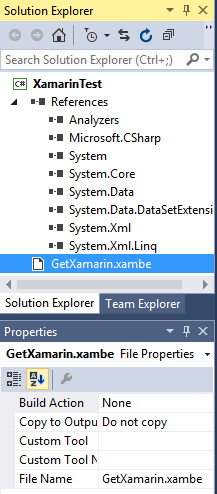
There are only two items in the Solution Explorer as shown:
That's all for now
XamarinApp01
There are only two items in the Solution Explorer as shown:
XamarinApp02
In order to proceed you need Xamarin and when you access to learn more about Xamarin you will be taken to the Xamarin site here:
http://xamarin.com/platform?utm_source=visualstudio&utm_medium=referral&utm_content=platform&utm_campaign=installer
The details of what Xamarin download gives you are shown here:
XamarinApp03
You need to provide some info before you can download.
Double click the Xamarinisntaller.exe to begin installing Xamarin (installs with Admin rights). It first tries to locate the Android SDK location and finds it on the computer here: (Note a few screens before the next image are not shown here)
Xamarinapp06
In order to proceed further any running Visual Studio instance needs to be closed and the installer closes the Visual Studio if you ask it to force it.
There are lot more requirements shown here when you proceed to install hitting Next button.
XamarinApp07
You need to agree for more terms next to proceed. If you do agree the download of the above starts as shown:
XamarinApp08
You may have to close out IE browsers as Java requires it. You get a series of messages that browser is closed while installing JDK but you will see the browsers are still open and unless you close it yourself, the program is unable to close browsers.
Xamarin studio 5.7.2 (windows installer kicks in) gets installed. Finally after a while you get the final screen that allows you create 'amazin' apps.
XamarinApp09
The installation has installed the following items to your programs as seen in control panel:
XamarinApp10
The installation continues without the JDK warnings to close the browsers.
Android SDK form 22_r3 gets installed. Many other versions of Android SDK (4.4.2,etc) gets installed. Installation is quite slow. The Android NDK r8d is admittedly slow.
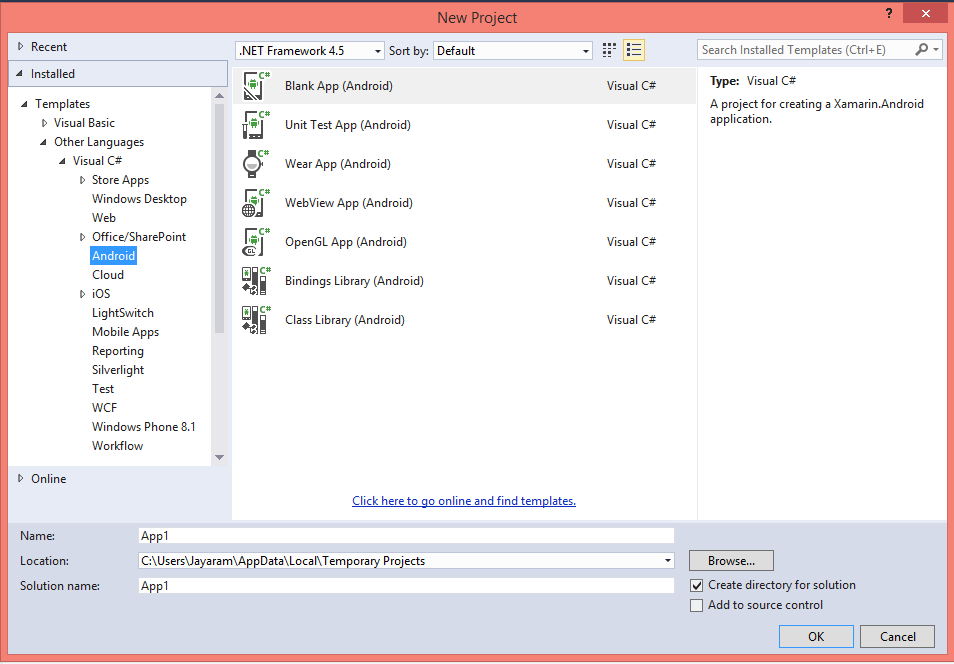
Now if you launch Visual Studio 2015 CTP6 and try to create an Android app you will see few more items as shown.
Xamarin Studio also gets installed. Which one do you use, Xamarin Studio or Visual Studio 2015 CTP6?
That's all for now
Sunday, March 08, 2015
Android apps using Visual Studio? - Part 1
Review this regarding cross-platform app development and Xamarin connection:
http://hodentek.blogspot.com/2014/07/cross-platform-app-development-part-1.html
Review regarding XAMARIN:
http://hodentek.blogspot.com/2014/01/master-c-and-become-universal-coder.html
Now in Visual Studio 2015 CTP6 you have the Android app under New Project in C#. Sorry, not available for VB. Not only you can work with Android but also with iOS apps in Visual Studio 2015 CTP6. Review this following screen shot:
Andy01
Herein you can write Anroid apps in C# and share your code with iPhone, iPad and other .NET languages.
However, there are no built-in templates but there is a link in the previous window at the bottom which will take you to the templates (if any) on the Internet.
In your search, look for Samples and under samples C#. Filter the results for Android. You will see the following.
Andy02
If you place your cursor on the description of the app you will see there are a lot of XAMARIN related samples. Some are XAMARIN based and the others are based on Apache Cordoba Framework.
However, if you go this way you may have to deep search and you may not find a sample immediately that you could bring in and look at.
I tried with one of them and reached a point where I could not proceed as it needed many more items and allowed me to create only Windows based application.
If you start the other way, starting from scratch which creates a XAMARIN project, then you will have to buy into it (download XAMARIN, install etc.) if you do not have Xamarin on your computer. Visual Studio seems to depend entirely on Xamarin to proceed forward.
We look at it both ways later.
http://hodentek.blogspot.com/2014/07/cross-platform-app-development-part-1.html
Review regarding XAMARIN:
http://hodentek.blogspot.com/2014/01/master-c-and-become-universal-coder.html
Now in Visual Studio 2015 CTP6 you have the Android app under New Project in C#. Sorry, not available for VB. Not only you can work with Android but also with iOS apps in Visual Studio 2015 CTP6. Review this following screen shot:
Andy01
Herein you can write Anroid apps in C# and share your code with iPhone, iPad and other .NET languages.
However, there are no built-in templates but there is a link in the previous window at the bottom which will take you to the templates (if any) on the Internet.
In your search, look for Samples and under samples C#. Filter the results for Android. You will see the following.
Andy02
If you place your cursor on the description of the app you will see there are a lot of XAMARIN related samples. Some are XAMARIN based and the others are based on Apache Cordoba Framework.
However, if you go this way you may have to deep search and you may not find a sample immediately that you could bring in and look at.
I tried with one of them and reached a point where I could not proceed as it needed many more items and allowed me to create only Windows based application.
If you start the other way, starting from scratch which creates a XAMARIN project, then you will have to buy into it (download XAMARIN, install etc.) if you do not have Xamarin on your computer. Visual Studio seems to depend entirely on Xamarin to proceed forward.
We look at it both ways later.
Friday, March 06, 2015
Problems you may encounter installing Visual Studio 2015 CTP6
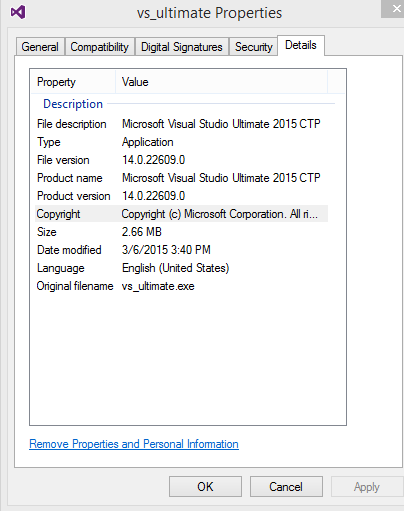
The desire to test drive resulted in downloading this file.
Before installing the program by choosing the Typical method which installs defaults, the C: drive was checked for 9GB space. The available 120Gb was more than sufficeint. Double clicking the file in the downloaded location started the typical acquiring/applying type of starting. However when the install button was clicked in the initial screen, the desktop went blank (Windows 8.1 Professional) and screen came back asking whether the installation is to be cancelled. However after going this step couple of times, it started acquiring and applying mostly C++ related files and framework 4.6 (I beileve so).
Search on the Internet for MobileTools_WPSDKCore_net.msi drew a blank including Microsoft Windows phone related sites. Left a question on the forum and reported a possible 'bug'.
Here are some screen shots from this installation:
Before installing the program by choosing the Typical method which installs defaults, the C: drive was checked for 9GB space. The available 120Gb was more than sufficeint. Double clicking the file in the downloaded location started the typical acquiring/applying type of starting. However when the install button was clicked in the initial screen, the desktop went blank (Windows 8.1 Professional) and screen came back asking whether the installation is to be cancelled. However after going this step couple of times, it started acquiring and applying mostly C++ related files and framework 4.6 (I beileve so).
During the installation the program required a file, MobileTools_WPSDKCore_net.msi which it could not find on the computer. The suggestion from the program was to get it from the Internet using the button provided for this purpose. The said button when clicked came back with a short response that the file could not be found. Yet another option was to 'skip' this file and proceed with the rest of the installation. 'Skip'ing would perhaps results in loss of funcitonality for Windows Phone apps.
Search on the Internet for MobileTools_WPSDKCore_net.msi drew a blank including Microsoft Windows phone related sites. Left a question on the forum and reported a possible 'bug'.
Here are some screen shots from this installation:
Subscribe to:
Posts (Atom)