Showing posts with label Visual Studio 2013. Show all posts

Sunday, April 19, 2015

Microsoft Visual Studio to develop IOT projects

You need the Windows Developer program for IoT Developer Tools besides the hardware (Intel Galileo board). You will be obviously using Microsoft Visual Studio.
Before you download the necessary .msi file you need to go to Microsoft Connect site (https://connect.microsoft.com/) and join the program.

Visual Studio 2014 and Visual Studio 2015 are not supported and you need the WindowsDeveloperProgramforIOT.msi file which you can download from Connect site.
Continued...

Monday, July 28, 2014

App development with outsystems - Cross-Platform App development - Part 2

outsystems is cloud based development platform built on top of Visual Studio.
You can create an account on the following page (by clicking Get Started):
http://www.outsystems.com/offer/ga/web-application-development/?utm_source=MSN&utm_medium=CPC&utm_term=%2Bapp%20%2Bdevelopment%20%2Bplatform&utm_content=cross%20platform%20app%20development&utm_campaign=SEARCH%20-%20US%20-%20Dev%20Tools

I created an account as shown:
Once you start accessing your service by clicking on the email link from Outsystems site you are directed to the Personal environment overview where you can watch a video which describe how Outsystems works in simple terms.
For example, it created a Personal environment for me at:
https://hodentek.outsystems.com


When you click on Click here to continue you get to the Get Started page which is at

http://www.outsystems.com/hone/Personal_Home.aspx


This page is really useful and it points to many of the resources. There are tutorials, templates, app samples, etc. This is also where you start your app. I built both web apps as well as hybrid apps. You will hear about in another post.

Outsystems claims that you can build an app in 5 minutes (that's an awesome number of apps in a 8 hour day!). However, the interface is so easy and user friendly that you may even achieve this.

Watch this video,


There are two ways to use the apps:
  • Use the outsystems cloud
  • Or detach code (one way process) and compile for .NET or Java a ; once detached you cannot attach back to outsystems.
The platform is built on VS.NET / Java and therefore if you just wanted to use the source code (but not the outsystems platform) then you go through a process of detaching your code on outsystems and then compile the code either on VS (Visual Studio) or a Java compiler (Eclipse).


Quo vadis? Cross-Platform App development - Part 1

There are lots and lots of Apps. In fact there are over a couple of million Apps including all of the major brands, Apple, Google, Blackberry, Microsoft with Apple at the top and Microsoft in the bottom. But this is a growing market. The variety is truly bewildering, different size devices; different operating systems(OS); different programming languages;  and different orientations.

This post is not very recent but you can see how the various mobile operating systems compare:
http://www.ibtimes.com/android-vs-ios-whats-most-popular-mobile-operating-system-your-country-1464892
The interactive image in the article really shows the popularity of a given OS/device among different geographical regions.

Windows Phone Apps is for example based on Microsoft's Window 7, 8, 8.1 OSs using .NET. With Windows OS and Visual Studio one can build Apps for all of Microsoft devices covering Phone, Tablet and Desktop. However Microsoft Windows Apps sans Html5/CSS/Javascript is OS specific. Even for apps built with Html5/CSS/Javascript the WinJS file is required (or recommended) in most cases.

Apple Apps can be used on both iPad and iPhone as long as certain files specific to each device profile is available, in general iPhone apps can be used on iPad but not the other way. However the so called iOS Universal apps can be used on iPhone, iPod touch and iPad (before the advent of iOS Universal there were two binaries created for each type). XCode/Interface Builder was used to create the iOS Universal. Although XCode, a superset of Objective-C makes this easy it is not straight forward mainly due to device size differences. Again Apple Apps are specific to devices running Apple iOS.

The same is true of Android Apps. It is built using Java in a multi-user Linux system. The recommended development platform is Eclipse. Read more here, http://developer.android.com/guide/components/fundamentals.html

Latest version of Eclipse Standard here:
http://www.eclipse.org/downloads/packages/eclipse-standard-44/lunar

However there have been several developments (bridge programs) to have a single program that can build Apps to work on any device.

  • With Xamarin you can use C# shared library to build native iOS, Android, Mac and Windows apps.
  •  PhoneGap (Apache Cardova) developer app used with Windows can bundle the App for a variety of platforms.

  • XDK Platform from Intel can similarly create apps for multiple OSs using Html5/CSS/Javascript similar to the PhoneGap, in fact using a later version.

  • Outsystems cloud based development platform can build apps that works with both Java and .NET environments and you can derive source code for each of these OSs

Html5/CSS/Javascript not dependent on any specific vendor together with responsive design should address most of the cross-platform requirements. I am sure more programs on the way in this general direction.

 August 20:
Get a good brief on Intel XDK here including installation:
http://hodentekmobile.blogspot.com/2014/08/cross-platform-apps-are-easy-with-intel.html
 

Tuesday, July 22, 2014

New update to SQL Server Data Tools: July 2014 Update

Latest release of SQL Server Data Tools(SSDT) is now available here:

http://msdn.microsoft.com/en-us/data/hh297027

This update is now available for Visual Studio 2012 and 2013

Instead of the above link you can also get it from inside Visual Stuido 2012 via Tools -> Extensions and Updates->Updates.

What's new in this:
Of course more bug fixes and some of the following enhancements:
  • Schema Compare update
         Added MSBuild support for Schema Compare with text and XML output.  A blog post is    available with more information.
  • Improved Windows Azure SQL Database node in the Server Explorer
        Added Token-based authentication using a Microsoft account (MSA) or organizational account (OrgId)
        Added supported for VS2012
  • Improved (Parallel Data Warehouse) PDW support
       PDW tooling is now part of the Microsoft Visual Studio Express 2013 for Windows Desktop SKU.  This requires the VS 2013 Update 2 or later to be installed
      Support for PDW appliance updates in both VS2012 and VS2013

Also read:
http://brianwmitchell.com/2013/11/sql-server-to-pdw-migration-whitepaper/

SSDT for SQL Server 2014 here:
http://hodentek.blogspot.com/2014/03/sql-server-data-tools-to-go-with-sql.html

SSDT BI_Templates here:
http://hodentek.blogspot.com/2013/10/ssdt-bi-templates-for-sql-server-2012.html

SSDT Web Site:
http://msdn.microsoft.com/en-us/data/tools.aspx


Tuesday, June 24, 2014

Visual Studio 2013 gets a new upgrade bump

Visual Studio 2013 is now in Upgrade 3 CTP2. Recent upgrade was Visual Studio 2013 Upgrade 2 about which I have been blogging recently and using it in my explorations. No stopping Microsoft's relentless pursuit, Visual Studio '14' is also in CTP.

Read here:
http://visualstudiomagazine.com/articles/2014/06/03/visual-studio-2014-ctp.aspx
I will comeback to VS2014 CTP later and any way it will be released in 2015.

Let me summarize the Upgrade 3 which is in CTP now. For one thing the upgrade activity has been hectic:
  • Update 2: May 12
  • Update 3, CTP 1: May 22
  • Update 3, CTP 2: June 6
Upgrade 3 CTP 1 is supposed to be a minor upgrade. You can download the CTP from here:
http://www.microsoft.com/en-us/download/details.aspx?id=42967

Upgrade CTP 2 is still not a 'go live' version but just bug fixes in the previous CTP.
Download Update 3 CTP2 from here:
http://www.microsoft.com/en-us/download/details.aspx?id=43130
------------------------
Download file details of Update 3 CTP2. You only install the ones you want. I skip the tfs, I am a singleton.

Date Published: 6/5/2014
File Name:
rtools_setup_arm.exe(24.5 MB)
rtools_setup_x64.exe(82.4 MB)
rtools_setup_x86.exe(58.4 MB)
tfs_express.exe (791 KB)
tfs_server.exe (798 kB)

Full description of VS 2013 Update 3 CTP 2 can be found here:
http://support.microsoft.com/kb/2933779/en-us

Sunday, March 02, 2014

FileZilla is a nice FTP program

In the last post I described moving an ASP.NET website contents from one hosting provider to another. What if you want to temporarily download your web site content to a folder on your computer? The answer for this is to use a FTP program that is easy to use and freely available.

FileZilla is a free FTP solution which provides both an FTP Client (allowing downloading your site content) and FTP server (you can upload files to a site) and is supported by a forum and its users.
You can download FileZilla from here:


https://filezilla-project.org/

For using FileZilla to move web site contents to file/folder system follow this link:
http://hodentekhelp.blogspot.com/2014/03/what-is-filezilla-and-how-do-you-use-it.html

Tuesday, January 21, 2014

Trick to bring up Object Browser in Visual Studio Express 2013 for web

Object browser is a great menu item in Visual Studio if you are trying to dig into the details of a program. Unfortunately it is missing (I don't think only in my installation) in Visual Studio Express 2013 for web. Object Browser is also absent in the Other Windows submenu item.


In order to make it show up, you can click on an object like a button, or a text-box and from the drop-down menu click on Go to defintion shown.


This will bring up the object browser as shown.


Monday, November 18, 2013

What are you waiting for, get on to the Cloud and start developing with Visual Studio

On Nov 13 Microsoft announced Visual Studio online. Here is the announcement
Here is a screen shot from the site. There is a new portal that goes with it as well.


You guessed it right, you can get started for FREE. Of course it is free for MSDN users. You will see some screen shots at the bottom of this post.

The line-up of Online offering according to this source is as follows:

•Hosted source control, work-item and agile-planning services (in other words, the key capabilities of Team Foundation Service on Windows Azure)
•A hosted build service
•Elastic load testing service
•Application Insights -- a service that provides information such as health, availability, performance and usage of applications
•"Monaco" -- a coding environment "for the cloud, in the cloud," which provides a subset of Visual Studio features inside a variety of browsers for "targeted Azure development scenarios." The first of these scenarios is for editing Azure Web Sites directly from inside any "modern" browser, on any device (Windows-based or not). Microsoft has been working on Monaco for three years, execs said, and already has used the Monaco technology for some of its other cloud-based developer offerings, including the Office 365 "Napa" development tools, to SkyDrive file editing.

It is very easy to start even if you do not have a subscription for Windows Azure.

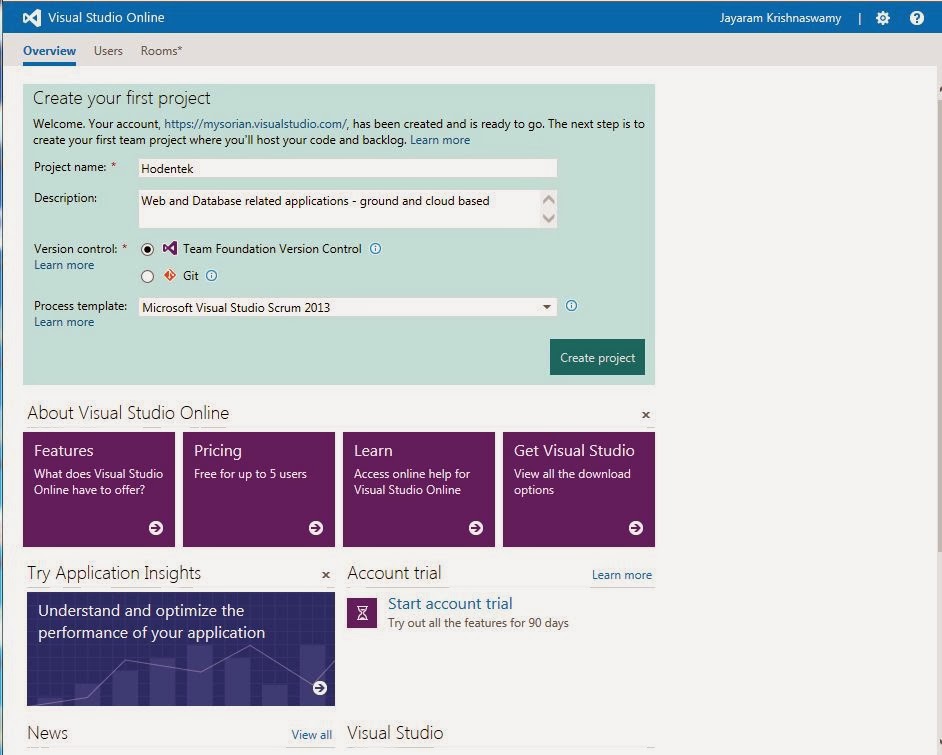
I have one and I could do it in no time at all. Here are some easy steps I took to create a VS project online. Probably you will hear a lot more from me in the comign days. Right now I am somewhat busy.

After signing up look up Visual Studio Online marked Preview

 
I am impatient, I clicked Quick Create with the lightning icon after giving an account name. I got a URL for this

 
I clicked Create Account.  Very quickly an account was created.

 
I clicked on Browse to create a project and provided some details..

 
Clicked on Create Project. The project got created.
 
 
Now you can connect to it using Visual Studio, Eclipse or XCode.
 
What is unusual is that this required java to develop (Not C#, not even C++).
 
What a shame?
 
Read this article by Mary Jo Foley on ZDNet here. Here is a summary of Mary Jo's article:
Summary: What's the former technical lead on Eclipse Java development tools been doing at Microsoft for the past three years? Building a browser-based development toolset.


Wednesday, November 06, 2013

Mark November 13, 2013 to hear Microsoft's vision of things to come

On November 13th at 10am EST/3P GMT Microsoft’s big wigs,
Soma Somasegar,
Scott Guthrie,
Scott Hanselman, and
Brian Harry
will discuss the future of Cloud and Services in the
Visual Studio 2013 Launch event.

This is free.

The sign-up page is here:
https://tfs.app.visualstudio.com/_account/Signup

You can download VS 2013 (all versions) here:
http://www.microsoft.com/visualstudio/eng/downloads

Thursday, September 12, 2013

Microsoft Visual Studio 2013 RTM will be available on October 18

Right now Release Candidate (RC) 2013 is available which came out in September. Microsoft Visual Studio 2013 with many new features will be launched November 13.

Things you find in this version:

Innovative new features to boost productivity:
  • Improvements to UI - more than 400 modified icons, ramped up color usage, redesigned Start page and other hard to summarize subtle changes.
  • Greater productivity with features such as automatic bracket completion; move code blocks with keyboard short cuts; and in-line navigation.
  • Two modes of scroll bar usage, bar mode and map mode. You can home-in on the exact code location and navigate to it using these modes.

  • The GoTo definition command has a added feature called Peek Definition. A line of code is something you or perhaps another developer added to the program and now you can backtrack and see all the historical details of when and who all dealt with the code. This is achieved by the new feature - CodeLens. CodeLens gathers your project META data and Team Foundation Server 2013 to provide this forensics.
  • The Connected IDE experience is introduced making start up very fast. Microsoft Visual Studio 2013 will automatically synchronize settings (keyboard shortcuts, themes, fonts, etc.) across the devices using Connected IDE Experience.
Support Windows 8.1 applications across all devices and platforms
Support for windows 8.1 store development including:
  • Tools 
  • controls and templates
  • Test support for XAML
  • UI Responsiveness Analyzer
  • Energy Consumption profiler for HTML and XAML Apps
  • Memory profiling tools for HTML Apps
  • Improved integration with Windows Store

Content layout enhancements to,
  • Blend for both XAML and HTML apps providing precision layout
  • Enhancements to coding in XAML apps with improved intellisense which is now available for databinding,template binding and resources. 
  • Improvements to connectivity using Windows Azure Mobile Services.
Web Development enhancements
  • The One ASP.NET vision unifies your web project experience in Visual Studio 2013 provides the ability to easily create hybrid applications that include improved versions of ASP.NET WebForms, MVC or Web API, all in a single project.
  • Browser link enhances interactive development with mutlitple, diverse open modern browsers, so that switching back and forth between source and web browsers is eliminated for enhanced productivity.
Create Modern Apps for office 365
  • Create Apps that extend the Office 365 to help interact with business processes,artifacts, etc.
  • Leverage the Office 365 in the cloud to integrate with business related IT operations
Visual studio 2013 supports TypeScript
"TypeScript is a programming language with support for classes, modules, and interfaces that compiles down to JavaScript, which runs on any browser, in Node.js, or in any other ES3-compatible environment." 
Debugging and optimization improvements

Expanded Application Lifecycle Management Capabilities

* In order to use many of these features Team Foundation Server will be needed.

Begin your journey here by downloading Visual Studio 2013:


This post is excerpted from this Microsoft web page:

DMCA.com Protection Status