Showing posts with label Cloud. Show all posts

Thursday, January 30, 2025

Very important where you save your SQL Server Installation media files

  This is a very important question. when I began using SQL Server for writing as well as for teaching, I used to take this for granted and used to store at the default location. Sometimes, I used to get into difficulty accessing the installation media as it was needed after a long interval and I would have made changes to my directory structure, or moved them to other places. However, it is very important where you save your SQL Server Installation media for a couple of reasons.

What's the need to save?

1. It provides a means for you to reinstall or repair your installation. You cannot do this task, if you do not have your installation media. 

2. For Off-line installations, it is essential to have this media.

3. If you are having multiple installations, it ensures consistency. I used to have this media on a memory stick and have all my students install on their work stations.

What are suitable locations to save the media?

There are couple of options. Choose one that best suits your needs.

1. Local Drive: When you start installing you will find out how much space is needed on your computer's local drive. At a minimum, you need 6 GB of disc space for the custom installation with most options. If you include all extras it is about 8GB. In order to work comfortably, it can be about 10GB depending on the databases you are considering. Herein, some sample databases are assumed. The installation process brings up the space requirements during installation. 

2. On a Network share. I could have set it up on the network share for my students, but I decided to give them a copy, if they wanted to play with it when not connected to the network.

3. If installation is on a virtual machine, an ISO would be suitable.

4. Mapped drive is another option.

5. On the Cloud: Cloud storage is yet another option. However, there may be cost in storage and data transfer involved. Latency is yet another factor to consider. Internet availability is most essential during the installation process.

The installation media folder can have any name of your choice. I usually accept the default name.

The SQL Server 2022 installation center's Option node is where you specify location of the media during installation.

I originally saved this media (SQL2022-SSEI-Dev.exe, 4191 KB) on my Download folder of the local drive.

On this blog (http://hodentekMSSS.blogspot.com), dedicated to SQL Servers you will find installation of SQL Server from SQL Server 2012 onwards. Even earlier ones are on my other blog, http://hodentek.blogspot.com


Wednesday, November 04, 2015

Before you do any migration master the MAP

MAP toolkit is a great tool to find information on various items of your computer/server. Before you think of migration of any kind, a tool such as this one is going to be very helpful.

MAP which stands for Microsoft Assessment and Planning Tool, presently in version 9.3 is according to Microsoft,

"The Microsoft Assessment and Planning (MAP) Toolkit is an agent-less inventory, assessment, and reporting tool that can securely assess IT environments for various platform migrations—including the latest versions of Windows client and server operating systems, Microsoft Office and Office 365, Microsoft SQL Server, Hyper-V, Microsoft Private Cloud Fast Track, and Windows Azure.
"
MAP Toolkit can deal with most of the following scenarios:
  • Cloud
  • Desktop
  • Server
  • Desktop Virtualization
  • Server Virtualization
  • Database
  • Usage tracking
  • Environment
This covers all most everything you ever dealt with in your computer.

Where can I get this tool?
Download from here .

Double click the downloaded file (MAPSetup.exe) and you are ready to go.

Here are things you can find about the Desktop:

Map_Desktop

This one about what you can find about the Cloud:


Map_Cloud.png

You can use MAP to inventory any of these. This is indeed a big list.

•Windows 10
•Windows 8.1
•Windows 8
•Windows 7
•Windows Vista
•Windows XP Professional
•Office 2013 and previous versions
•Windows Server 2012 R2
•Windows Server 2012
•Windows Server 2008 R2
•Windows Server 2008
•Windows Server 2003 R2
•Windows Server 2003
•Windows 2000 Professional or Windows 2000 Server
•Internet Explorer
•VMware vSphere
•VMware vCenter
•VMware ESX
•VMware ESXi
•VMware Server
•Selected Linux distributions
•SQL Server
•Oracle
•Hyper-V
•Lync
•System Center Configuration Manager
•Forefront Endpoint Protection
•Exchange Server
•SharePoint Server
•BizTalk Server
•Visual Studio 2010 and 2012 Premium and Ultimate editions
•Software ID (SWID) Tags

Thursday, October 29, 2015

SQL Server 2016 CTP3 is ready to download.


SQL Server Team blog on 10/18/2015 announced the availability of SQL Server 2016 CTP3 besides quite a few others. This post is related to CTP2 only.

Microsoft has been very active in working on its database product SQL Server 2016 this year as seen in the number of posts. It is still in CTP but then it is not 2016 yet. These are the quoted kye words for this version,'faster transactions and queries, deeper insights on any device, advanced analytics, new security technology, and new hybrid cloud scenarios'.

http://hodentek.blogspot.com/2015/05/sql-serverr-2016-early-bird-special.html -5/13
http://hodentek.blogspot.com/2015/05/start-evaluating-sql-server-2016-ctp2.html -5/28
http://hodentek.blogspot.com/2015/07/sql-server-2016-ctp-21-is-ready-for.html -7/11
http://hodentek.blogspot.com/2015/07/upgrading-sql-server-2016-ctp-2-to-sql.html -7/11
http://hodentek.blogspot.com/2015/07/notes-2-sql-server-management-studio.html -7/13
http://hodentek.blogspot.com/2015/08/regarding-sql-server-2016-ctp-22.html -8/06
http://hodentek.blogspot.com/2015/09/download-sql-server-ctp-23-and-check.html -9/11

You can download from here after the sign in ritual.
https://www.microsoft.com/en-us/evalcenter/evaluate-sql-server-2016.
From the other links on the above site you can download the previous versions of SQL Servers(2014 SP1 and 2012 SP1; both evaluation versions valid for 180 days)

The stated benefits of the CTP3 are the following:
  •     Enhanced in-memory performance provide up to 30x faster transactions, more than 100x faster queries than disk based relational databases and real-time operational analytics
  •     New Always Encrypted technology helps protect your data at rest and in motion, on-premises and in the cloud, with master keys sitting with the application, without application changes
  •     Built-in advanced analytics– provide the scalability and performance benefits of building and running your advanced analytics algorithms directly in the core SQL Server transactional database
  •     Business insights through rich visualizations on mobile devices with native apps for Windows, iOS and Android
  •     Simplify management of relational and non-relational data with ability to query both through standard T-SQL using PolyBase technology
  •     Stretch Database technology keeps more of your customer’s historical data at your fingertips by transparently stretching your warm and cold OLTP data to Microsoft Azure in a secure manner  without application changes
  •     Faster hybrid backups, high availability and disaster recovery scenarios to backup and restore your on-premises databases to Microsoft Azure and place your SQL Server AlwaysOn secondaries in Azure
File formats are 64bit ISO or CAB. The installation is as usual except if you are using Microsoft Edge, you cannot save, you just run. However you do get an option to name a directory (with a default) to save extracted files.

Keep coming back to Hodentek and HodentekMSSS for more posts on SQL Server related information.

Monday, August 10, 2015

Doing BI in the cloud using PowerBI for Office 365

Early last year Microsoft announced the general availability (GA) of PowerBI for Office 365. Office is the most used office program and PowerBI brings in great value by providing a self-service means to discover, analyze and visualize data leading to deep insights.

Using PowerBI for Office 365 one can easily deploy a cloud-based BI application for sharing insights; colloborating and accessing reports from practically anywhere.

Power BI for Office includes the following Microsoft
'Power' tools:
  • Power Query, enabling customers to easily search and access public data and their organization’s data, all within Excel (formerly known as “Data Explorer“).
  • Power Map, a 3D data visualization tool for mapping, exploring and interacting with geographic and temporal data (formerly known as product codename “Geoflow“).
  • Power Pivot for creating and customizing flexible data models within Excel.
  • Power View for creating interactive charts, graphs and other visual representations of data.
What are the main capabilities?

PowerBI allows the companies to include the cloud as an arena in which they can share and colloborate. The DataCatalog; Q & A with natural language support; mobile connectivity are unbeatable capabilities.
  • Quickly create collaborative BI sites – enable anyone to quickly create a collaborative BI site to share workbooks containing data and insights.
  • Keep reports up to date with scheduled data refresh – reports that have been saved to the cloud can now connect back to on-premises data sources to refresh the data and stay up to date.
  • Manage data queries for the team – share not only workbooks but also the data queries created in Power Query for Excel. Team members can now build and manage data queries for others to use when creating their own reports.
  • Maintain a Data Catalog of searchable data – IT departments can now use the Data Catalog feature to make it easier for everyone to find and connect to corporate data by searching for it from within Excel.
  • Ask questions of your data in natural language – with the Q&A features people can type questions they have of the data in natural language and the system will interpret the question and present answers in the form of interactive visualizations.
  • Stay connected with mobile access to your reports – stay connected from anywhere with new HTML5 support and the Power BI windows app.
How much does it cost?

First of all you should be Office 365 Enterprise E3 or E4 customers and it was promotional $20 per month per user for the existing customers. Access this link here for reduced new prices.

However you could sign-up for a free-trial of PowerBi for Office 365 here and you will also get a 30day trial of Office 365 Pro-plus.

I do not have the Enterprise edition but just a $10 month subscription and I get only 'Power Map' add-in in my Office 365's Excel application.I have not figured it out how I may be able to use this without the other tools.

Note: Text in italic taken directly from Microsoft sites.

Tuesday, July 28, 2015

Standard setting Microsoft Power BI enters GA

PowerBI 2.0 was released recently (http://blogs.msdn.com/b/powerbi/archive/2015/07/24/power-bi-is-generally-available-today.aspx).  According to the link there appears to be two items, Power BI Service and Power BI Desktop. Power BI Visualization framework and its library will be available on GitHub as well.

Review articles on\using previous version here:

Power BI Unchained
http://hodentek.blogspot.com/2015/02/power-bi-unchained.html
Spin out a cutting edge report with Power BI
http://hodentek.blogspot.com/2015/02/spin-out-cutting-edge-report-with-power.html
Visualizing data on SAP's SQL Anywhere
http://hodentek.blogspot.com/2015/02/powerbi-preview-reporting-from-sql_13.html
Excel data visualization with Power BI
http://hodentek.blogspot.com/2015/02/powerbi-preview-reports-using-data-on.html

Power BI Service: Cloud Hosted Bi and Analytics
Power BI Service download is from this link.
https://powerbi.microsoft.com/?WT.mc_id=Blog_GA_James

I used Sign-in on the above linked page with my personal live.com acccount. It appears you cannot use just your Microsoft account (that anybody can get for free) but the Office 365 or enterprise account.

PowerBI_01

However this did not work for me. I am trying to resolve this issue with Microsoft.
Well, the mantra, 'five seconds to sign up, five minutes to WOW' did not work for me. I shall WOW later.

Installing the Power BI Desktop

Power BI Desktop can be downloaded from here:
https://powerbi.microsoft.com/desktop

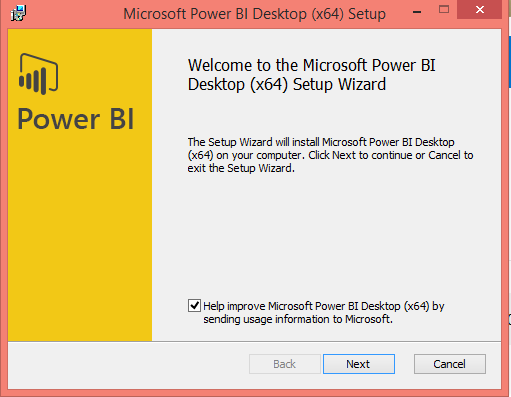
Install double clicking the Windows Installer Package PBIDesktop_x64 (55.6MB).


PBIDesk02.png
Agree to licensing terms. Accept default location. After one or more screens page with Install button will be displayed. Click Install. User Control Access window is displayed. Click OK. Progress page is displayed.

PowerBI Desktop is installed quite rapidly.

PBIDesk06.png

A new desktop icon replacing the one from the preview version is created.

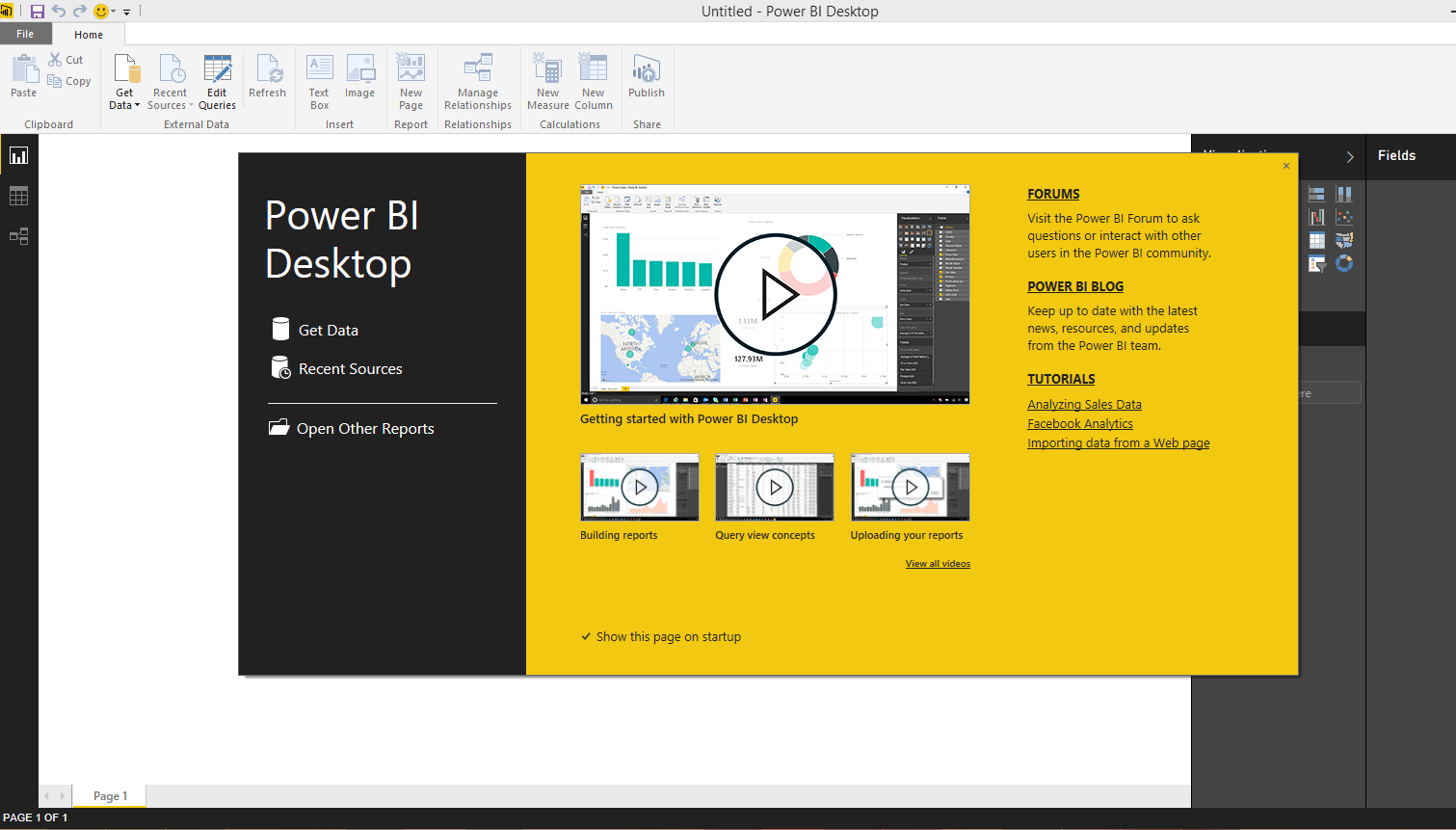
Launching the application displays the following window.


PBIDesk07.png

 
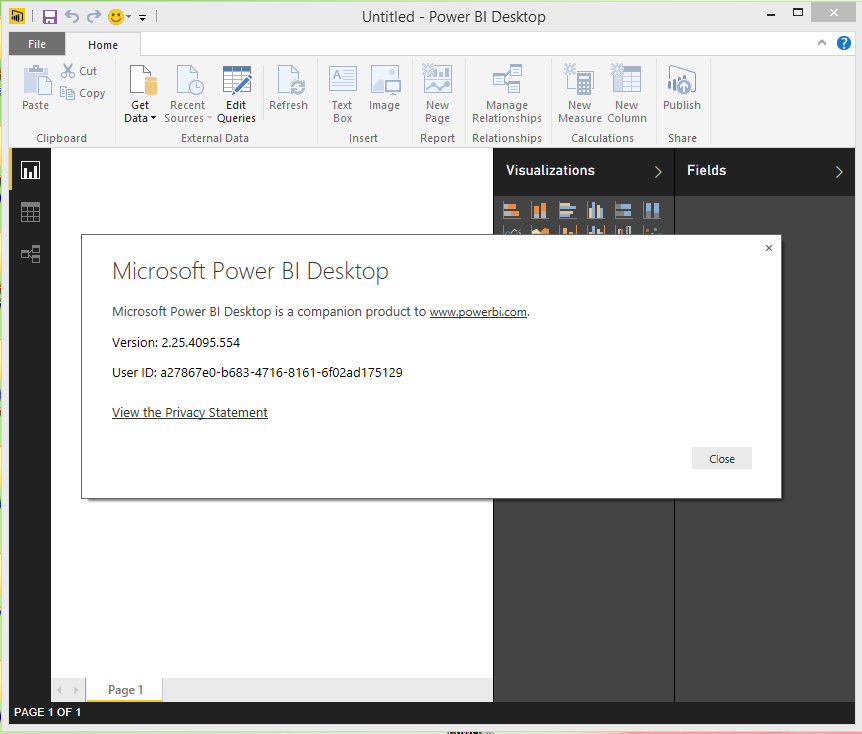
Dismiss the start up screen and you will see the Power BI Desktop with the 'ribbon'.

PBIDesk08.png

Happy Visualizing Data!

How does this stack up against Tableau and Qlik?

Review all the data sources from which you can get data for visualization here.


Thursday, January 16, 2014

Big Data Generation 2: Conseil Européen pour la Recherche Nucléaire

2012 marked the year when Higgs Boson (aka Higgs Particle predicted in 1964)  was discovered at CERN. In order to get to this, immense research was undertaken spanning many years of hard work.

One of the main challenges is the data storage of the immense amount of data that is gathered every second, non-stop. The other challenges are how to make this data available to 1000's of scientists globally and how to find the rarest of events that is hidden in this immense amount of data. This is clearly the area of what we call 'Big Data'.


Big data is generated here and federated across the World.

"CERN’s 17-mile-long collider generates hundreds of millions of particle collisions each second. Recording, storing and analyzing these collisions represents a massive challenge; the collider produces roughly 20 million gigabytes of data each year. CERN stores that data partly on the premises in Geneva, but has to distribute roughly 80% to data centers all around the world. So far, CERN has amassed about 200 petabytes of data."

The above is quoted from here,
Trends in Big Connectivity: Higgs Boson & the Science of Big Data

CERN’s Big Data processing relies on the Hadoop Distributed File System for storing massive amounts of data.

Huawei plays a big role in facing this data storage challenge with its cloud / storage solutions. Follow the details here

http://enterprise.huawei.com/en/search/index.htm?ssUserText=cern

CERN relies on NetApp Storage solutions.
Watch this NetApp Video:


About CERN:
It is too well known that needs an introduction, but if you have missed here is an intro and a video from CERN.

Conseil Européen pour la Recherche Nucléaire, or European Council for Nuclear Research's main field of activity is Particle Physics. The physics to understand the building blocks of this universe and how they interact.

It should be noted that the World Wide Web (the first scripted) was invented by Berners-Lee in 1989 also at CERN.
http://home.web.cern.ch/about
Here is a movie that tells you what CERN is about:
http://cds.cern.ch/video/CERN-MOVIE-2012-193

Monday, July 30, 2012

Security Conference in Honolulu, July 26,2012

Thursday, July 26, 2012
Waikiki Beach Marriott Resort &  Spa                                                                                                                       
2552 Kalakaua Avenue, Oahu                                                                                                                      
Honolulu, Hawaii 96815 USA

Security of every kind of device from hand-held to Cloud was discussed at this one day conference in Honolulu hosted by Data Connectors. There were 8, approximately one-hour sessions from 8:15 to 16:15.
Here is a A-Z list of companies that participated and or talked about their products:
• ANUE Systems
• Aruba
• Beyond Security
• Bit 9
• Core Security- Thinking ahead
• Cyber-Ark -Security that empowers people
• Damballa –
• Fortinet
• Hawaiian Telecom
• Infoblox
• ISD Security
• LanDesk
• Paloalto Networks-The network security company
• Radware
• Refrentia
• Sophos- Simply Secure
• Secure Technology Hawaii
• Trend Micro
• Varonis-All about the Data
• WatchGuard
I managed to speak to couple of the vendors to get into the mood of security and it was interesting.
The talks were interesting too.  As always some were good and some were mediocre.
WatchGuard presented ' Virtualization -Securing the Future ', the ins and outs of virtualization and how to secure virtualized environments. Virtualization is very attractive but presents its own set of challenges when it comes to security. Their XTM cornerstone, the Application Proxy probes the packet and checks the IP Header and the Protocol (TCP/UDP) and on finding a match digs in deeper the contents and works at the Application Layer. They claim that this is the key that other technologies miss. They seem to have Systems Manager Interface; a web interface and of course a command line interface to administer their product.
Aruba Networks presented ' Enabling secure BYOD over any network '. You heard it right, it was not BYOB! This was about onboarding and management of users of mobile devices in the context of an enterprise. This makes it possible to tell your employee, 'Bring your own device', we are not scared. Their product is better than existing products that target a single device. Their slogan is any device, any network, and any endpoint using their Aruba ClearPass.
Paloalto made presentation ' Breaking the Lifecycle of the Modern Threat ' on the threat landscape- what to expect and how to get yourself protected.

Bit9 (2002 company) spoke on ' Protection against Spear Phishing and the Modern Threats '. They listed out all the notable 2011 security breaches from Honda to ADP which included a bunch of high profile organizations like NASDAQ, Sony, Google, Citigroup etc. Threat comes in many shapes and forms. Hidden executables; Vulnerabilities; and portable storage devices. The human elements creating threats vary from mere criminal enterprises to Nation-states. Just imagine the kind of resources they can muster! I saw this graph in the presentation which was interesting- the peak in advanced threat appears to occur from about lunch time to evening six in Beijing!  Social engineering has brought in anti-social (anti-internet!) elements and social networking is another vector in this criminal operations. Solution is to use trusted software, detect the threat with real time sensor and stop the threat by controlling the application, follow it up measuring and monitoring risk and compliance with deep analytics.  Bit9 Global software Registry provides security to all the different items: Domain controllers, web Servers, Application Servers, Virtual Servers and a whole lot of others.

Fortinet and Hawaii Telecom made a joint presentation ' Delivering World-class UTM Solutions across Hawaiian Telecom '. Keep it simple was one of the items discussed. Increasing complexity of security solutions was 40% of the top challenges faced by the respondents who dealt with security. Fortinet seems to be in a good position with 18% of Market share in 2011 Q3. They are at the top-right of the Gartner's magic quadrant for Unified Threat Management.  Their slide on how their solution compares with traditional solutions which are cumbersome and costly was interesting. The core of it is the FortiOS, a security hardened OS that powers all FortiGate multi-threat security systems. The companies and organizations taking up Fortinet filled up the whole page of a slide. I especially liked the presentation by their Hawaiian presenter. It was a neat presentation.

ISD Security/SOPHOS: ‘ The security threat landscape, What's at risk and how to get the best protection ' was presented by Sophos evangelist, Arnie Almeida. It was interesting to hear that Social engineering, is a primary method of attack. I quote, ' Cyber criminals know what motivates people  (money, sex, gossip, etc.) and exploit these themes to infect computers and steal information '. I wonder why Arnie left out vanity and Narcissism!! The consequence of data loss is enormous. I was also under the impression that Windows was the most targeted OS but the Android leads the pack of threatened! Another interesting piece of info I learnt that 15% of all iPhone owners use very easy passwords like '0000' and '1234'. Sophos suggestion:  Use the following methods to secure, 'Encryption', 'encryption' and 'encryption'. Use encryption from desktop to the cloud including the USB Drives, CD/DVDs. Sophos is also a leader and figures in the Magic quadrant for end point protection. Their clientele list occupies a whole slide and its borders. Look for SophosLabs on the internet.

LanDesk software presented 'Managing the top 3 security challenges in a distributed environment'. The focus was on desktops on remote offices, these being more vulnerable than those in HQ. Virus attacks and installation of unauthorized software, downloads, etc. are more difficult to secure.

I did not see Symantec, McAfee and others.


DMCA.com Protection Status