Showing posts with label PowerPivot. Show all posts

Monday, August 10, 2015

Doing BI in the cloud using PowerBI for Office 365

Early last year Microsoft announced the general availability (GA) of PowerBI for Office 365. Office is the most used office program and PowerBI brings in great value by providing a self-service means to discover, analyze and visualize data leading to deep insights.

Using PowerBI for Office 365 one can easily deploy a cloud-based BI application for sharing insights; colloborating and accessing reports from practically anywhere.

Power BI for Office includes the following Microsoft
'Power' tools:
  • Power Query, enabling customers to easily search and access public data and their organization’s data, all within Excel (formerly known as “Data Explorer“).
  • Power Map, a 3D data visualization tool for mapping, exploring and interacting with geographic and temporal data (formerly known as product codename “Geoflow“).
  • Power Pivot for creating and customizing flexible data models within Excel.
  • Power View for creating interactive charts, graphs and other visual representations of data.
What are the main capabilities?

PowerBI allows the companies to include the cloud as an arena in which they can share and colloborate. The DataCatalog; Q & A with natural language support; mobile connectivity are unbeatable capabilities.
  • Quickly create collaborative BI sites – enable anyone to quickly create a collaborative BI site to share workbooks containing data and insights.
  • Keep reports up to date with scheduled data refresh – reports that have been saved to the cloud can now connect back to on-premises data sources to refresh the data and stay up to date.
  • Manage data queries for the team – share not only workbooks but also the data queries created in Power Query for Excel. Team members can now build and manage data queries for others to use when creating their own reports.
  • Maintain a Data Catalog of searchable data – IT departments can now use the Data Catalog feature to make it easier for everyone to find and connect to corporate data by searching for it from within Excel.
  • Ask questions of your data in natural language – with the Q&A features people can type questions they have of the data in natural language and the system will interpret the question and present answers in the form of interactive visualizations.
  • Stay connected with mobile access to your reports – stay connected from anywhere with new HTML5 support and the Power BI windows app.
How much does it cost?

First of all you should be Office 365 Enterprise E3 or E4 customers and it was promotional $20 per month per user for the existing customers. Access this link here for reduced new prices.

However you could sign-up for a free-trial of PowerBi for Office 365 here and you will also get a 30day trial of Office 365 Pro-plus.

I do not have the Enterprise edition but just a $10 month subscription and I get only 'Power Map' add-in in my Office 365's Excel application.I have not figured it out how I may be able to use this without the other tools.

Note: Text in italic taken directly from Microsoft sites.

Wednesday, February 11, 2015

PowerBI Preview reporting from SQL Anywhere 16 - Part 1

This post describes the steps you may take to connect to SQL Anywhere 16's 'demo' server. Previously you have seen that it is possible to create a linked server successfully using the drivers provided with SQL Anywhere 16.

http://hodentek.blogspot.com/2014/07/use-sybasesaps-sql-anywhere-ole-db.html
http://hodentekmsss.blogspot.com/2014/07/creating-linked-server-to-sapsybase-sql.html

In a future article here are on my other blog, http://hodnetekMSSS.blogspot.com  you will learn how to use PowerPivot to connect to SQL Anywhere 16.

Here are some screen shots of PowerBI  connecting  to SQL Anywhere.
Before you start connecting make sure you have started the SqlAnywhere 16 server successfully and also Sybase Central to verify that you can access the objects.


If you have followed my earlier article here:
http://hodentekmsss.blogspot.com/2015/02/authoring-report-with-power-bi-using.html

You will notice that PowerBI can obtain its data from a Sybase Database as(I am assuming that SQL Anywhere 16 is a Sybase database) shown
Sybase3

Choose Sybase Database and click Connect button. The following screen will be displayed


I have superposed the server start up screen on the PowerBI's screen. The server name is demo16. This server takes the pair dba/sql as username and password for connection, a database authentication.

When I complete the database name 'demo' and click Ok on the PowerBI's Sybase Database page, the following will be displayed:
'
Sybase6

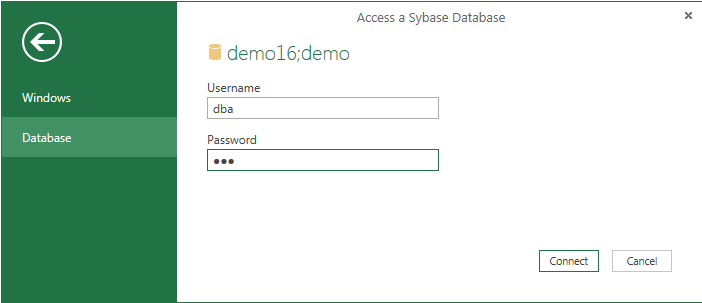
I enter the authentication information (dba/sql) and click Connect, the following will be displayed

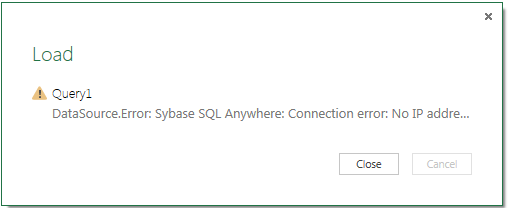
sybase7
Looks like the program is looking for an IP Address.  Since the server is running on the local computer the IP address should be the same as the computer's IP address. Also from Sybase Central 16 you find the following:

Sybase8

Every connection turns up in a Query in PowerBI and you can delete the query to connect to a new connection. Following the above reasoning the following connection was tried:

sybase9

After clicking OK the following was displayed.


sybase10
However trying to connect produces the following:


sybase16

It appears that there is a connectivity problem via PowerBI where as ODBC Ole DB seems to work as well as ODBC drivers. The PowerBI program certainly needs enhancements in terms of allowing ODBC and OLE DB drivers in addition to the vendor products.  Also the interactive screens should provide a gateway for a solution rather than a hard stop.

I am sure these will improve in the final version. In the mean time if I find a work around you may find it on this blog should you revisit.

Friday, April 20, 2012

Bank of New Zealand (BNZ), an early adopter of SQL Server 2012 feels good


BNZ tried earlier to get their BI act together with SAS, SAP and even SQL Server 2008 R2 but there were excessive delays in getting BI views from their huge data. With SQL Server 2012 and the PowerView feature, it appears they can now provide 80 Views every week. This is a great thing going for MSFT. Self-service BI feature of SQL Server 2012 removed the dependance on DB staff and
hastened up the whole process.

Read more here from the source of this post

Monday, May 31, 2010

Deliver a knock out punch with PowerPivot

In the last couple of Microsoft events PowerPivot took a pivotal role and I could not ignore it anymore. It's awesome. Microsoft Excel was (and is) darling of those who crunched numbers. What PowerPivot has done is to give them even more crunching power; a strong analytical and data visualizing tool; a larger canvas to plug-in (a COM Plug-in) their numbers; a lot more access to resources of all kinds and all of this in a file size hard to believe; and a processing time even harder to comprehend.

What do you need to have. Well for starters you need to have Excel 2010 as the core application to which you add-on PowerPivot. In fact you need all of the following (according to documentation):

•Requires Microsoft Office Professional Plus 2010 Trial
•PowerPivot for Excel supports 32-bit or 64-bit machines
•PowerPivot requires a minimum of 1 GB of RAM (2 GB or more recommended)
 The amount of memory needed will depend on the PowerPivot solution you are designing
•Requires Windows XP with SP3, Windows Vista with SP1 or Windows 7
•If you are running a version of Windows other than Windows 7, you will need to download and
 install the .NET Framework 3.5 SP1

I run on Windows 7 Ultimate and using an evaluation version of Office Professional Plus 2010 Beta
You can download PowerPivot (Microsoft SQL Server 2008 R2 - PowerPivot for Microsoft Excel 2010 - RTM) from here:

http://www.microsoft.com/downloads/details.aspx?FamilyID=e081c894-e4ab-42df-8c87-4b99c1f3c49b&displaylang=en


When you install PowerPivot you get a menu item appear on your Excel spread sheet as shown:


Do you need to know SQL? No, it has its own DML called DAX (Data Analysis Expression Language)

You also need samples to work with. You can get them on a spread sheet or in an MS Access file from here:

http://powerpivotsampledata.codeplex.com/

Although it is for massive number crunching you can bring in images as well. Well you need yet another tool - Silverlight Pivot Control. This is still baking and will be ready in the near future. But you can get ready by downloading and installing Pivot Collection Tool for Microsoft Excel(there is a command line version also).

You download Pivot collection tool from here:
I will skip this detail for you (I did it as I did not know about the CodePlex stuff. When you install it you add another menu item to your Excel) there is a CodePlex tool even better here:

http://pivotcollectionmaker.codeplex.com/

All of this getting really memorable on this Memorial Day more of the rest in my next.

You can learn all about PowerPivot from here:
http://www.powerpivot.com/

Monday, April 26, 2010

SQL #39 Saturday at New York City

This (Saturday April 24,2010) was a great event with a large line up of very interesting speakers. The event was attended by a large number of interested folk, from geeks to ceos. The format was very good and the lunch too (It is getting better with more healthy food, not the junior pop-corn and coke).


The one day event had more than 25 speakers with parallel sessions. The emphasis it appeared was on BI. PowerPivot made a power play with an excellent presentation by Andrew Burst.

At lunch time there was a sponsors session repesented by vendors:

Ignite 8
Redgate
Expressor and
Idera

There was also a min exhibition where I noticed BigBuy, SetFocus and others.

Roger Doherty's illuminating talk described the highlights of SQL Server 2008 R2.

Wednesday, April 21, 2010

Microsoft SQL Server 2008 R2 has finally arrived

The final polished product has fianlly arrived. Now I can drop the November-CTP tagged on to the product and makes it more final-like.
Well, this is the product that will make SQL Azure more amenable to the on-site dbas. Let us see how well it works with SSIS and SSRS line of products. I am sure the deficiencies of the CTP has been completly remedied. In my last post I used the CTP to rename a SQL Azure database and did not succeed. Probably the final product would do the trick.

Well if you are a SQL Server junkie you may want to test drive the SQL Server 2008 R2 Hosted Trial here. You can help yourself to a number of other products as well (total of 7 labs).
DMCA.com Protection Status