This post describes the steps you may take to connect to SQL Anywhere 16's 'demo' server. Previously you have seen that it is possible to create a linked server successfully using the drivers provided with SQL Anywhere 16.
http://hodentek.blogspot.com/2014/07/use-sybasesaps-sql-anywhere-ole-db.html
http://hodentekmsss.blogspot.com/2014/07/creating-linked-server-to-sapsybase-sql.html
In a future article here are on my other blog, http://hodnetekMSSS.blogspot.com you will learn how to use PowerPivot to connect to SQL Anywhere 16.
Here are some screen shots of PowerBI connecting to SQL Anywhere.
Before you start connecting make sure you have started the SqlAnywhere 16 server successfully and also Sybase Central to verify that you can access the objects.
If you have followed my earlier article here:
http://hodentekmsss.blogspot.com/2015/02/authoring-report-with-power-bi-using.html
You will notice that PowerBI can obtain its data from a Sybase Database as(I am assuming that SQL Anywhere 16 is a Sybase database) shown
 Sybase3
Choose Sybase Database and click Connect button. The following screen will be displayed
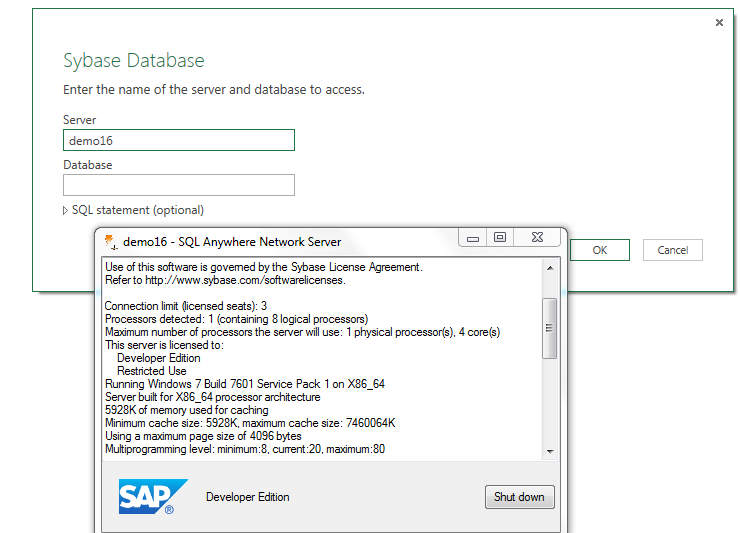
I have superposed the server start up screen on the PowerBI's screen. The server name is demo16. This server takes the pair dba/sql as username and password for connection, a database authentication.
When I complete the database name 'demo' and click Ok on the PowerBI's Sybase Database page, the following will be displayed:
'
 Sybase6
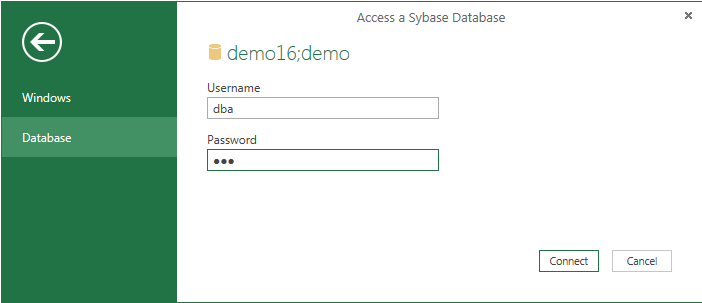
I enter the authentication information (dba/sql) and click Connect, the following will be displayed
 sybase7
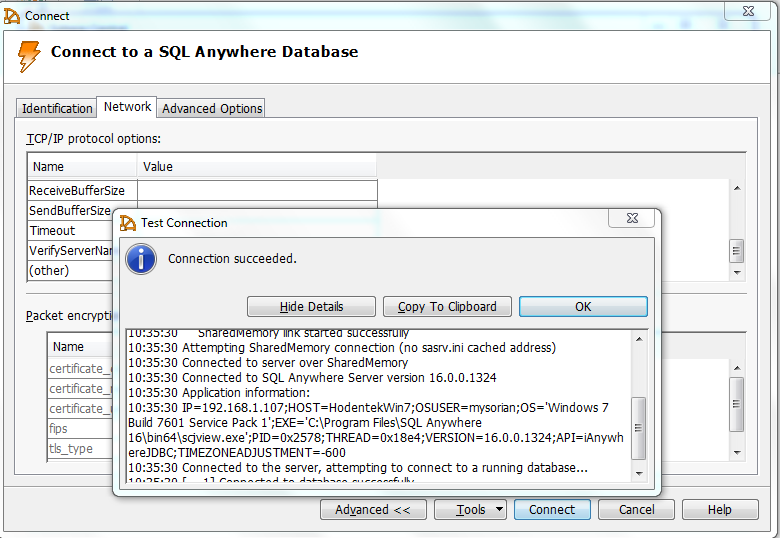
Looks like the program is looking for an IP Address. Since the server is running on the local computer the IP address should be the same as the computer's IP address. Also from Sybase Central 16 you find the following:
 Sybase8
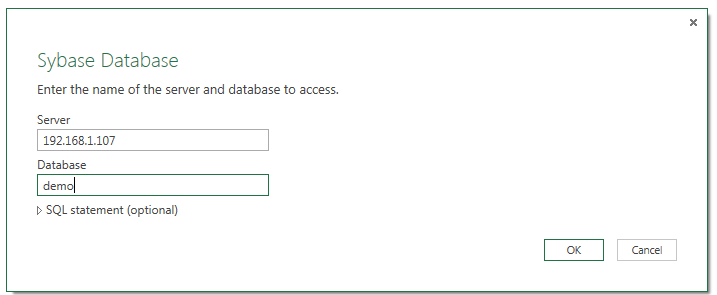
Every connection turns up in a Query in PowerBI and you can delete the query to connect to a new connection. Following the above reasoning the following connection was tried:
 sybase9
After clicking OK the following was displayed.

sybase10
However trying to connect produces the following:

sybase16
It appears that there is a connectivity problem via PowerBI where as ODBC Ole DB seems to work as well as ODBC drivers. The PowerBI program certainly needs enhancements in terms of allowing ODBC and OLE DB drivers in addition to the vendor products. Also the interactive screens should provide a gateway for a solution rather than a hard stop.
I am sure these will improve in the final version. In the mean time if I find a work around you may find it on this blog should you revisit.
http://hodentek.blogspot.com/2014/07/use-sybasesaps-sql-anywhere-ole-db.html
http://hodentekmsss.blogspot.com/2014/07/creating-linked-server-to-sapsybase-sql.html
In a future article here are on my other blog, http://hodnetekMSSS.blogspot.com you will learn how to use PowerPivot to connect to SQL Anywhere 16.
Here are some screen shots of PowerBI connecting to SQL Anywhere.
Before you start connecting make sure you have started the SqlAnywhere 16 server successfully and also Sybase Central to verify that you can access the objects.
If you have followed my earlier article here:
http://hodentekmsss.blogspot.com/2015/02/authoring-report-with-power-bi-using.html
You will notice that PowerBI can obtain its data from a Sybase Database as(I am assuming that SQL Anywhere 16 is a Sybase database) shown

Choose Sybase Database and click Connect button. The following screen will be displayed

I have superposed the server start up screen on the PowerBI's screen. The server name is demo16. This server takes the pair dba/sql as username and password for connection, a database authentication.
When I complete the database name 'demo' and click Ok on the PowerBI's Sybase Database page, the following will be displayed:
'
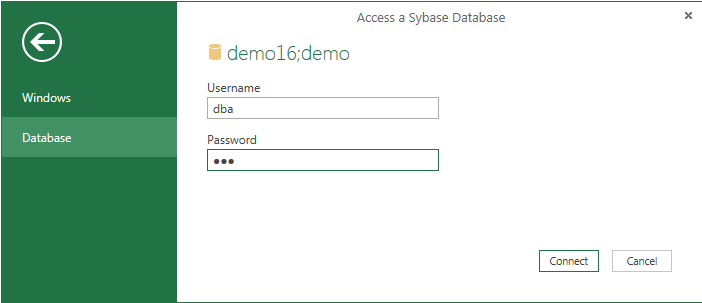
I enter the authentication information (dba/sql) and click Connect, the following will be displayed
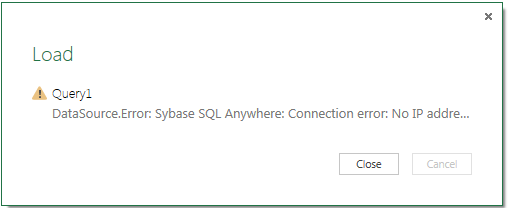
Looks like the program is looking for an IP Address. Since the server is running on the local computer the IP address should be the same as the computer's IP address. Also from Sybase Central 16 you find the following:

Every connection turns up in a Query in PowerBI and you can delete the query to connect to a new connection. Following the above reasoning the following connection was tried:

After clicking OK the following was displayed.

sybase10
However trying to connect produces the following:

sybase16
It appears that there is a connectivity problem via PowerBI where as ODBC Ole DB seems to work as well as ODBC drivers. The PowerBI program certainly needs enhancements in terms of allowing ODBC and OLE DB drivers in addition to the vendor products. Also the interactive screens should provide a gateway for a solution rather than a hard stop.
I am sure these will improve in the final version. In the mean time if I find a work around you may find it on this blog should you revisit.


