Showing posts with label Linux. Show all posts

Thursday, January 23, 2025

Installing the latest version of SQL Server

 Download the latest version of SQL Server from here.


There are a couple of download options as you can see on this page from the above link.


If you are a developer, the best option is the Developer version which provides:

  • Full featured free edition
  • Licensed for use as a development and test database
  • It is for non-production use

However, most purposes the SQL Server 2022 Express is adequate. It provides:

  • Free edition of SQL Server
  • Good fit for desktop development
  • Best fit for small server applications.

The SQL Server editions may be installed on Windows, Linux and Docker Containers.

In this blog for purposes of demonstration and use, the Developer edition will be installed on a Surface Laptop 5 with the following features.

Windows 11 Pro, Version 23H2, OS build 22631.3593. It has 16GB installed RAM

Downloading the developer edition begins by clicking the Download button in the above screen. In response you download the executable, SQL2022-SSEI-Dev.exe (4191 KB)file. This file gets displayed as shown.


If you want a quick installation use the BASIC option. 

In blog the Custom option will be used. If you want to differ to another time, you may just download the installation files by choosing Download Media.

Read the details of the SQL Server 2022 Installation Center


Tuesday, March 20, 2018

Python support in Visual Studio Community 2017

Yes, in a big way. Just the Intellisense support may by itself a great help.

You need to install PTVS (Python Tools for Visual Studio) to have Python support in Visual Studio (2017,2015, 2013 and earlier). In Visual Studio 2015 you need a Python Interpreter (Python 3.5 or earlier, 3.6 and above are not supported). The VS may guide you to install a Python Interpreter.

Python support is not presently available in Visual Studio for Mac, but is available on Mac and Linux through Visual Studio Code.

More here:

Well, here is my personal take. I have Microsoft Visual Studio Community 2017, version 15.5.7 which has the following Python related products:

VS2017Python_1

In the installed templates I can see all of the following that are specific to Python:


VS2017Python_0
What is more. You also get other perks, if you install Visual Studio that I have installed:


VS2017Python_2

Actually, I have other Python stuff as well:


Wednesday, July 26, 2017

mssql-scripts is a multi-platform tool to script database objects

In your SSMS on your computer you can use the Generate Scripts drop-down
menu to create scripts for database objects as shown here for Northwind database on SQL Server 2016 SP1.


The above is for SQL Server on Windows Platform. However, mssql-scripts tool provide the same functionality as Generate Scripts wizard on SQL Servers on Linux and macOS. Of course mssql-scripts would work on Windows as well.

Using mssql-scripts based on Python you can generate T-SQL scripts for objects on SQL Servers, Azure SQL database and Azure SQL Data Warehouse. The generated script is saved to a .sql file or on Linux can be piped to standard Unix utilities (sed, awk and grep). The scripts can be checked into source control systems as well.

The source code for mssql-scripter is found here:
https://github.com/Microsoft/sql-xplat-cli

Friday, March 31, 2017

Install on Linux SQL Server vNext CTP-1.4

Many CTP's have been released for SQL Server vNext and looking at the pace, the importance of this reflects the zeal of Microsoft's drive towards Open source and acceptance by a vastly larger audience.


The latest CTP, CTP 1.4 is supported on the following Linux platforms:


RHEL 7.3
https://access.redhat.com/products/red-hat-enterprise-linux/evaluation

SUSE Linux Enterprise 12:
https://www.suse.com/products/server/

Ubuntu 16.04:
https://www.ubuntu.com/download/server

Docker:
https://www.docker.com/get-docker (Community Edition is free)

Bottom line requirementss:
You need a minimum of 3.25GB and the file system must be XFS or EXT4

Installation details here:
https://docs.microsoft.com/en-us/sql/linux/sql-server-linux-setup

Sunday, April 24, 2016

Dataiku Data Science Studio (DSS) now available as image on Microsoft Azure

Dataiku DSS allows data professionals to prototype, build and deploy specific services to transform raw data for Prediction or otherwise.

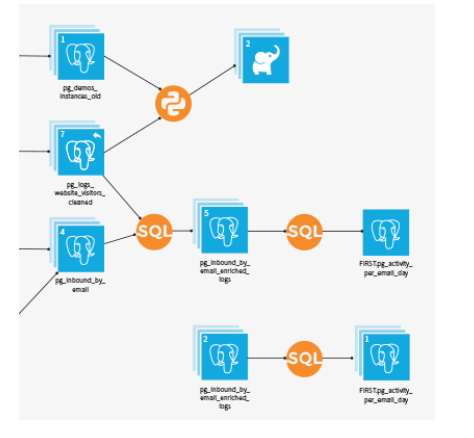
Once you have the data on Azure you can use DSS's web interface to load and prepare data in a visual interface; analyze and visualize data; and train machine algorithms to model your project. The resulting model can be finally automated to run entire workflow.

The pre-built image is now available on Azure, but you may need to go to the Azure's new portal here,

or get started from here.


Features that you may interested in:
  • Connectivity: Connect to more than 25 data storage systems
  • Data Wrangling: Interactive data cleaning and enrichment
  • Machine Learning: Step-by-step guided machine learning
  • Data Mining : Immediate visual insights
  • Data Visualization: Histogram, maps, scatter plots, heat maps, boxplots, and so much more.
    Easily build visualisations and explore your data with drag and drop functionalities.
    -DSS automatically computes charts on your existing Big Data infrastructure (SQL or Impala) for optimal performance.
  • Data Workflow: Visualize and re-run Workflows
  • Real-time Scoring: Go from design to production, instantaneously

Other features of importance:

Collaboration: Integrated documentation and knowledge sharing
Deployment: Deploy workflows using staged deployment models
Enterprise readiness: Data governance and fine grained data access and integration with Hadoop

Watch this video from Dataiku here:

Wednesday, March 16, 2016

Microsoft out of windows into the open


Microsoft is getting into the OPEN in a big way.
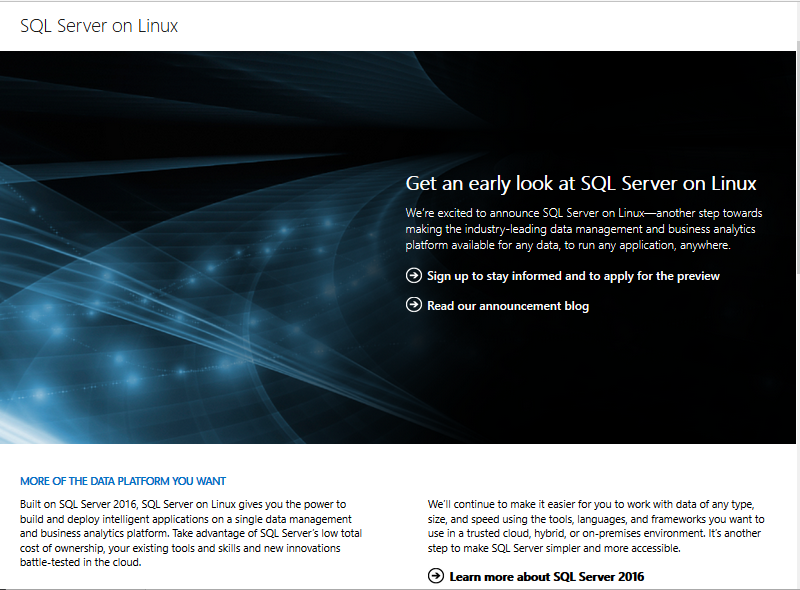
First week of March this year Microsoft announced the availability of SQL Server on LINUX for both on-premises and the cloud. The core RDBS capabilities are now in preview but will be available mid-2017. The above image from Microsoft site.


More details here:
http://blogs.microsoft.com/blog/2016/03/07/announcing-sql-server-on-linux/

All the very best on Windows will be available for LINUX as well such as:
Mission-Critical Performance
Industry-Leading TCO
The best in best security
Plus all the hybrid cloud innovations
These all available out-of-the box.

Microsoft is not just for Windows but is truly cross-platform.
The preview is available as of the announcement.
Sign-up here to get more as the preview is limited to a select initial group:
https://www.microsoft.com/en-us/server-cloud/sql-server-on-linux.aspx

Saturday, January 16, 2016

Microsoft's R Server Developer Edition is FREE

Data is dead long live analytics.

Analytics will be the beacon to follow by all enterprises in the future. Having mere data and not being able to act on it is something that everyone will rush to avoid. R language, a language meant for statisticss and analytics will be one of the most sought after skills in the near future.

Microsoft has thrown in a lot to be at the forefront, not only acquiring the Revolution Analytics Company but also making it one of the prime features of SQL Server 2016.

Microsoft will be rebranding Revolution Enterprise for Hadoop, Linux and Tera data as R Server.
If you are interested in this growing technology area you could jump start downloading the R Server Developer Edition which is free (as free can be). It's just like all the other developer's stuff, has all the features of enterprise but not production worthy.

Also Revolution R Open has been rebranded as Microsoft R Open which is also free. For those who are already using MicrosoftData Science Virtual will have a preinstalled R Server. It is not a stretch that R Server will be on Azure as well for machine learning and IOT.

Download R Server here.
http://blogs.technet.com/b/machinelearning/archive/2016/01/12/making-r-the-enterprise-standard-for-cross-platform-analytics-both-on-premises-and-in-the-cloud.aspx

Read more here:
http://blogs.technet.com/b/machinelearning/

Students following an acdemic course will be benefitted with the Microsoft DreamSpark Program .

Tuesday, December 01, 2015

Cumulocity is IoT Ready, go for it

 The keywords for this IOT company are Connect, Manage, Extend and do more things. In order to have wide applicability you can connect anything over any network.
Connect at Cumulocity has the following features:
  • Connect out-of-the box to more than 30 usable certified devices (whole list is here, but I could only recognize, Raspberry and a Arduino variant). Looks like it is heavy on LINUX and JAVA-based but I may be missing the others) 
  • More than 10 embedded environments supported
  • RestAPIs for any connected device


Connect Over any network

  •     Runs on all networks, mobile or fixed.
  •     No need to open your firewalls.
  •     No need to purchase additional VPN services.
  •     Reduce your mobile traffic using SmartREST by 80% over other HTTP APIs.

While connecting is the first step, managing the connected items has top priority.
Cumulocity can,
  • Store and Manage all your data- Store, search and track all assets, devices, configs, measurements,etc
  • Control assets in real-time securely from anywhere
  • Keep everything online; monitor device availability, monitor/control SLA violations, etc

Extending is important as you may need tailor to your needs.
  • With Cumulocity you can fashion your own IoT in minutes using the Cumulocity Application Builder mashing it up with your business rules.
  • Extend by plugging-in your own devices
  • Add real-world capabilities to your data

  • Cumulocity has the  most modern web interface (speed and responsive) and supports tablets and smartphones right away.
  • Cumulocity is enterprise-ready: users, groups, permissions; audit security related events etc

Want to try for free, no problem.
Look at all these happy customers.

Tuesday, April 14, 2015

Open Source Mobile Backend - The Dream Factory

The Dream Factory provides RESTful services for your applications. Given a datasource, any datasource The Dream Factory generates a comprehensive, secure RESTApi which will be your backend that you can use to build frontend applications. It provides for scripting and customization. You have support for all of this:

  • Client SDK
  • Single sign-on
  • jQuery
  • Angular JS
  • Sencha
  • iOS
  • Android
  • Windows Phone
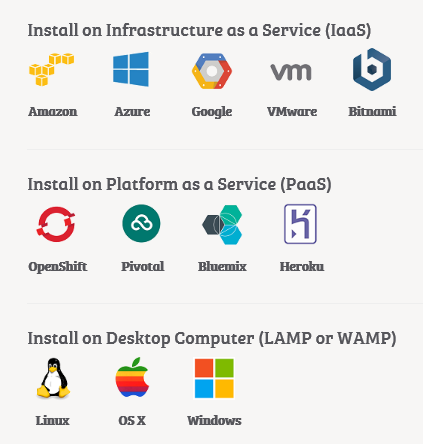
You can install on any server including your humble desktop. If you can afford you can install on any of the following:


TheDreamFactory
Why wait? Test Drive today starting from here:

Saturday, September 06, 2014

JumpStart learning based multiplayer game company jumps to the Azure Cloud


The jump was partly from RackSpace to Azure Cloud. In the process the entire on-premise infrastructure has also been moved to Azure according to
http://blogs.msdn.com/b/stevengu/archive/2014/09/03/partner-profile-jumpstart-moves-games-to-microsoft-azure-to-improve-reach-and-gameplay-and-adds-two-new-games.aspx.

JumpStart is a leader in the learning-based multiplayer games for kids with recent releases like School of Dragons and Madagascar Math Ops.

According to a JumpStart article it has thrown all of its eggs in Azure basket that includes all of its web content, web and mobile game products to Azure.

Read more about this here: http://www.jumpstart.com/aboutus/press-releases/jumpstart-transitions-to-microsoft-azure-scalable-cloud-technology
1

Saturday, March 15, 2014

Windows Azure/Oracle Colloboration is done deal

It is now official that the collaboration deal is in place according to a general availability. Details here:
Announcing General Availability of Oracle Software on Windows Azure and Updates to Windows Azure Traffic Manager

Open and flexible platforms are in vogue and that was adopted as a rule by Windows Azure. Partenership with Oracle reaches a new height with this collaboration and what this means is the following Oracle products are now generally available as viratual images and more with license thrown in.

On Windows Server 2008 R2
Oracle database 11g R2 -Standard and Enterprise
Oracle Weblogic Server 11g R2 -Standard and enterprise
Oracle database 11g R2 and Oracle Weblogic Server 11g R2 Standard
Oracle Weblogic Server 11g Standard

On Windows Server 2012
JDK6
Oracle database 12c and Weblogic Server 12c Standard
Oracle database 12c Standard
Oracle Weblogic Server 12c Standard
Oracle database 12c and Weblogic Server 12c Enterprise
Oracle database 12c Enterprise
Oracle Weblogic Server 12c Enterprise

You can get to them via the Windows Azure Image gallery.
It is very easy to access these images to create your virtual server application.
Login to portal
Click the portal icon and open this window


Click on From Gallery and then Select Oracle on the list on the left to display the following:


Well you can try it or buy it from Windows Azure as shown:


Good luck with your implementations!!


 Vis-a-vis the collboration Oracle supports all these for databse and java developers.

Saturday, September 28, 2013

Oracle software on Windows Azure

You can now have Oracle on windows Azure. Right now (effective immediately) it is in preview which means it is the time for you to check it out without shedding too many dollars.

This became possible as a result of a partnership between Oracle and Microsoft.
 
Customers can run Oracle supported software on:
  • Windows Server Hyper-V
  • Windows Azure
The following Oracle related items are available as preview in Windows Azure image gallery:
  • Popular Configurations of Oracle
  • Java
  • Oracle Database
  • Oracle WebLogic Server
  • Oracle Linux
Customers who have Oracle license can run Oracle on Windows Azure (license mobility is OK)

Read more details here:
http://www.oracle.com/technetwork/topics/cloud/faq-1963009.html

Start your trial here:
http://www.windowsazure.com/en-us/campaigns/oracle/

Mahalo,

Jay
DMCA.com Protection Status