Showing posts with label Machine Learning. Show all posts

Tuesday, May 30, 2017

Deep learning AI with Caffe2GO

You create a video and you want it the way Picasso or Monet would have visualized it. Can it be done? The answers appears to be answered by Facebook's Caffe2Go. It was easy with stills as many programs do it, but with a video it is another thing.

Caffe2Go is supposed to be third iteration of AI, the deep learning. This was possible earlier with big machines and lots of computing power, since the program has to learn the myrid images that these great artists envisioned it could not have been done otherwise. But to do it on the phone in the palm of your hand, that is something that Facebook seems to have pulled off, with the Facebook app Caffe2Go.

It is a deep learning platform on the mobile phone. The app takes the style of the artist and transforms the input video, it is basically a style transformer.

Here is a demo of this deep learning app:
https://www.facebook.com/Engineering/videos/1015460775164720

Sunday, April 24, 2016

Dataiku Data Science Studio (DSS) now available as image on Microsoft Azure

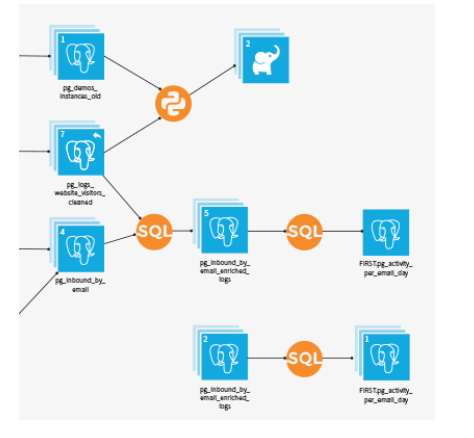
Dataiku DSS allows data professionals to prototype, build and deploy specific services to transform raw data for Prediction or otherwise.

Once you have the data on Azure you can use DSS's web interface to load and prepare data in a visual interface; analyze and visualize data; and train machine algorithms to model your project. The resulting model can be finally automated to run entire workflow.

The pre-built image is now available on Azure, but you may need to go to the Azure's new portal here,

or get started from here.


Features that you may interested in:
  • Connectivity: Connect to more than 25 data storage systems
  • Data Wrangling: Interactive data cleaning and enrichment
  • Machine Learning: Step-by-step guided machine learning
  • Data Mining : Immediate visual insights
  • Data Visualization: Histogram, maps, scatter plots, heat maps, boxplots, and so much more.
    Easily build visualisations and explore your data with drag and drop functionalities.
    -DSS automatically computes charts on your existing Big Data infrastructure (SQL or Impala) for optimal performance.
  • Data Workflow: Visualize and re-run Workflows
  • Real-time Scoring: Go from design to production, instantaneously

Other features of importance:

Collaboration: Integrated documentation and knowledge sharing
Deployment: Deploy workflows using staged deployment models
Enterprise readiness: Data governance and fine grained data access and integration with Hadoop

Watch this video from Dataiku here:

Sunday, August 02, 2015

Big data, Analytics, AI addressing Oncology questions

AI recently has come to the forefront gaining notoriety as the harbinger of 'Killer Robots'.
AI at its core is machine intelligence and IBM has worked on AI since the early days of AI. We all remember the movie Space Odyssey 2001 where the computer HAL 9000 could not only understand natural language but was also able to read lips.

AI cannot be all that bad and it can be most useful in answering questions of great importance, fast and accurate based on knowledge.

IBM's Watson products (Watson for Oncology, Discovery Advisor and Engagement Advisor) are based on harvesting massive amount of information and digesting them and putting them to good use by charting out actions. The information comes from many different sources structured, unstructured  depending on the question Watson has to answer.

Watson for Oncology is a smart software product for medicine and the AI training has been received at Sloan Kettering and is able to deliver answers to oncology related questions and help doctors to find the most efficacious treatment options. It does to by cross-referencing the patient information against massive medical databases; curated texts from medical conferences, articles and other announcements. 

Cancer treatment has moved away from generic to customization.

Here is Watson for Oncology from the IBM Site.

Thursday, July 17, 2014

Big day for Big Data at Insight 2014

If you are working in Big Data this should interest you and if work with Data and IBM then this is for you.
Insight 2104 is IBM driven Conference for Big Data and Analytics.


Get all the competitive advantages of data:

 * Drive business outcomes with sophisticated analytics
 * Develop speed of insight  to accelerate "speed of action"
 * Extend differentiation  through cognitive capabilities


If you need to convince your boss to let you attend then show him this list (I took it out of the advertisement)

Top reasons to make sure you're at Insight 2014:
  • 1,500 deep-dive learning opportunities - elective sessions, hands-on labs and developer activities led by  industry thought leaders and client speakers
  •  Business and Industry Leadership program
  •  100+ Hands-on labs to sharpen your skills
  • Five new "Fast Tracks" in Cloud, Mobile, Social, Cognitive Computing, Security and Infrastructure
  • The Solution EXPO - the latest solutions presented by 350+ exhibitors and IBM experts
  • Networking opportunities to deepen your knowledge and shape your career
 

Tuesday, July 15, 2014

Azure ML: Predictive analytics as a Service (PaaaS?)

It is a fully managed Machine Learning Cloud service for predictive analytics solutions. It takes in historical data and create a statistics based model to predict future trends. It would immediately find applications in eCommerce (purchasing trends), pharmaceuticals, traffic; epidemics studies, etc. and forecast future events and take proactive steps. You can start building a service now.

Azure ML is,

  • Designed for new and experienced users
  • Proven algorithms from MS Research, Xbox and Bing
  • First class support for the open source language R
  • Seamless connection to HDInsight for big data solutions
  • Deploy models to production in minutes
  • Pay only for what you use. No hardware or software to buy.
Using Azure ML creating such a model makes it fast to predict and forecast. This has been done in the past but, the steep learning curve needed; the availability of knowledgeable staff with advanced model building capabilities, time to build the solution and resources required limited Machine learning to only large enterprises. What took weeks and months takes a few hours- according to Microsoft.

In Microsoft's own words this is what you can get from Azure ML,

"Azure ML, which previews next month (July), will bring together the capabilities of new analytics tools, powerful algorithms developed for Microsoft products like Xbox and Bing, and years of machine learning experience into one simple and easy-to-use cloud service. For customers, this means virtually none of the startup costs associated with authoring, developing and scaling machine learning solutions. Visual workflows and startup templates will make common machine learning tasks simple and easy. And the ability to publish APIs and Web services in minutes and collaborate with others will quickly turn analytic assets into enterprise-grade production cloud services."

Get to read everything about Azure ML here:
http://blogs.technet.com/b/machinelearning/

Read about 20 years of ML research at Microsoft here:
http://blogs.technet.com/b/machinelearning/archive/2014/07/08/twenty-years-of-machine-learning-at-microsoft.aspx

You start creating a service (presently in preview and therefore free)  in the Azure Portal (Data Services | Machine Learning).

 
The following are the items to create the Machine Learning service. You create a workspace by providing a name, herein, for example HodentekML. You have to specify a owner, which requires a Windows Live login. Since my account is in South Central US perhaps that is only option for me as far as the location is concerned. Since I do not have a Storage account, I will have to create a little later as you will see. I also have to provide a storage account name (something like 3-8 characters in all, only letter (small case) and numbers not using any special characters)
 
 
When you click CREATE AN ML WORKSPACE it will take you to the screen to create a Cloud Service.
In order to use Azure ML you need Cloud Service. If you do not have one, you need to create a Cloud Service to complete your Azure ML. The interactive windows takes you to creating a Cloud Service with a Quick Create link. Click on the arrow to CREATE A CLOUD SERVICE which takes you to next screen.


You need to provide the first part of the URL in the first box, herein MLPreview is entered, the URL is,
MLPreview.cloudapp.net

With this you will have created a Machine Learning Service.


Well this is just the beginning. Here is a must watch video in using AzureML


DMCA.com Protection Status