Showing posts with label Data Mining. Show all posts

Sunday, April 24, 2016

Dataiku Data Science Studio (DSS) now available as image on Microsoft Azure

Dataiku DSS allows data professionals to prototype, build and deploy specific services to transform raw data for Prediction or otherwise.

Once you have the data on Azure you can use DSS's web interface to load and prepare data in a visual interface; analyze and visualize data; and train machine algorithms to model your project. The resulting model can be finally automated to run entire workflow.

The pre-built image is now available on Azure, but you may need to go to the Azure's new portal here,

or get started from here.


Features that you may interested in:
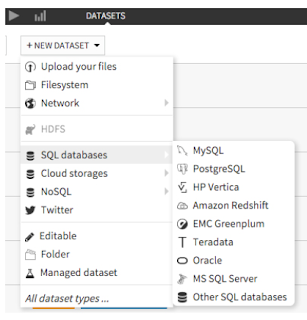
  • Connectivity: Connect to more than 25 data storage systems
  • Data Wrangling: Interactive data cleaning and enrichment
  • Machine Learning: Step-by-step guided machine learning
  • Data Mining : Immediate visual insights
  • Data Visualization: Histogram, maps, scatter plots, heat maps, boxplots, and so much more.
    Easily build visualisations and explore your data with drag and drop functionalities.
    -DSS automatically computes charts on your existing Big Data infrastructure (SQL or Impala) for optimal performance.
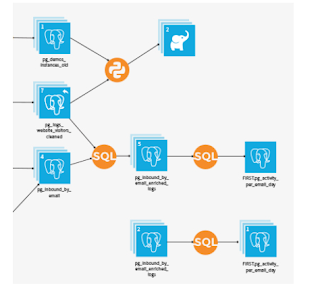
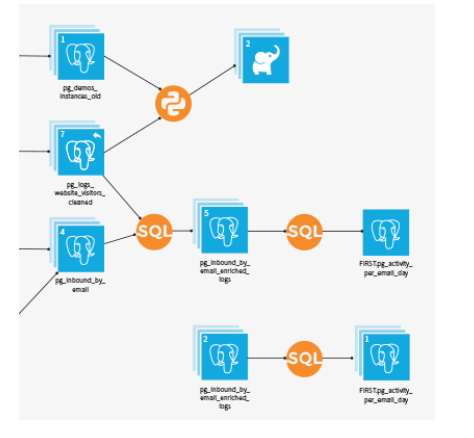
  • Data Workflow: Visualize and re-run Workflows
  • Real-time Scoring: Go from design to production, instantaneously
Other features of importance:

Collaboration: Integrated documentation and knowledge sharing
Deployment: Deploy workflows using staged deployment models
Enterprise readiness: Data governance and fine grained data access and integration with Hadoop

Watch this video from Dataiku here:

Friday, October 16, 2015

Get the free Oracle SQL Developer 4.1.1 and develop

This is a great tool and has evolved a lot. The last time I wrote about this was in May 2014 when the version was 4.0.2. If you have not worked with this tool, please access Oracle.com and search. If you need information on previous versions you can access my previous posts here;
----
http://hodentek.blogspot.com/2007/08/do-you-know-how-to-use-oracle-sql.html
http://hodentek.blogspot.com/2008/12/oracle-sql-developer-tool-15-with-sql.html
http://hodentek.blogspot.com/2009/05/articles-on-earlier-versions-of-oracle.html
http://hodentek.blogspot.com/2010/01/migrating-mysql-table-using-oracle-sql.html
http://www.packtpub.com/article/oracle-sql-developer-tool-1.5-sql-server-2005

You may download this free tool from here:

http://www.oracle.com/technetwork/developer-tools/sql-developer/overview/index.html
sqldeveloper-4.1.1.19.59-no-jre.zip (383.6MB)

This free tool will allow you a complete end-to-end development of PL/SQL applications. It has worksheet to run queries and SQL scripts. A DBA console with reports; data modelling and data migration tools.

In order to run SQL Developer Tool you need Java SDK8.

You can get it from here:
http://www.oracle.com/technetwork/java/javase/downloads/jdk8-downloads-2133151.html
You choose the OS version, herein Windows 7 Ultimate  x32bit
jdk-8u60-windows-i586.exe is the download for this Windows x32

Double click to install.

In this edition of Oracle SQL Developer you can not only connect to relational database management systems but can also connect to Oracle NoSQL and the Cloud.

Friday, July 04, 2014

Vastly improved Oracle SQL Developer Tool 4.0


This is a great tool if you are working with Oracle and you can do all of this:
Develop
Administer
Model
Migrate

I have been using SQL Developer tool since 2007 and I find the latest version released this may vastly improved with a rich interface.

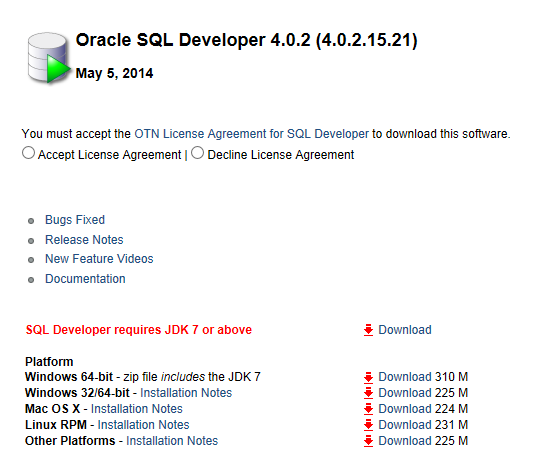
The latest release 4.0 can be downloaded from here:
Oracle SQL Developer 4.0.2 (4.0.2.15.21)
http://www.oracle.com/technetwork/developer-tools/sql-developer/downloads/index.html


The x64 bit version I downloaded came with the required JDK (7.0).

Apart from these new features SQL Developer 4.0 it supports Oracle database 12C:
  • Database performance monitoring'
  • Database search
  • Command line support now covers reporting and Cart
  • Cart itself has enhanced features-multiple cart support; export ddl options, etc.
  • Creating and drill -down on Reports with floating Editor and Navigation windows
  • UI enhancements- Usability enhancements
  • Data modeler is now 4.0 to support 12C with masking of sensitive data and ability to create Trasparent Sensitive Data Protection
  • Oracle Migrations
  • Oracle Data Miner
Installation cannot be easier than this. Download the zip file (Choose the one that you can work
with), unzip and start using.

While installing you may import your preferances from an earlier version if it exists. The
computer I am using did not have any previous installation.

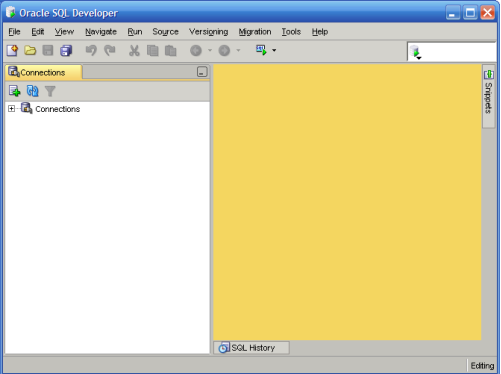
The User Interface gets displayed as shown with a modal window requesting your permission
to track usage for product improvement.  I generally say, OK.


The View menu shows many of the features that you will be using.


Team menu lets you connect to GIT or to Subversion

The Start page also has important informative content such as Videos; Tutorials and Online demonstrations, etc

 
The Tools menu is also feature rich as it gives you access to many of tasks you may need to perform and the Data Modeler submenu shown above shows many features of database administration'


You must not forget to take a look at the Help | About which gives an idea of all the extensions


You will agree that SQL Developer has evolved vastly from its beginnings,


This vastly improved compared to the ones I used in previous years:

Here is a context for this article if you have missed the earlier ones:

http://hodentek.blogspot.com/2007/08/do-you-know-how-to-use-oracle-sql.html

http://hodentek.blogspot.com/2008/12/oracle-sql-developer-tool-15-with-sql.html

http://hodentek.blogspot.com/2009/05/articles-on-earlier-versions-of-oracle.html

http://hodentek.blogspot.com/2010/01/migrating-mysql-table-using-oracle-sql.html

http://www.packtpub.com/article/oracle-sql-developer-tool-1.5-sql-server-2005
DMCA.com Protection Status