Showing posts with label Basic. Show all posts

Thursday, January 23, 2025

Installing the latest version of SQL Server

 Download the latest version of SQL Server from here.


There are a couple of download options as you can see on this page from the above link.


If you are a developer, the best option is the Developer version which provides:

  • Full featured free edition
  • Licensed for use as a development and test database
  • It is for non-production use

However, most purposes the SQL Server 2022 Express is adequate. It provides:

  • Free edition of SQL Server
  • Good fit for desktop development
  • Best fit for small server applications.

The SQL Server editions may be installed on Windows, Linux and Docker Containers.

In this blog for purposes of demonstration and use, the Developer edition will be installed on a Surface Laptop 5 with the following features.

Windows 11 Pro, Version 23H2, OS build 22631.3593. It has 16GB installed RAM

Downloading the developer edition begins by clicking the Download button in the above screen. In response you download the executable, SQL2022-SSEI-Dev.exe (4191 KB)file. This file gets displayed as shown.


If you want a quick installation use the BASIC option. 

In blog the Custom option will be used. If you want to differ to another time, you may just download the installation files by choosing Download Media.

Read the details of the SQL Server 2022 Installation Center


Thursday, March 26, 2015

Azure App SVC Pricing highlights

If you are in the business of building enterprise-ready apps in a well-built development platform then Azure App Service provides in addition to building apps a common management and billing model. The choice is yours to pick items from a large menu. You can start off experimenting for free (or shared) and then upgrade to Basic, Standard or Premium tiers.

The new Azure App Service details are here:
http://hodentek.blogspot.com/2015/03/microsofts-rolls-out-new-azure-app.html

Quoting from Microsoft (http://azure.microsoft.com/en-us/pricing/details/app-service/),

"Azure App Service is a one-of-a kind solution that brings together the tools you need for building enterprise-ready apps around a common development, management and billing model. You can choose from a rich ecosystem of pre-built apps and API services as well as a unified set of enterprise capabilities including mobile backend services, turnkey connectivity to SaaS and enterprise systems, and workflow-based creation of business processes"

The following image details the Service Capabilities


The following image details the App Capabilities


The pricing depends on geographical location of the data center


If you are serious about using this service, perhaps the best way to go about is to try the Free and Shared option shown here:


The details of Basic (1,2, or 4 cores 10GB each), Standard Tier (1,2,4 cores 50GB each) and Premium Tier(1,2,4 core 250GB each)  are available at the link mentioned above.

Wednesday, May 07, 2014

Microsoft Azure SQL Database Service Tiers' details laidout


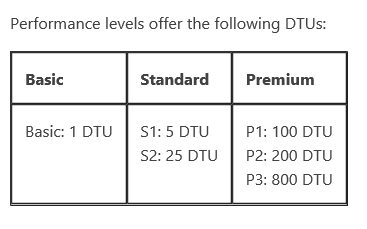
Let us begin with the new acronym DTU. DTU stands for Database Throughput Unit. DTU includes many of the measures such as CPU, memory and read/write rates to a database. DTU provides a guide for the customer to assess the new SQL Database performance levels - Basic, S1, S2, P1, P2,P3. Each of these is designed to provide higher throughput measured as a function of time (Basic in throughputs/hour, Standard(S1,S2) in throughput/minute and Premium (P1,P2 and P3) in throughput/sec.

I wonder whether Microsoft has something for me like throughputs/week!

The following table is from Shawn Bice's blog post.


Here are some throughput/time values tied to service levels:


Microsoft appears to not to say that these are not transaction guarantees for customers but provided to assist  making choices.


Thursday, April 24, 2014

Microsoft revamps Azure SQL Database editions


The Web and Business editions will be replaced within a year with three levels tailored and better suited to business needs. You do not need to wait for a year as it is already in Preview.
The objectives were made clear in this email notice (quote):
New service tiers

In response to customer feedback, Azure SQL Database is introducing new service tiers to help you more easily innovate with cloud-designed database workloads. The new tiers help deliver predictable performance across six performance levels for lightweight to heavyweight transactional application demands. Additionally, the new tiers offer a spectrum of business continuity features, a stronger uptime service-level agreement (SLA), larger database sizes for less money, and an improved billing experience.

  •    Basic: Designed for applications with a light transactional workload. Performance objectives for Basic provide a predictable, hourly transaction rate.

  •    Standard: Standard is the go-to option for getting started with cloud-designed business applications. It offers mid-level performance and business continuity features. Performance objectives for Standard deliver predictable, per-minute transaction rates.

  •    Premium: Designed for mission-critical databases, Premium offers the highest performance levels and access to advanced business continuity features. Performance objectives for Premium deliver predictable, per-second transaction rates.

I tried to create a Basic tier database minutes ago but the interface still shows Web and Business:

 
DMCA.com Protection Status