Showing posts sorted by relevance for query Sample databases. Sort by date Show all posts

Wednesday, December 17, 2008

Northwind Database with SQL Server 2008

I have been using TestNorthwind, a copy of the Northwind database that got shipped with SQL Server 2000 in many of my articles and my book. Some of my readers have asked me how to get this database.

With each new version of SQL Server Microsoft has been providing new sample databases such as pubs, Northwind, Adventure Works etc. In recent versions Microsoft does not provide a sample database during installation of the server but provides a link to download the sample database. A variety of methods can be used to install the databases. Two most common ones being; running the SQL script files or, using the attach/detach methods.


The sample databases PUBS and NORTHWIND can be downloaded from this link:
 http://www.microsoft.com/downloads/thankyou.aspx?familyId=06616212-0356-46a0-8da2-eebc53a68034&displayLang=enhttp://www.microsoft.com/downloads/thankyou.aspx?familyId=06616212-0356-46a0-8da2-eebc53a68034&displayLang=en

This .msi file installs both Northwind and Pubs database MDF/LDF files as well as instwnd.sql and instpubs.sql files. Make sure you read the ReadMe files.

The Important steps for attaching the Northwind database are shown here.

Step 1: Run the installer program. This is just one screen from the installation.


The files are installed to C:\SQL Server 2000 Sample Databases

Step 2: Connect to SQL Server 2008 and start the Attach wizard

Connect tot SQL Server 2008 and expand the nodes. Right click Databases folder and choose Attach...
The Attach Databases window gets displayed as shown.


Step 3: Click on Add...button. Browse to the C:\drive and click on the NORTHWND.mdf. You can provide a different name using the AttachAs option.


Step 4: Click on the OK button. Northwind database can now be found in the Databases folder. The owner will be the account name of the machine owner in this Windows XP Installation.


Which database to use and where?
This largely depends on the purpose the database will be used. I have used Northwind many times as it is sufficient to demonstrate most aspects of relational databases. I have used it in the past as a backend database for demonstrating Analysis Services, Reporting Services and Integration Services demos. Adventure Works is another excellent sample database well suited for OLTP and OLAP demos. Actually I keep all of them on my servers for testing.

Friday, May 14, 2010

Using Microsoft sample SQL Server databases (2000,2005,2008)

Often times you may want to test something simple and you don’t want to create a database of your own. You can use Microsoft relational database samples. These samples are available for most versions. Recently samples are not bundled with the servers and you may have to get them from online sources.

Read the rest of the story here:
http://hodentekmsss.blogspot.com/2010/05/using-sample-databases-with-sql-server.html

Tuesday, June 18, 2013

Hyperlinks referenced in my new book


My new book on SQL Server Reporting Services 2012 is about to be released and this post provides a list of links referenced in the book, sorted chapter wise.


Hyperlinks provide a gateway to the extensive literature that can be accessed on the Internet. They provide information (collective knowledgebase) above and beyond what one finds in a single article,book,blog or other media formats. However links in a printed book are useful to only those readers who would go to any lengths to find information but irksome, frustrating and almost useless to the others. They are of course useful in online formats such as eBooks.

In order to conform to page count limit set by the publishers (as you might have noticed computer books have become heftier and heftier) and yet provide guidance to the readers there is no better way than publishing a list of links that is chapter-wise sorted and placed in a location that is easy to access. This post is an attempt to do just that. However some essential information from Microsoft Documentation is used as is in the book in some of the chapters.

Chapter 1: Overview and Installation – SQL Server Reporting Services 2012

Operating System Requirements
http://msdn.microsoft.com/en-us/library/ms144275.aspx.

Software requirements (Power Shell)
http://msdn.microsoft.com/en-us/library/ff637750(v=azure.10).aspx

Finding processor cores of the computer
http://hodentekhelp.blogspot.com/2013/01/how-do-i-find-number-of-cores-in.html

Download link for SQL Server2012 Enterprise Evaluation x64 bit
http://www.microsoft.com/en-us/download/details.aspx?id=29066

Options for SharePoint Integration
http://technet.microsoft.com/en-us/library/hh213532.aspx

Distributed replay controller
http://msdn.microsoft.com/en-us/library/ff878183(v=SQL.110).aspx

Configuring reporting services 2012
http://msdn.microsoft.com/en-us/library/cc281311.aspx

SQL Server 2012 Security related link
http://msdn.microsoft.com/en-us/library/ms144228.aspx

Setting up IE browser to start with Administrator Privileges
http://hodentekhelp.blogspot.com/2013/01/how-to-start-ie-browser-with.html

SQL Server 2000 database files
 http://www.microsoft.com/en-us/download/details.aspx?id=23654

Attaching and detaching databases
http://msftdbprodsamples.codeplex.com/workitem/19203

Attaching/Detaching step-by-step
http://hodentek.blogspot.com/search?q=Sample+databases

Running script files, step-by-step
http://hodentekmsss.blogspot.com/2013/01/how-do-i-install-sample-database-using.html

Choosing SharePoint Server for SQL Server 2012 Integration
http://technet.microsoft.com/en-us/library/dc6a3372-db26-43f0-b7aa-f725acc635c2

Installing SharePoint 2010 on Windows 7(x64)
http://msdn.microsoft.com/en-us/library/ee554869(office.14).aspx

SharePoint 2010 hardware and software requirements
http://technet.microsoft.com/en-us/library/cc288751(v=office.14).aspx

Download link SharePoint2010 Trial
http://www.microsoft.com/en-us/download/details.aspx?id=16631

Installing Microsoft Sync Frame work 1.0(x64)
http://go.microsoft.com/fwlink/?LinkID=141237

Get Microsoft SQL Server 2008 Native Client MSI
http://go.microsoft.com/fwlink/?LinkId=123718

Download and Install Windows 6.1-KB974405-x64.msu
http://www.microsoft.com/en-us/download/details.aspx?id=17331

Get Microsoft Chart Controls for Microsoft .NET Framework 3.5 (KB2500170).
http://support.microsoft.com/kb/2500170

SharePoint2010 and SQL Server 2012 choice
http://msdn.microsoft.com/en-us/library/dc6a3372-db26-43f0-b7aa-f725acc635c2

Reporting Services 2012 Add-in for SharePoint 2010
http://www.microsoft.com/en-us/download/details.aspx?id=29068

Making changes to application pool identity
http://hodentekhelp.blogspot.com/2013/04/how-do-you-make-changes-to-application.html

Chapter 2: SQL Server Reporting Services 2012 Projects with Visual Studio 2012

SSDT and SQL Server 2012
http://msdn.microsoft.com/en-us/library/hh272686(v=vs.103).aspx

SSDT first time problems
http://www.sqlservercentral.com/blogs/jamesserra/2012/04/13/ssdt-installation-confusion/print/

http://blogs.msdn.com/b/ssdt/archive/2012/06/06/getting-started-with-localdb-debugging-using-ssdt.aspx?CommentPosted=true#commentmessage

SSDT and SSRS 2012
http://social.msdn.microsoft.com/Forums/en-US/sqlreportingservices/thread/1f005f31-82a6-4e1c-b221-cb2c798c4caa

SSDT December 2012 update
hodentekmsss.blogspot.com/2012/12/december-update-to-ssdt.html
http://msdn.microsoft.com/en-us/data/hh297027

Report Designer
http://technet.microsoft.com/en-us/library/ms173745.aspx

Problem with report preview in VS Designer
http://social.technet.microsoft.com/Forums/en-US/sqlreportingservices/thread/41d46c69-5a18-4915-8b5e-fc3c19da8db9

http://social.technet.microsoft.com/Forums/en-US/sqlreportingservices/thread/38ff8d54-06aa-40c3-8916-378d5185320e

First edition
Learning SQL Server Reporting Services 2008, ISBN: 9781847196187, Packt Publishing, 2009
Export problem to MS Access
http://connect.microsoft.com/SQLServer/feedback/details/735375/business-intelligence-bids-ssdt-missing-referenced-assembly

Visual Studio 2012 Ultimate download site
http://www.microsoft.com/visualstudio/eng/downloads

Report Viewer Controls
http://msdn.microsoft.com/en-us/library/ms251671.aspx

Visual Studio 2010 download site
http://www.microsoft.com/en-us/download/details.aspx?id=12187

Detailed description of Report Builder 2.0
http://dotnet.sys-con.com/node/982742   Part 1

http://jayaramkrishnaswamy.sys-con.com/node/1227111  Part 2

RDL and RDLC Schemas
http://msdn.microsoft.com/en-us/library/ms252109.aspx

Report Viewer Runtime 2008 version
http://www.microsoft.com/en-us/download/details.aspx?id=6576

Report Viewer Runtime 2010 package
http://www.microsoft.com/en-us/download/details.aspx?id=6442

Report Viewer Runtime 2010 SP1
http://www.microsoft.com/en-us/download/details.aspx?id=6610

Report Viewer Runtime 2012
http://www.microsoft.com/en-us/download/details.aspx?id=35747

Chapter 3: Overview of SQL Server Reporting Services 2012 Architecture, Features, and Tools

Major Components of Native Mode installation
http://msdn.microsoft.com/en-us/library/ms157231.aspx

SharePoint Standalone Deployment for SQL Server 2012 Integration
http://msdn.microsoft.com/en-us/library/bb510781(v=sql.105).aspx

Reporting Services 2012 Configuration details
http://msdn.microsoft.com/en-us/library/ms155866.aspx

Regarding Report Parts and their usage
http://msdn.microsoft.com/en-us/library/ee635721.aspx

ESRI Shape Files
http://www.esri.com/library/whitepapers/pdfs/shapefile.pdf

Regarding Report scheduling
http://go.microsoft.com/fwlink/?linkid=232473

Creating, modifying and deleting Schedules
http://msdn.microsoft.com/en-us/library/ms155897.aspx

Power View Features
http://office.microsoft.com/en-us/excel-help/power-view-explore-visualize-and-present-your-data-HA102835634.aspx

Authentication – Report Servers
http://msdn.microsoft.com/en-us/library/bb283249.aspx

URL access parameters
http://msdn.microsoft.com/en-us/library/1c3e680a-83ea-4979-8e79-fa2337ae12a3

Reporting Services Default Extensions
http://msdn.microsoft.com/en-us/library/ms157231.aspx

Security, Data Processing, Rendering, Report Processing and Delivery Extensions
http://msdn.microsoft.com/en-us/library/hh213576.aspx


Chapter 4: Working with Report Manager

Report Manager 2012 - Overview
http://msdn.microsoft.com/en-us/library/ms157147.aspx

Configure a Report Server for Local Administration on Windows Vista and Windows Server 2008
http://msdn.microsoft.com/en-us/library/bb630430.aspx

Tasks and permissions on Native mode report server
http://msdn.microsoft.com/en-us/library/ms159840.aspx

Launch error from while launching Report Builder from Report Manager
http://social.msdn.microsoft.com/Forums/enUS/sqlreportingservices/thread/ec0a6b15-1816-4d6c-87c0-b2f1f28f3d04

Report Manager Site Settings
http://msdn.microsoft.com/en-us/library/ms181194.aspx

Report Manager F1 Help
http://msdn.microsoft.com/en-us/library/ms189690.aspx

System Role assignments (New/Edit)
http://msdn.microsoft.com/en-us/library/ms186541.aspx

Clickthrough Reports (SSRS)
http://technet.microsoft.com/en-us/library/ms345252.aspx

Exporting Reports (Report Builder and SSRS)
http://msdn.microsoft.com/en-us/library/dd239307.aspx

Caching Reports (SSRS)
http://msdn.microsoft.com/en-us/library/ms155927.aspx

Chapter 5: Working with Report Manager
Learning SQL Server 2008 Reporting Services, Jayaram Krishnaswamy, Packt publishing, ISBN: 9781847196187, 1st Edition, March 2009
http://www.packtpub.com/learning-sql-server-2008-reporting-services/book/mid/010409ofvkyp

Chapter 5: Working with Report Builder 3.0

Report Builder: ENU\x86\ReportBuilder3.msi (24.8 MB) file download link
http://www.microsoft.com/en-us/download/details.aspx?id=29072

Report Builder 2.0 Interface description
http://dotnet.sys-con.com/node/982742   Part 1

Authoring Reports with Report Builder 2
http://jayaramkrishnaswamy.sys-con.com/node/1227111 Part 2

Data source properties - credentials
http://msdn.microsoft.com/en-us/library/ms178308.aspx

Chapter 7: Report Authoring with Report Builder 2.0
Learning SQL Server 2008 Reporting Services, Jayaram Krishnaswamy, Packt publishing, ISBN: 9781847196187, 1st Edition, March 2009
Report Parts in Report Designer (SSRS)
http://technet.microsoft.com/en-us/library/ee635721.aspx

Chapter 6: Power View and Reporting Services

Business Intelligence Semantic Model
http://blogs.msdn.com/b/analysisservices/archive/2012/03/09/xvelocity-and-analysis-services.aspx

What’s new in Power View
http://office.microsoft.com/en-us/excel-help/whats-new-in-power-view-in-excel-2013-and-in-sharepoint-server-HA102901475.aspx

Comparison of Multidimensional and Tabular Model
http://www.jamesserra.com/archive/2012/04/sql-server-2012-multidimensional-vs-tabular/

Overview of Power View
http://social.technet.microsoft.com/wiki/contents/articles/3726.power-view-overview.aspx#Useful_links_for_Project_Crescent_and_SQL_Server_Denali

Power View Visualization
http://office.microsoft.com/en-us/excel-help/power-view-explore-visualize-and-present-your-data-HA102835634.aspx

Practicing Power View online
http://blogs.msdn.com/b/oneclickbi/archive/2011/12/27/more-demos-of-power-view-available.aspx

News about Windows Azure HDInsight; and Power View/Power Pivot
http://redmondmag.com/blogs/the-schwartz-report/2013/03/big-data-fray.aspx

Tabular Model and default field set
http://msdn.microsoft.com/en-us/library/hh479569.aspx

Measures: Tabular Data Model
http://msdn.microsoft.com/en-us/library/hh230824.aspx

Power View with Multidimensional model
http://blogs.msdn.com/b/analysisservices/archive/2012/11/29/power-view-for-multidimensional-models-preview.aspx

Chapter 7: Self-service Data Alerts in SSRS 2012

Data Alerts details
http://msdn.microsoft.com/en-us/library/gg492252.aspx

Setting up content types in SharePoint site
http://msdn.microsoft.com/en-us/library/bb326289.aspx

SharePoint Integrated Reporting Services proxy site
http://msdn.microsoft.com/en-us/library/gg492284.aspxhttp://msdn.microsoft.com/en-us/library/gg492284.aspx

About alert Rules and Alert Scheduling
http://technet.microsoft.com/en-us/library/gg492254.aspx

Chapter 8: Reporting Services and Programming

URL Access
http://msdn.microsoft.com/en-us/library/1c3e680a-83ea-4979-8e79-fa2337ae12a3

Deprecated prefixes (DSU and DSP) in SQL Server Reporting Services 2012
http://social.msdn.microsoft.com/Forums/en-US/sqlreportingservices/thread/72f83019-9d2b-4ede-a526-e096a0cabc5b/

URL Access syntax for SharePoint Integrated Reporting Services server
http://msdn.microsoft.com/en-us/library/ms153586.aspx

Report Viewer: CodePlex Site link
http://reportviewer.codeplex.com/

Stream callback and Report Viewer
http://msdn.microsoft.com/en-us/library/microsoft.reporting.winforms.createstreamcallback.aspx

Report Server Web Services Management Endpoints
http://msdn.microsoft.com/en-us/library/ms155398.aspx

ReportExecution2005 end point
http://msdn.microsoft.com/en-us/library/ms154052.aspx

SharePoint proxy endpoints
http://msdn.microsoft.com/en-us/library/ms155398.aspx

SharePoint Integrated mode ReportService2006
http://technet.microsoft.com/en-us/library/reportservice2006.reportingservice2006

Windows Management Framework 3.0 (PowerShell) download
http://www.microsoft.com/en-us/download/details.aspx?id=34595

Power Shell quick reference (Cheat sheets)
http://www.microsoft.com/en-us/download/details.aspx?id=30002

PowerShell script for getting all Prerequisites to install SharePoint server 2010
http://gallery.technet.microsoft.com/scriptcenter/bcf3332d-f726-4ac7-b01a-eeda4b7ece8e

Making changes to Application Pool
http://hodentekhelp.blogspot.com/2013/04/how-do-you-make-changes-to-application.html

Power Shell – In depth link
http://msdn.microsoft.com/en-us/library/gg492249.aspx

System.Management namespace details
http://msdn.microsoft.com/en-us/library/aa719480.aspx

RSS disambiguation
http://en.wikipedia.org/wiki/RSS_(disambiguation))

Configuring Reporting Services URL
http://msdn.microsoft.com/en-us/library/bb630447.aspx

Writing custom code for reports
http://msdn.microsoft.com/en-us/library/ms156028.aspx

Chapter 9: Windows Azure SQL Reporting

Windows Azure SQL Reporting Services limitations
http://msdn.microsoft.com/en-us/library/windowsazure/gg430132.aspx

Pricing for hosting reports on Windows Azure SQL Reporting
http://social.msdn.microsoft.com/Forums/en-US/ssdsgetstarted/thread/fecb288a-d1a8-4eda-b6f7-85f6dc1e4b4e

Main link for pricing
http://www.windowsazure.com/en-us/pricing/details/

MSDN Forums
http://social.msdn.microsoft.com/Forums/en-US/category/windowsazureplatform

Technet forums
http://social.technet.microsoft.com/Forums/en-US/ssdsgetstarted/threads

Windows Azure Portal- link to old portal
http://www.windowsazure.com/en-us/home/features/portals/

Windows Azure Service - known issues
http://msdn.microsoft.com/en-us/library/windowsazure/hh667464

Comprehensive reference to SQL Azure with hands-on examples
Microsoft SQL Azure: Enterprise Application Development, ISBN:9781849680806, Packt Publishers, 2010
https://www.packtpub.com/microsoft-sql-azure-enterprise-application-development/book

Chapter 10: Applications Accessing Report Servers

Windows Presentation Foundation in Visual Studio
http://msdn.microsoft.com/en-us/library/bb546194(v=vs.90).aspx

Web Browser Class (.NET Framework 4.5)
http://msdn.microsoft.com/en-us/library/system.windows.controls.webbrowser.aspx

Browser WebBrowser.Navigate () method
http://msdn.microsoft.com/en-us/library/system.windows.forms.webbrowser.navigate.aspx

View and Explore Native Mode Reports Using SharePoint Web Parts (SSRS)
http://msdn.microsoft.com/en-us/library/ms159772.aspx

SQL Server Integration Services
http://msdn.microsoft.com/en-us/library/ms141026.aspx

Chapter 14: Web Service task to convert miles to kilometres
SQL Server Integration Services Using Visual Studio 2005, ISBN: 9781847193315, Packt Publishers, 2007
http://www.packtpub.com/sql-server-integration-services-visual-studio-2005/book


Thursday, January 30, 2025

Very important where you save your SQL Server Installation media files

  This is a very important question. when I began using SQL Server for writing as well as for teaching, I used to take this for granted and used to store at the default location. Sometimes, I used to get into difficulty accessing the installation media as it was needed after a long interval and I would have made changes to my directory structure, or moved them to other places. However, it is very important where you save your SQL Server Installation media for a couple of reasons.

What's the need to save?

1. It provides a means for you to reinstall or repair your installation. You cannot do this task, if you do not have your installation media. 

2. For Off-line installations, it is essential to have this media.

3. If you are having multiple installations, it ensures consistency. I used to have this media on a memory stick and have all my students install on their work stations.

What are suitable locations to save the media?

There are couple of options. Choose one that best suits your needs.

1. Local Drive: When you start installing you will find out how much space is needed on your computer's local drive. At a minimum, you need 6 GB of disc space for the custom installation with most options. If you include all extras it is about 8GB. In order to work comfortably, it can be about 10GB depending on the databases you are considering. Herein, some sample databases are assumed. The installation process brings up the space requirements during installation. 

2. On a Network share. I could have set it up on the network share for my students, but I decided to give them a copy, if they wanted to play with it when not connected to the network.

3. If installation is on a virtual machine, an ISO would be suitable.

4. Mapped drive is another option.

5. On the Cloud: Cloud storage is yet another option. However, there may be cost in storage and data transfer involved. Latency is yet another factor to consider. Internet availability is most essential during the installation process.

The installation media folder can have any name of your choice. I usually accept the default name.

The SQL Server 2022 installation center's Option node is where you specify location of the media during installation.

I originally saved this media (SQL2022-SSEI-Dev.exe, 4191 KB) on my Download folder of the local drive.

On this blog (http://hodentekMSSS.blogspot.com), dedicated to SQL Servers you will find installation of SQL Server from SQL Server 2012 onwards. Even earlier ones are on my other blog, http://hodentek.blogspot.com


Friday, March 30, 2018

T-SQL - TableSample does not always give the same number of rows

TableSample clause started with SQL Server 2015 limits the number of rows returned from a table to a sample % or sample numbers. In fact, it may not provide the specified rows of %. Also, it is not for tables with too few rows.

Here is how TableSample is defined in the MSDN site:
------------
TABLESAMPLE (10 PERCENT) /*Return a sample 10 percent of the rows of the result set. */
TABLESAMPLE (15 ROWS) /* Return a sample of 15 rows from the result set. */.
--------------
For these scenarios it cannot be applied:

Derived tables
Linked Server Tables
Tables from Table-Valued functions
Row-set functions
Open XML

This here is the syntax for TableSample clause:
----------------
TABLESAMPLE [SYSTEM] (sample_number [ PERCENT | ROWS ] )
[ REPEATABLE (repeat_seed) ]

TableSample in FROM Clause does not behave as defined in the syntax and could provide surprising results:

I queried the Northwind databases Orders table using the following syntax in SQL Server 2016 Developers edition.

SELECT * FROM Orders TableSample(10 Percent)
SELECT * FROM Orders TableSample (10)--surprisingly this does not result in error
SELECT * FROM Orders TableSample (10 ROWS)

These queries were run a number of times and the rows returned were variable from run to run and some times resulted in 0 returned rows.

Friday, February 24, 2017

Introducing Wide World Importers - the new sample database from Microsoft

There have been a number of sample databases that debuted with various SQL Server versions starting from pubs, Northwind, Foodmart and AdventureWorks

Northwind employees have been in the limelight for years and it is time for them to retire. Some 9 employees managed the whole business and now businesses have gone global and IOT and robots are standing in queue.

In this background Microsoft has introduced the Wide World Importers, WWI for short. You can get an overview here , or read on.

This is how Microsoft describes WWI's business:

"Wide World Importers (WWI) is a wholesale novelty goods importer and distributor operating from the San Francisco bay area.

As a wholesaler, WWI’s customers are mostly companies who resell to individuals. WWI sells to retail customers across the United States including specialty stores, supermarkets, computing stores, tourist attraction shops, and some individuals. WWI also sells to other wholesalers via a network of agents who promote the products on WWI’s behalf. While all of WWI’s customers are currently based in the United States, the company is intending to push for expansion into other countries.

WWI buys goods from suppliers including novelty and toy manufacturers, and other novelty wholesalers. They stock the goods in their WWI warehouse and reorder from suppliers as needed to fulfill customer orders. They also purchase large volumes of packaging materials, and sell these in smaller quantities as a convenience for the customers.

Recently WWI started to sell a variety of edible novelties such as chilli chocolates. The company previously did not have to handle chilled items. Now, to meet food handling requirements, they must monitor the temperature in their chiller room and any of their trucks that have chiller sections."

In an importing and redistributing business the Workflow is very well defined to address all exigencies and so it is with WWI as charted by Microsoft:

Workflow of stocks:

    WWI creates purchase orders and submits the orders to the suppliers.
    Suppliers send the items, WWI receives them and stocks them in their warehouse.
    Customers order items from WWI
    WWI fills the customer order with stock items in the warehouse, and when they do not have sufficient stock, they order the additional stock from the suppliers.
    Some customers do not want to wait for items that are not in stock. If they order say five different stock items, and four are available, they want to receive the four items and backorder the remaining item. The item would them be sent later in a separate shipment.
    WWI invoices customers for the stock items, typically by converting the order to an invoice.
    Customers might order items that are not in stock. These items are backordered.
    WWI delivers stock items to customers either via their own delivery vans, or via other couriers or freight methods.
    Customers pay invoices to WWI.
    Periodically, WWI pays suppliers for items that were on purchase orders. This is often sometime after they have received the goods.

You will be hearing more about WWI in my blogs:
http://hodentek.blogspot.com
http://hodentekMSSS.blogspot.com
http://hodentekHelp.blogspot.com

Thursday, February 09, 2017

Importing a CSV file into an Appery.io Collection

Appery.io supports importing data files in CSV or JSON formats. In this post you will learn the procedure to import a CSV text file.

The file we are going to import is FFD.CSV saved on the files/folders of the local computer which has been imported recently into other data sources such as MS Access 2016 here and here; SAP SQL Anywhere 17; and Power BI. The data file is created by exporting the data from a Query on SQL Server 2012 using the Export/Import Wizard.

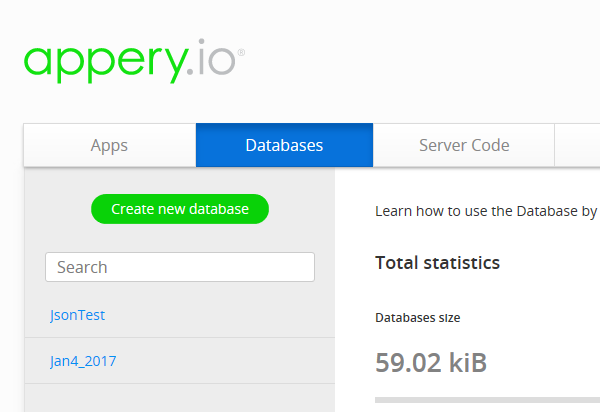
Log in to Appery.io and Click on Databases tab.

ApperyIO4_0.PNG

There are already two databases under my account. Click Create new database.

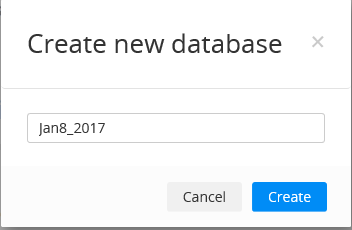
Create new database window appears. Insert name, herein it is Jan8_2017.


ApperyIO4_1.PNG

Click Create and the database is created as shown. The database is empty and has no collection.


ApperyIO4_2.PNG

Importing a collection: A Collection in Appery.io is like a table in a relational database.
Now we can either create a collection or import one.

Since we are importing the data we click on the link, import a collection.

The Import data screen is displayed as shown. Provide a name for this collection - SQLServerData. Click on Browse... and locate the file FFD.CSV on your computer.


ApperyIO4_4.PNG


Click Import.
Data in the FFD.CSV file is now in the appery.io collection in the database Jan8_2017


ApperyIO4_5.PNG

Note that some of the letters in the ProductName came with a ? mark as these are not characters in the English language set.

Here is a sample of the data in the FFD.CSV file


ApperyIO4_6.PNG


http://hodentekmsss.blogspot.com/2017/02/importing-csv-text-file-into-ms-
access.html
http://hodentekmsss.blogspot.com/2017/02/importing-text-file-into-ms-access.html
http://hodentekmsss.blogspot.com/2017/01/importing-csv-file-into-sapss-sql.html
http://hodentekmsss.blogspot.com/2016/12/report-based-on-text-file-using-power-bi.html

Sunday, October 06, 2013

Looking at Oracle Express after a long break

The version I am now looking at is Oracle 11G Express. It is also entry level like its predecessor 10G, free with a small foot print. If you are looking at getting acquainted with Oracle you may sample the express which is based on the Oracle 11g Release 2 code base. The download link is here:

http://www.oracle.com/technetwork/products/express-edition/overview/index.html

The last express version of Oracle I looked at was 10G XE. Here are the links (earliest last) to my previous Oracle 10G XE articles. It is possible some links are broken.

In many cases, exporting a table to create an XML file is easy, but importing an XML file to create a table is much more difficult. This is true for Oracle 10G XE, as you will see in the following article:
 
Loading and Unloading XML Files Using Oracle 10G XE

Queries are quantitative questions you pose to a database. Questions such as "how many employees make more than $20,000.00 a year?" or "which employee has worked for more than two years?" are typical examples. In some cases, to answer questions like the ones above, you may go no further than looking it up in one table. However some questions may need more than one table, and it is not uncommon that several tables must be used to provide the answer. Here is how you query multiple tables in Oracle.

Multi-Table Queries with Oracle 10G XE

If you need to dealing with moving legacy data  to more recent databases, this article might help.
It will show you how to move data from an MS Excel file into an Oracle 10G XE table.

Importing a CSV Text File into Oracle 10G XE

Creating tables is one of the most basic tasks you will be doing. Oracle 10G XE provides a wizard to help you create a table. The wizard walks you through several steps for creating a table, taking you to the next step after you have entered valid entries for the current step. While scripts can be used to create a table, creating a table using the visual, form-based creation process is a lot simpler and less prone to errors. This tutorial describes a table to be created in the HR database with all the necessary ingredients for a typical database. This article shows you how.

Creating a Table using Oracle 10G XE

If you're a DBA, one of your basic tasks involves managing users: dropping, adding, and changing
permissions. Even if you aren't a DBA, if you use a database, you may find it helpful to know the
tasks that a DBA performs. This article explains the basics for how to perform these tasks in Oracle
10G XE. Here is a 101 level explanation.

Oracle 10G XE User Management 101

If you have ever loaded data into an Oracle table, you know that it is a rather complicated process.
You will be surprised at how much easier it is to do in Oracle 10G XE. Keep reading to find out.

Loading Spread Sheet Data into Oracle 10G XE

In a previous article, a set of tables from Oracle 10G XE were transferred to SQL 2005 Server using
SQL 2005 Server's Export/Import Wizard. This article is about migrating a table from Oracle 10G XE to SQL Anywhere 10. Someone commented why would anyone want to do this.

Migrating from Oracle 10G XE to SQL Anywhere 10

This tutorial takes you through the process of creating a web service client using the
ApplicationBuilder interface in Oracle 10g XE. The client will access the services offered by a web
service created using the Visual Studio 2005.

Creating an Oracle Web Service Client for a Web Service Created in VS 2005

Oracle 10G XE is versatile. You can also create applications.
This tutorial shows you how to create a report based on a table in the Oracle 10g XE database without stepping out of the IDE. It will show you how to manipulate the report and create a UI.

Developing Applications on Oracle 10g XE: Generating a Report

In an earlier tutorial we saw how to use SQL commands in the Oracle 10g Express Edition, or simply
Oracle XE. We also saw how to use the PL/SQL commands as well. In another tutorial we saw how to use the Query Builder, the graphical interface for fashioning and running SQL in the Oracle XE. The
present tutorial describes the SQL scripting support in Oracle XE. In order to bring out the basic
features of scripting support a few example scripts are considered in the discussion.

SQL Script Support in Oracle 10G Express Edition

Here is my favorite. Learning step-by-step everything you want to do, the technique in all my books so far.
Many enterprises need to move data from one kind of data source to another. This tutorial guides you through the steps necessary to move data from Oracle XE into a SQL 2005 Server database.

Step-By-Step Guide to Importing Data from Oracle XE to SQL 2005

In an earlier tutorial we saw how to use SQL commands in the Oracle 10g Express Edition, or simply
Oracle XE. We also saw how to use the PL/SQL commands as well. In this tutorial we will see how to use the Query Builder, the graphical interface for fashioning and running SQL in the Oracle XE. The
tutorial shows how to interact with the query builder to create a SELECT query in the context of a
single table as well as a SELECT query from two related tables.

Using Query Builder in the Oracle 10g Express Edition

Querying the database is one of the most common tasks that you may have to carry out routinely. This tutorial shows you the options for running SQL queries and how to run the queries against the database in the Oracle Express Edition, Oracle XE for short.

Learning to Query in Oracle XE

There are plenty of companies that produce large, expensive database programs with lots of features. But if you're a small company, you don't need to spend a lot of money to get a database that suits your needs; in fact, you may not need to spend any money at all. This article introduces you to Oracle 10g XE, a free database with a friendly user interface.

Experience the Possibilities with Oracle 10g Express Edition

Here is an article from my book:

"SQL Server Integration Services Using Visual Studio 2005", Chapter 13: Package to Copy a Table from Oracle XE', Packt Publishing, Birmingham and Mumbai, 978-1-847193-31-5, 2007".


This book is a real low cost option to learn SSIS with very little effort from your side.
Image

Oracle 11G XE

It is very easy to  install and work with Oracle 11G XE. Here are some Oracle 11g XE installation slides. After downloading run the setup (319662 KB) program. Here are some installation slides:


Make sure you choose a password for the SYSTEM here. It is not very stringent as in Windows Azure.


After installation you would have a shortcut like this one on your desktop.


You just double click it to launch as shown.


You are in. Login to start your session.

Make sure you read the following to explore Oracle 11G XE further:

http://www.oracle.com/technetwork/articles/sql/11g-xe-quicktour-498681.html

Enjoy.

Mahalo
 

Thursday, June 30, 2011

SQL Azure is getting beefed up

SQL Azure Updates have been regularly paced and surely enriching the user experience from the day it entered production not too long ago.

The May 2011 Service Update enriches even further. The following are the recent improvements.
Read full story here,

http://blogs.msdn.com/b/windowsazure/archive/2011/05/16/sql-azure-may-2011-update.aspx

   1. SQL Azure Management REST API – a web API for managing SQL Azure servers.

REST API are great to work with and it makes automating SQL Azure managment a lot easier than through the portal. Now the guys who click will be replaced by guys who code as this is a programmatic approach. REST API is an open protocol, well documented and there is not too much to learn.

   2. Multiple servers per subscription – create multiple SQL Azure servers per subscription.

The servers could be anywhere North America or Singapore (is it?).  Makes distributing servers across the globe for truly golbal enterprises.

   3. JDBC Driver – updated database driver for Java applications to access SQL Server and SQL Azure.

DotNet is great but don't under estimate the power of JAVA. The JDBC driver 3.0, a Type 4 driver can handle both SQL Azure and SQL Server and what is more it is free. Now on premises JAVA Apps can capture the data from the Azure clouds.

   4. DAC Framework 1.1 – making it easier to deploy databases and in-place upgrades on SQL Azure.

Here is completely free article on DAC if you want to sample the experience.
http://hodentek.blogspot.com/2010/02/working-with-data-gotten-lot-easier.html

DAC is a thing I personally love and the DAC Framework 1.1 takes it a little further. DAC makes it so easy to  import/export data it is truly amazing.

By the way, my book on SQL Azure was recently published and you may avail yourself of a free copy by sending an email to me, mysorian@gmail.com with the subject line, SQL AZURE. Your named will be entered into a raffle and the winner gets a copy of my book on SQL Azure(1st Winner hardcopy and 2nd Winner an eBook)

http://hodentek.blogspot.com/2010/12/my-sql-azure-book-is-published.html

Wednesday, March 01, 2017

Get ready to using Wide World Importers Database from Microsoft

In order to get this database first go here ( https://github.com/Microsoft/sql-server-samples ).

There are three releases of which the first one Wide World Importers sample database v1.0 is the one you should get.

Before you begin to do this task, verify that you have done a dependent tass (upgrading to SP1). If not, go here and complete the task.

Click on that link. This should take you to this site here .

I will show you the easy way to get this task done. SQL Server has both Backup / Restore hookups that you can use.
Download WideWorldImporters-Standard.bak

From Databases choose Restore Database....


Restore Database screen gets displayed. Click on Device and click the ellipsis button to locate the backup file.


Go locate the backup file you downlaoded as shown (your location will be different).

Click OK. The file can now be accessed by the processor.


Click OK. After a short while of processing you should see this message.


 Wide World Importers is now in your named instance of SQL Server 2016 SP1 as shown.


It does come with data as shown.


Don't you think it was easy!

Thursday, March 02, 2017

Bacpac file on GitHub can also be used to construct Wide World Database on SQL Server 2016

In my previous post I showed you how easy it is to bring the Wide World Importers (WWI) database into a named instance of SQL Server 2016 SP1 on your computer(desktop / laptop).

In this post I describe how you may construct the database on the named instance using a BacPac file.
If you have not used this kind of file please review the following link here.

In what follows I describe using the .bacpac file to construct the WWI database
Go here:
https://github.com/Microsoft/sql-server-samples/releases/tag/wide-world-importers-v1.0

Get this bacpac file:
Azure SQL Database Standard tier

    WideWorldImporters-Standard.bacpac - standard edition OLTP sample database in bacpac format. For Azure SQL Databases in the Standard tier.


Download the 58.4 MB file from the above site.


SQL Server 2016 SP1 like the other versions has a wizard to bring the database using a .bacpac file such the one you downloaded.

You invoke the wizard as shown in the next image and follow through.


bakpacWWI_01.png

Click Import Data-tier Applicaiton... to open the window shown in the next image.  Read the steps in this introductory page.


bakpacWWI_02.png

 Click Next. You click the Browse... button to locate the  indicated file. This is the location to which I saved the WideWorldImporters-Standard.bacpac file. 
It does not matter it is for Azure SQL Database.


bakpacWWI_03.png

After getting the file location from the location as shown in the next image proceed to next step.


bakpacWWI_04.png


After getting the file location in the wizard's interface (the image one above the previous) click Next.


bakpacWWI_05.png

 Just verify that the location for files are what you want. Herein defaults are accepted. You could browse and park elsewhere.

The database name was changed to WWI_Bacpac.

Click Next. The Summary of processing is presented as shown.


bakpacWWI_06.png


Click Next. The next four images shows the progress captured in images. Indexes are dropped and created, etc.

 bakpacWWI_07.png
 bakpacWWI_08.png
 bakpacWWI_09.png
bakpacWWI_10.png

Object explorer refreshed - last processing step.

The WWI database is imported successfully.

Here is the final verification of the import into the named instance.

bakpacWWI_10.png

This method of importing the database appears to be slower than the one in the previous post. as there is a lot of processing related to deconstructing and reconstructing the indexes.
DMCA.com Protection Status