Showing posts with label Windows 7. Show all posts

Monday, October 19, 2015

Telnet and Windows 10

Presently Telnet Server is not implemented on Windows 10. Telnet Client is installed but not enabled. Most probably it is deprecated as was done for the latest server.
---------
Telnet server deprecated use remote desktop
---------------
TELecommunication NETwork protocol is an unsecured (username/password is in text, not encrypted) network protocol and its use will be prejudicial to security on local networks as well as Internet.
It was still available in Windows 7. Follow these threads (1, 2) for Installing
Telnet Client and Telent Server on Windows 7.

Telnet client is installed but not enabled on Windows 10 and you need to
enable it. You can go this directory to access telnet.exe on Windows 10.
C:\Windows\System32\telnet.exe. Presently it is used to connect to remote servers
at.

Enabling the client on Windows 10:

Here are screen shot(s) to enable Telnet Client on Windows 10 and test it.

This is how your Windows Features accessible from Control Panel |
Programs | Programs and Features | Turn Windows Features On or Off
appears when telnet client is enabled. When not its not enabled there is no check mark:


telnet1.png

Place check-mark for Telnet Client (if not checked) and click OK.

You can now test the client as shown using command line:
C:\WINDOWS\system32>telnet
You get the following response:
Welcome to Microsoft Telnet Client
Escape Character is 'CTRL+]'
Microsoft Telnet>

You get the help now using the following command:
Microsoft Telnet>help /?
The response will be:
Commands may be abbreviated. Supported commands are:

c    - close                    close current connection
d    - display                  display operating parameters
o    - open hostname [port]     connect to hostname (default port 23).
q    - quit                     exit telnet
set  - set                      set options (type 'set ?' for a list)
sen  - send                     send strings to server
st   - status                   print status information
u    - unset                    unset options (type 'unset ?' for a

list)
?/h  - help                     print help information

Thursday, October 15, 2015

Upgrading to Windows 10 on a Windows 7(x32) Ultimate

I tried upgrading to Windows 10 directly from Microsoft site on an ACERs Aspire 4810TZ-4100 laptop/Notebook with modest resources and did not succeed. Earlier on I had successfully upgraded a Toshiba Tablet and a Toshiba Laptop.

This was actually an upgrading of  Win7 (x32)Ultimate to Windows 10

Downloaded MediaCreationControl from here;
http://www.microsoft.com/en-us/software-download/windows10

The downloading took about 15 minutes. Verifying downloads; creating Windows 10 Media; setup is cleaning up activities took another 30 minutes. The checking for updates took a long time and did not finish. There were a number of sites asking for cookies; custora.com; admr.net;gstatic.com and several others I did not care to write down. I allowed all of them and the 'Checking for Updates' went on and on. After another 6 hours I just left the computer on to check next day.

In the morning when I logged-in it was still Windows 7. There were no error messages.

Thursday, October 01, 2015

IoT development with PIC controller-based Codebug

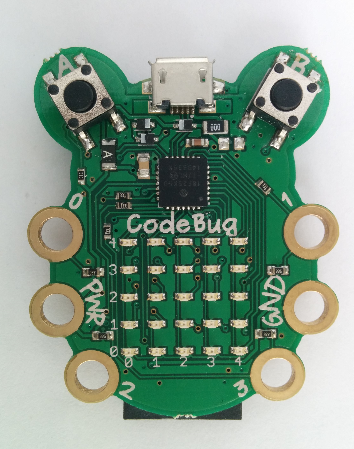
"CodeBug is a cute, programmable and wearable device designed to introduce simple programming and electronic concepts to anyone, at any age. It is easy to program CodeBug using the online interface, which features colourful drag and drop blocks, an in-browser emulator and engaging community features. Create your own games, clothes, robots or whatever other wacky inventions you have in mind! "

For hobbyists looking for low-cost IOT hardware Codebug (from a kickstarter project) offers something very affordable and interesting. Codebug is built around PIC18F microcontroller.
In addition to the microcontroller (8-bit SOC) all the following are also included:
  • USB Developer board
  • 5x5 Led Matrix board
  • Pair of buttons
  • +Battery Option (which allows you to build simple wearable device)
Details are here.

You want more and more resources, well  you can get an expansion board to connect to RaspberryPI.

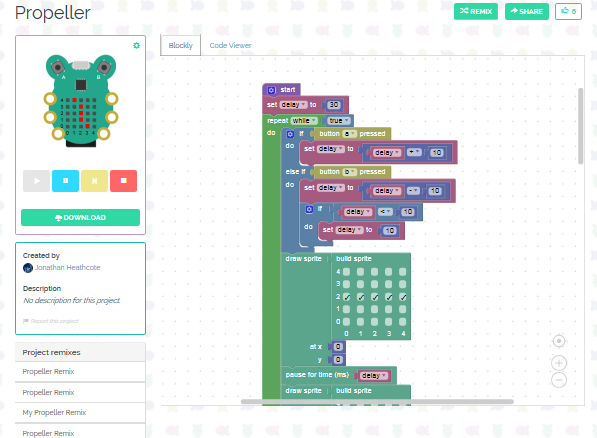
The designing and programming appears simple using (drag and drop) building blocks and here is the demo of Codebug simulating the rotation of a propeller. You can see the design and the code as well as an active demo.


You can try this (propeller) one out online. Just click on start button on the bug and see propeller turning.

Here is video of Codebug riding a rover:


If you rather start of with PIC18F and Windows then you may try this out:

Monday, May 18, 2015

Installing Arduino IDE on Windows 8.1

I was able to work with Arduino UNO using Visual Studio 2013 Community edition (here and here). However, when I wanted to install the Arduino IDE to run on Windows 8.1 Professional, the drivers that came with latest nightly builds (Arduino 1.6.4) did not work. In the device manager I could not find the ports and all that I could see was the node for 'Other devices' having an unknown device. I later found that the driver would work for Window 7 but not on Windows 8.1.

The version appropriate for Windows 8 was an earlier version which I found in the release notes.

ArduinoWin8_1drivers_hint.png

The download of the drivers was on a Google site shown here.

ArduinoWin8_1drivers_Google

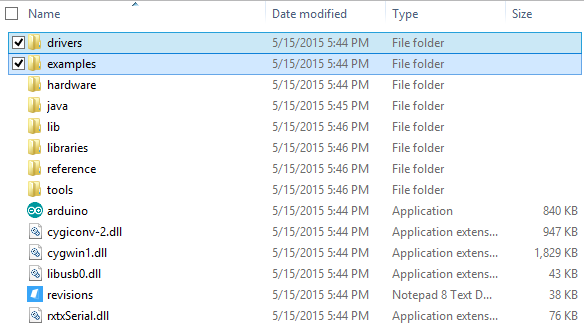
I downloaded the zip file, arduino-1.0.5-r2-windows. The extracted folder has the same kind of folder structure as the other versions as shown here:


folderStructure.png

From the driver's folder installed the following:   dpinst-amd64.exe 

ArduinoUSBDriveInstaller.png

Now I could see the ports in the device manager as shown:


ArduinoWin8_1drivers_Google_3

The Arduino UNO's IDE can now be started as shown:


ArduinoWin8_1drivers_Google_4

Clicking Yes and choosing the latest opens up the IDE in the more recent version

 ArduinoWin8_1drivers_Google_5

With so many boards and supported OSs, it can consume time to find the right thing.

Reading serial port with PowerShell:
http://hodentek.blogspot.com/2015/06/arduinos-analog-serial-readout-with.html

Sunday, October 19, 2014

Expanding vista of Windows OS: Universal Windows apps with Windows 10

In pursuing its dream of 'Mobile-first, Cloud-first' world Microsoft has embarked on the new version of Windows, Windows 10. You can build Universal Windows apps for all Windows devices from embedded to any size; games or enterprise applications; and one store and one way to deal with apps from the store.

In order to experience the thrill (there will be a lot not so thrilling experiences on the way with lots of updates and all. Things may break now and then) you should sign-up for the Windows Insider Program here.
http://windows.microsoft.com/en-us/windows/preview

This is what the offer is if you sign-up:
"Join the Windows Insider Program so you can be part of every key moment along the way as we create Windows 10. You'll get Windows 10 Technical Preview, all the builds as soon as they're available, and an easy-to-use feedback app."

Well you need to be good at fixing things up if they go wrong preferably with experience in trouble shooting with all kinds of tools.

Some of the nice things now possible with Windows 10 can be found in this announcement link here:
http://blogs.windows.com/bloggingwindows/2014/09/30/announcing-windows-10/

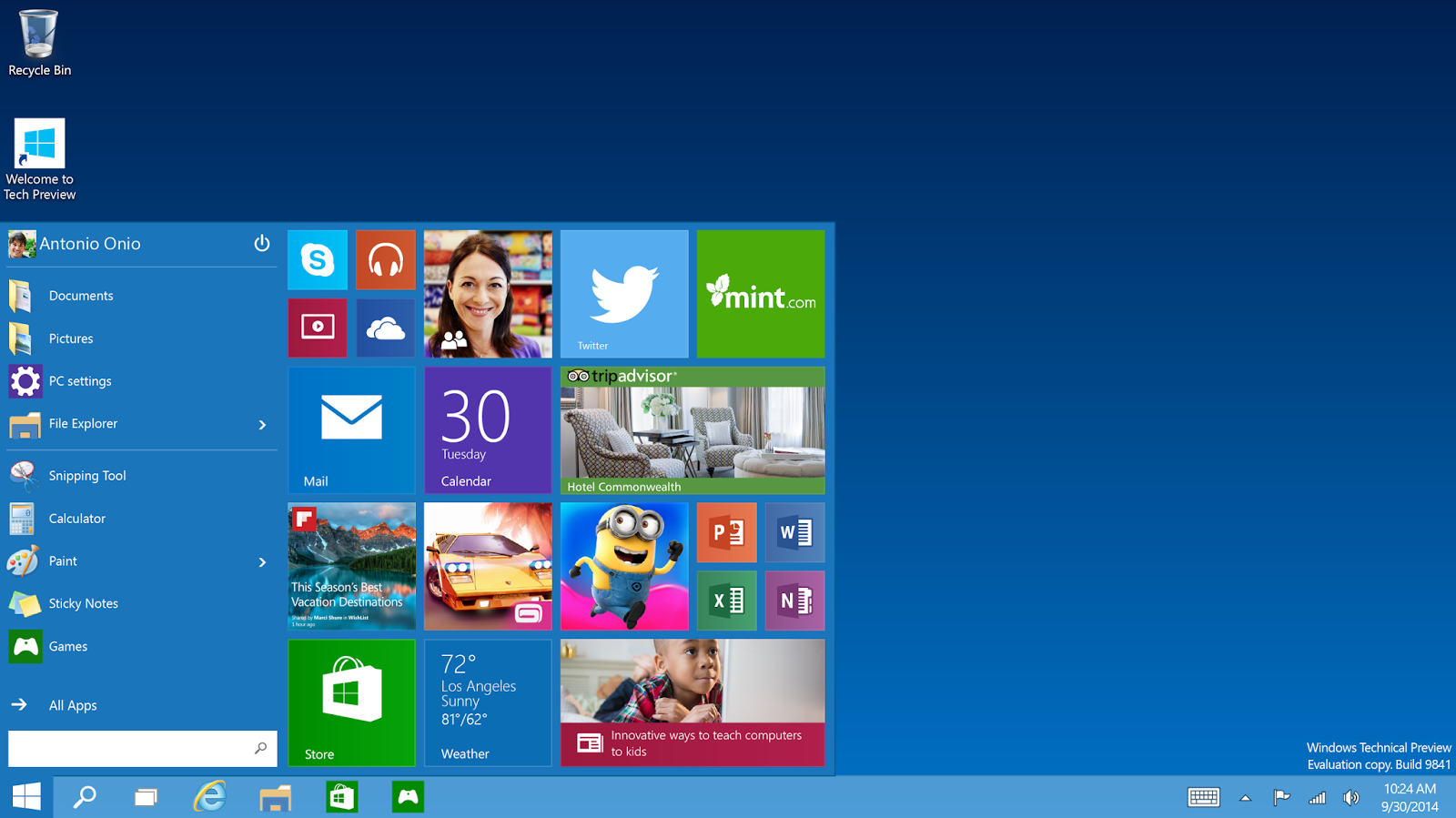
The desktop has the start menu as well as some selected favorite apps together juxta-positioned on the desktop as shown. I suppose you can add / remove the apps from the desktop. I will let you know if it is possible after I have tried it.

The format of Windows Store Apps and desktop programs are indistinguishble and everything runs in a window. The apps windows can be dragged around and resized just like any desktop window.


Snapping multiple apps together on the same screen is possible as shown.


Note that all the above images taken from the link mentioned earlier.
Other noted features are:
  • Admits Multiple desktops
  • New task-view button for quick switching
  • finding files faster (I would like to see this happen)
etc.
Watch this video to get your first impression.


I have signed-up but not installed Windows 10. Presently fighting with a bug in the Windows 8.1 OS. I will be installing on a VM and let you know my impressions.

It appears that Microsoft has found a closure to the complaints regarding the Start button users of Windows 7 (and earlier versions) who were unhappy with Windows 8 which got somewhat improved in Windows 8.1.
 

Monday, August 18, 2014

These patches from Microsoft may be harmful for your computers, uninstall them

According to Woody Leonard's post on InfoWorld, the following recent patches do more harm then good.

It appears that Microsoft has taken them out of its site. If it is installed uninstall them as they may cause Windows to freeze creating Blue Screen horros in Windows 7 and Balck Screen horrors in Windows 8.1. Windows updates causing problems (sometimes) is not new to me.

KB 2982791
KB 2970228
KB 2975719
KB 2975331

In Windows 8.1 search for Windows Updates from Search in charms and pick up view installed updates history.

Thursday, July 31, 2014

Have you installed Java on your Windows 7 64bit computer?

Well I have, and I have not. I have tried, but so far I have had no success. There are many other folks looking for an answer. Perhaps we need to crowd source a work around.

I recently came to know about a fun program which it appears a rage in Japan.
Shimeji is a fun program that you can find details here:
http://www.ashido.com/huntersmoker/shimeji.html

English code fork here:
http://code.google.com/p/shimeji-ee/

I downloaded Shimeji-ee_1.0.3_Mischievous.zip to try it out.
I extracted the folder to my hard drive.

Java is not installed on my computer (as seen in Programs and Features). But I suspect there is a x32  bit Java on my machine. I see it on Control Panel | Programs


I run Shimeji-ee.exe.
I get a Shimeji -ee message:
"This application requires a Java Runtime Environment 1.6.0" and
 it takes me to Java.com site and I download JavaSetup7u65.com
I download and run. Java Installer runs
Oracle installer takes over(notice the IoT items!).


After the installation I get a message that Java was successfully installed. Does not say which version, but I suppose it is x64bit.

 
[Well, I am busy saying yes to Java Updates on this machine like once a day!]

I find it in Control Panel's Programs and Features


It is time to verify, back in the Java.com site.


I now verify it in the java.com site by clicking on 'Agree and Continue'. Looks like it did not install since I get the

http://java.com/en/download/uninstallapplet.jsp

OK. Let me assume that there is some problem with this java's jsp page and I go ahead and try to run Shimeji-ee.exe one more time.

I get a fatal exception message:
Error: Could not create the Java Virtual Machine (error message in Windows 8.1 is slightly different but equally useless).

This is the same message on my Windows 8.1 Professional Laptop as well.

Have I installed Java on Windows 7 x64 (or Windows 8.1 )?
           The answer is Yes according to Control Panel, no according to java.com site.

Do I have Java x32 bit and x64 bit?
           Yes, definitely (also verified in Windows Registry)

Do they work?
           No

Well I am searching if I find it you will be the first to know.

Mahalo

Thursday, July 10, 2014

Windows 7 support is ending

Recently Microsoft turned off (or in the process) support for Windows XP and now it seems Windows 7 is also headed for the chopping block.

http://news.yahoo.com/microsoft-ending-mainstream-support-windows-7-early-2015-185319567.html?.tsrc=rogers

View details of the dead-line here:
https://bgr.com/2014/07/08/microsoft-windows-7-support-deadline/

However there will be an extended support after Jan 13, 2015 (not a Friday) for

Windows Server 2008
Exchange Server 2010
Windows 7 Home, Professional, Starter, Enterprise and Ultimate

The extended supports takes you Jan 14,2020, not too bad!
Go to Microsoft Web site to find finer details.

Sunday, July 06, 2014

ODBC Drivers available on Window 8.1 Platform

There are ODBC Drivers for the 32bit and 64bit architectures on the Windows 8.1 Professional platform. When you install specific programs the drivers should install to support them. If you do not use the correct version you may possibly get 'architectural mismatch' errors.
These are the drivers available out of the box:

32bit ODBC drivers (two views)


64bit ODBC drivers


There appears not that many 64 bit drivers for the Windows 8.1 platform. One way to encourage folks to adopt Windows 8.1 would be to make it more usable from data access point of view
 

Sunday, June 29, 2014

Get rid of the Trust Media View malware right now

Well, Trust Media View started impacting my browser on my Windows 7 Ultimate x64 bit machine. It's kind of ugly and visually nauseating. The people who made it must be pretty dumb. I do not see why they need to show many of the pop-ups on just one page.


I tried Microsoft Security Essentials and it reported no problem. Well should I believe this?
I am not sure how good is MES when it comes to malware removal.

Should XP users worry about Microsoft turning off the spigot to provide malware support to XP. Probably it is no big deal.

Finally I tried to disable the add-on and fortunately I found an entry for it in Manage Add-ons window show here.


I just disabled it and then restarted the computer. It does seem that Trust Media View ads have disappeared. I wonder why this screen cannot be modified to remove it.

If it comes back, I am going to do a System Restore. I am getting pretty good at this!
Mahalo

Monday, June 16, 2014

Open Source mobile app development with PhoneGap

It is now possible to work with PhoneGap on Windows using PhoneGap Developer App available from the Windows Store. PhoneGap is a free, open source framework based on the Open Source Apache Cardova project that allows developing mobile apps using standardized Web APIs.You can create apps using HTML, CSS and Javascript. PhoneGap bundles up your code for the device of your choice.

You start here:
http://phonegap.com/

PhoneGap Developer app can be used to develop both Windows Phone 8 app as well as the soon to arrive Windows Phone 8.1 store app. With PhoneGap you have full access to the PhoneGap APIs and there is no need to install platform SDKs, registering devices etc.

Get the information guide relevant to your platform from here:
http://docs.phonegap.com/en/edge/guide_platforms_index.md.html
Watch video here for additional motivation:

Thursday, January 23, 2014

UK Government Chooses the OS - the winner is...

According to this article in TechRepublic, UK's Communication-Electronics Security Group seems to have checked out Linux, Windows and Mac OS X from the stand point of security and have come up with Linux as a clear winner.

After you read the article please also read the interesting comments both pro and cons before you jump into big conclusions.

The test for cheching out the Oss consisted of the following:

•VPN
•Disk Encryption
•Authentication
•Secure Boot
•Platform Integrity and Sandboxing
•Application Whitelisting
•Malicious Code Detection and Prevention
•Security Policy Enforcement
•External Interface Protection
•Device Update Policy
•Event Collection for Enterprise Analysis
•Incident Response

The specific OSs tested were Ubuntu 12.04 LTS; Windows 8  and  Mac OS X and the summary of the rating is:

*Ubuntu 12.04 nine of the 12 tests and had zero significant risks
*Windows 8 passed seven with 1 significant risk
*Mac OS X passed eight tests with zero significant risks

Well security is a very important parameter in the choice but there are other criteria such as cost as well. With Microsoft not supporting Windows XP in the near future there may folks looking for a suitable platform and perhaps some Windows folks may go over to Linux.

Wednesday, January 22, 2014

Windows XP Support anti-malware support extension

Windows XP help and support cut-off starting APRIL 8, 2014 would have resulted in moving out of Windows XP from everywhere including the 0.5 million ATM machines.

Now this extension will provide anti-malware security till July 2015. Not much of an extension but better than nada.

Read the full story here:
http://blogs.technet.com/b/mmpc/archive/2014/01/15/microsoft-antimalware-support-for-windows-xp.aspx

Windows XP is 'no longer supported operating system' means,

"Windows XP users will no longer receive new security updates, non-security hotfixes, free or paid assisted support options, or online technical content updates from Microsoft."

I think users should simply bypass Windows 7 and go directly to Windows 8.1, of course this will depend on those selling software for ATM machines.


Wednesday, July 04, 2012

A deal from Microsoft you cannot miss


Believe it or not, you can upgrade your XP, Vista or Windows 7 to Windows 8 Pro for a mere 39.99. You also get Media Center thrown in. This is sweet and I am sure many will go for it. I will be getting two of them myself.

Details here,
http://news.cnet.com/8301-10805_3-57465416-75/windows-8-pro-upgrade-set-for-$39.99-media-center-too/

Looks like July 4 has opened up quite a few things:

(Stock)Market is up and Now this.

Monday, May 16, 2011

Your Windows 7 computer does not connect to Kindle Mass Storage


Two great software, but do they work in unison?
No, was the answer I experienced until I found the solution for Windows 7 Ultimate (x32).
I have not been reading much these days. My wife asked me to take a look at her Kindle, the screen had gone blank.
I tried to work the switches on the Kindle to no avail. I plugged it into my notebook running Windows 7 Ultimate (x32) and looked like it got into drive E:. Of course I could not open Kindle. It was very frustrating and I started cursing silently. The Device Manager did show that I was connected to the Kindle's mass storage. The Microsoft disk drivers are the latest. The drive does not appear to have a problem. So where is the problem? The Device Manger recognizes the software but the drive system does not.


After looking all over the internet, I finally decided to look if a device driver exists for Kindle. It turns out you have to have the Microsoft Windows Mobile Device Center 6.1 for Windows Vista (x32) shown here.


In order to install this you have to pass the Microsoft’s Windows genuine validation here:

With this installed Amazon’s Mass storage can be accessed from your notebook.

Happy Reading! Happy Ending!

DMCA.com Protection Status