Showing posts with label ODBC Drivers. Show all posts

Sunday, April 29, 2018

ODBC Connectivity to SQLite Databases

ODBC is a easy way to connect to a database assuming an ODBC driver exists. There are ODBC drivers for SQLite available depending on the OS you are using.

Please go to this site  to download your ODBC driver for SQLite.

The current version are as described in my previous post. Download the one appropriate for you use:

LiteODBC_00

I downloaded the one shown here,


LiteODBC_0

You double click the executable show above to begin the installation.

Follow the wizard. Here are some screens shown for your guidance.


LiteODBC_1


LiteODBC_2

I chose the default folder.


LiteODBC_3


LiteODBC_4
As you may know Windows OS has two ODBC Data Source (x32) and (x64). You can verify that you find the driver in the (x64) version as shown here:


LiteODBC_5

Now you start using SQLite.

In the Install directory (in my case: C:\Program Files\SQLite ODBC Driver for Win64), you can find the ODBC Drivers for two versions,
SQLite 2.8.17 
SQLite 3.22.0 .


Tuesday, November 21, 2017

Power BI and OLE DB Provider MSDASQL

Power BI does not support the Microsoft OLEDB Provider for ODBC Drivers also known as MSDASQL.

Power BI uses the .NET Framework Data Provider of OLEDB (System.Data.OLEDB).
This was found while connecting Power BI to Microsoft Excel using the connection string developed using a (Universal Data Link) UDL file.
----------
[oledb]
; Everything after this line is an OLE DB initstring
Provider=MSDASQL.1;Persist Security Info=False;Extended Properties="DSN=Excel7_11;DBQ=C:\Users\Owner\Desktop\Blog2017\MSSS2017\Hindu_Islam_old.xls;DefaultDir=C:\Users\Owner\Desktop\Blog2017\MSSS2017;DriverId=1046;FIL=excel 12.0;MaxBufferSize=2048;PageTimeout=5;";Initial Catalog=C:\Users\Owner\Desktop\Blog2017\MSSS2017\Hindu_Islam.xlsx
----------------------------
Also Power BI does not support the Persist Security Info attribute set to false.
This is the error message about OLE DB Provider support.


Sunday, July 06, 2014

ODBC Drivers available on Window 8.1 Platform

There are ODBC Drivers for the 32bit and 64bit architectures on the Windows 8.1 Professional platform. When you install specific programs the drivers should install to support them. If you do not use the correct version you may possibly get 'architectural mismatch' errors.
These are the drivers available out of the box:

32bit ODBC drivers (two views)


64bit ODBC drivers


There appears not that many 64 bit drivers for the Windows 8.1 platform. One way to encourage folks to adopt Windows 8.1 would be to make it more usable from data access point of view
 

Sunday, August 25, 2013

Connecting to SQL Server 2012 from OpenOffice 4.0 is a walk in the park

It just takes 4 easy steps as you will see presently.

It's assumed that you have set up an ODBC DSN to connect to SQL Server 2012. If you want to know how you can set up this file access the following link:

http://hodentekmsss.blogspot.com/2013/08/how-do-you-create-odbc-dsn-to-sql.html

Click open OpenOffice 4.0 from its shortcut on desktop to display the following:


Click on Database in the displayed list.

The Database wizard is displayed as shown with four steps and it is already in Step 1 -Select Database.


Click Connect to an existing database and click the drop-down list to view how you want to connect.

Choose the last one, ODBC. Click Next. You Step into step 2 - Set up an ODBC Connection.

The accessible ODBC sources are displayed as shown.


Click on sql11 and Click OK. Click Next. You move into Step 3 - Set up user authentication. Enter credentials to the SQL Server. The windows authentication is used.


Place check mark for Password required. Click Test Connection.


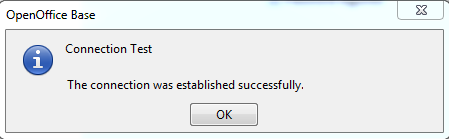
Enter Password field and click OK. You should see a positive response as shown.


Click OK and click Next to move to Step 4 - Save and proceed as shown.


Read instructions. Save the OpenOffice database with a name as shown, Aug 25.odf.

The file opens in the OpenOffice 4.0 user interface as shown.


Now you can start working with Northwind database in OpenOffice 4.0

Perhaps, if you find connecting to SQL Server 2012 using SSMS is a bit taxing and somewhat intimidating try Apache OpenOffice 4.0. 


Tuesday, August 06, 2013

Connect to SQL Azure using OpenOffice

In my 2011 book, I have described the procedure for connecting to SQL Azure using OpenOffice Version 3.2.1. Basically OpenOffice supports this connectivity using ODBC. Follow this link:

http://msdn.microsoft.com/en-us/library/windowsazure/hh974312.aspx

Download Microsoft ODBC Driver 11 for SQL Server (windows) here:
http://www.microsoft.com/en-us/download/details.aspx?id=36434

This should let you create an ODBC connection which allows connection to SQL Servers.

Once you have this you can follow the procedure in "Microsoft SQL Azure: Enterprise Application Development,2011, ISBN:978-1-849680-80-6, Chapter 10: Recent Developments #OpenOffice access to SQL Azure"

Please note that I have not tested this with new version of Apache OpenOffice and the new ODBC driver.

The above example shows running reports using SQL Azure Data.


DMCA.com Protection Status