For Signing up for DocumentDB read here:
http://hodentek.blogspot.com/2014/08/how-do-you-sign-up-for-azure-documentdb.html
Getting to know Document DB - Part 1 here:
http://hodentek.blogspot.com/2014/08/getting-to-know-documentdb.html
In Part 1 we found that we need to install Microsoft Azure DB Client Library.
In this post we will install the client library as well as look at the Microsoft created sample which is perhaps the best way to look at the details of DocumentDB.
Installing Microsoft Azure DocumentDB Client Library
Client Applications connect to Azure DocumentDB service using Client Library.
In order to install Microsoft Azure DocumentDB Client Library you need to run the command:
PM>
Install-Package Microsoft.Azure.Documents.Client-Pre
PM is the Package Manager Console. If you do not know how to get to the console read here.
http://hodentekhelp.blogspot.com/2014/08/how-do-you-install-nuget-package-manager.html
- Launch Visual Studio 2013 Express for Web Update 3. -Run as administrator
Make sure you have the NuGet properly installed. If not get it from the Gallery Tools | Extensions and Updates...
- Click Open the Packet Manager Console
Type in the install script mentioned above and you will get an error message as there is no solution yet.
- Download the C# Sample from here:
http://code.msdn.microsoft.com/Azure-DocumentDB-NET-Code-6b3da8af
Download, extract and open it in Visual Studio.
When you build you may get some 12 error messages.
Now in the Package Manager Console run the Install again as shown
--------
PM>
Install-Package Microsoft.Azure.Documents.Client -Pre
Attempting to resolve dependency 'Newtonsoft.Json (= 4.5.11)'.
Installing 'Microsoft.Azure.Documents.Client 0.9.0-preview'.
You are downloading Microsoft.Azure.Documents.Client from Microsoft, the license agreement to which is available at http://go.microsoft.com/fwlink/?LinkID=509837. Check the package for additional dependencies, which may come with their own license agreement(s). Your use of the package and dependencies constitutes your acceptance of their license agreements. If you do not accept the license agreement(s), then delete the relevant components from your device.
Successfully installed 'Microsoft.Azure.Documents.Client 0.9.0-preview'.
Adding 'Microsoft.Azure.Documents.Client 0.9.0-preview' to DocumentDB.Samples.DatabaseManagement.
Successfully added 'Microsoft.Azure.Documents.Client 0.9.0-preview' to DocumentDB.Samples.DatabaseManagement.
---------------------------------------
Build the project again:
Now you are still showing six errors.
Some of these are related to missing references:
----------------
I guess the latest SDK (Microsoft Azure SDK 2.4) is needed.
Go to notifications area and install the latest SDK.
Download the SDK
Run the SDK
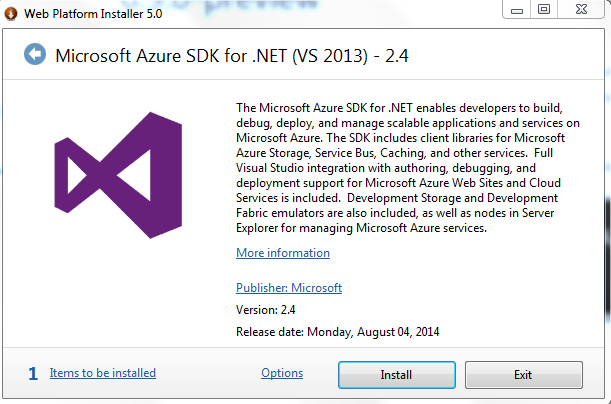
Web Platform Instlaler takes over.
Now you are ready to install MSFT Azure SDK for .NET (VS2013) -2.4
Click Install.
----------------------------------
Once you download the Microsoft Azure SDK, the errors go away and the build succeeds.
We look at the details of the project in the next post
here.
 NuGet_00.png