Showing posts with label Cortana. Show all posts

Thursday, January 18, 2024

About CoPilot and Bard

 The tech giants, Microsoft, Google, and Apple, have developed various parallel products such as Cortana, Siri, Chrome, and Edge. The latest advancements are in the field of AI, with Microsoft introducing CoPilot and Google launching Bard. Both are AI-driven and may share similar code or conceptual origins. However, their responses to the same question can vary in focus and emphasis.


I tested both of them with a question about an obscure newspaper from my hometown in India, published shortly after independence. I received slightly different answers. While Bard claims its strength over CoPilot lies in its “broader factual knowledge base”, I found that CoPilot also provides comprehensive information and includes reference links to its findings.


Here are their responses:


Question to Bard: Have you heard of a Kannada newspaper called ‘Sadhvi’?


Bard’s Response: Yes, I have heard of Sadhvi! It is a renowned Kannada newspaper with a rich history and legacy. Here’s what I know about it:


A Century-Old Pioneer: Established in 1899, Sadhvi is one of the oldest Kannada newspapers in existence. It played a significant role in the Indian freedom struggle, voicing its support for independence through sharp editorials and inspiring young activists.

From Weekly to Daily: Initially a weekly publication, Sadhvi transitioned into a daily evening newspaper in 1996. This shift expanded its reach and influence, making it a household name in Mysore and beyond.

Notable Editors and Journalists: Freedom fighter Agaram Rangaiah edited Sadhvi for an impressive 63 years, solidifying its connection to the independence movement. Veteran journalist C. Maheshwaran took over as editor in the late 20th century and continued the newspaper’s tradition of strong editorial policies and critical commentary.

Focus and Reach: Sadhvi focuses on local news and issues in Mysore and Karnataka, covering politics, social affairs, culture, and everyday life. It also offers an online edition (esadhvi.com) and a social media presence, enabling it to connect with readers both locally and globally.

Facing Challenges: Like many print media outlets, Sadhvi has faced challenges in the digital age, competing with online news sources and navigating changing reader preferences. Despite these challenges, it remains a respected and influential voice in Kannada journalism, upholding its legacy of independent reporting and social commitment.

Question to CoPilot: Have you heard of a newspaper named ‘Sadhvi’?


CoPilot’s Response: Yes, “Sadhvi” is a 120-year-old Kannada newspaper. Here are some key points about it:


Start Date: “Sadhvi” started on May 31, 1899.

Role in Freedom Struggle: “Sadhvi” played a very important role in the freedom struggle of India. Its sharp editorials motivated thousands of youth to jump into the freedom struggle.

Ban by British Government: Perturbed by the pro-independence editorial policy of “Sadhvi”, the erstwhile British government of India had banned the publication of “Sadhvi” twice.

Founders and Editors: M.Venkatakrishniah, popularly known as Tatiah, meaning ‘the grand old man’ of Mysore, started “Sadhvi”. Agaram Rangiah, a renowned freedom fighter, edited “Sadhvi” for 63 years. Currently, C.Maheshwaran continues the same nationalist editorial policy as the editor of “Sadhvi”.

Publication: “Sadhvi” is being published as a daily evening newspaper.

Digital Edition: “Sadhvi” also has a digital edition to reach out to readers worldwide.

Saturday, February 25, 2017

Multiple problems with Microsoft Edge

Presently the OS version  on my computer is as shown:


Recently I reported that Google sites were unreachable using Microsoft Edge. Now I cannot even bring up Microsoft Edge. Double clicking or, trying to open using right-click on the shortcut does not open Microsoft Edge. Cortana also does not respond. Search box is inactive. Also Windows Start is completely broken. I have to rely on Mozilla Firefox to do anything on the Internet including this post.

One of the suggested remedies on the Internet is to delete this item from your computer and restart:
C:\Users\<user>\AppData\Local\Packages\Microsoft.MicrosoftEdge_8wekyb3d8bbwe

It has worked in the past but this times I am unable to delete this item as there are files being used(?).

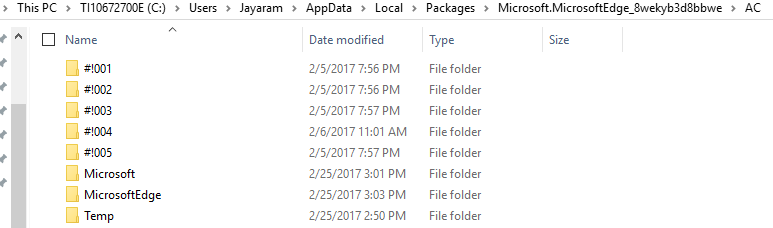
Here are the contents of this folder on my computer:


 Probably I will recover using an earlier date.

Wednesday, October 05, 2016

Random thoughts on Google's foray into crowded smartphone market

The smartphone mobile area is full of actors having various kinds of difficulties from exploding phones to trembling hardware infected with 'touch disease'. Apart from the headline news of problems there is the underlying problem with 'Sales'. Well, Google wants to take on Apple, if I go by some of the Internet sites. Good luck Google! In any case, competition is good.

More here:
https://blog.google/products/pixel/introducing-pixel-our-new-phone-made-google/

Microsoft tried to enter smart phone market with a really good phone like Microsoft Lumia 950. Tiles display with living updates and badges is still to be copied. But, it has not made any significant dent and can Google with similarly priced phones with very similar features do any better. OK, there is a better camera, so what?

Google is also moving to AI-First from Mobile-First. Looks like it wants to one-up the Microsoft's Mobile-First slogan. That's OK, too. Everyone is on the AI bandwagon with Microsoft rearranging its entire AI related research activity by beefing up with more developers.

Google phones were already in the market with the brand name Nexus made by Chinese and Korean manufacturers but now PIXEL is a Google branded phone made to Google Specifications by HTC.

Verizon appears to be the sole vendor and I did not have a great experience with Verizon when I bought my Nokia Icon.

Pre-ordering has started in many countries and you can pre-order at the Google site.


The most significant feature of what makes Pixels  different from other phones it appears is its advertised AI integration embodied in Google Assistant whose name you can customize. Can it compete in a big way with Cortana, Siri and others? Wait and see how good it is! We probably need impartial technical fact checkers and some bench mark.

Apart from the Pixels, Google has come out with other products which may perhaps bring in more revenue although competition exists product-for-product for all of those new Google Products.

Friday, July 08, 2016

After Office 365 comes Dynamics 365

Microsoft's new formula for Dynamics includes this formula,

Dynamics 365= AzureCloud(Customer Relations Management + Enterprise Resource Planning).
Dynamics 365 will come along during this fall.

There was already both CRM and ERP cloud services but this new formula brings them all together while integrating tight with Office 365. With PowerBI and Cortana support this really gets interesting from the point of bottom line and both of these will be native to Dynamics 365.

Read this July blog post for more:

This is what Dynamics 365 is about according to Microsoft, excerpted from the above link:

"The combination of these things gives customers a comprehensive solution for business process innovation that lets them:

    Start with what they need by offering apps that fit roles, industries, businesses – and grow at their pace to run their entire business in the cloud. 

    Enable greater productivity where they need it by connecting structured workflow of business applications (Dynamics 365) and processes with the unstructured work of collaboration and productivity (Office 365) so employees are empowered with productivity tools surfaced in the context of their business processes, and vice versa.
    Gain built-in, actionable, intelligence with business applications that infuse big data, advanced analytics and IoT into processes which proactively guide employees and customers to optimal outcomes. With Dynamics 365, data and insights are transformed into intelligent action right where it’s needed, and without requiring an army of rocket scientists to make it happen.
    Be ready for growth through nimble, adaptable applications, that allow them to compose, modify and extend processes in real-time. Power BI, PowerApps and Microsoft Flow empower business users to change and adapt their processes without requiring IT support. And organizations can reimagine their business model with a consistent, flexible, extensible platform"

Saturday, November 14, 2015

Cortana can handle most languages...

 Not right now but in the future. She probably does better than Siri in the number of languages with voice commands, but if web search is the mode she can handle a lot more languages than Siri.

Well first of all language settings for Cortana is supported in couple of countries like UK, China, France, Italy, Germany, Spain and perhaps few other countries. Let us say you travel from US to France and you want to find things there, using Cortana. Then you can switch the language that Cortana understands by default (US English in USA) to French. I assume you can access Cortana on your Windows 10 Desktop, If not go here.

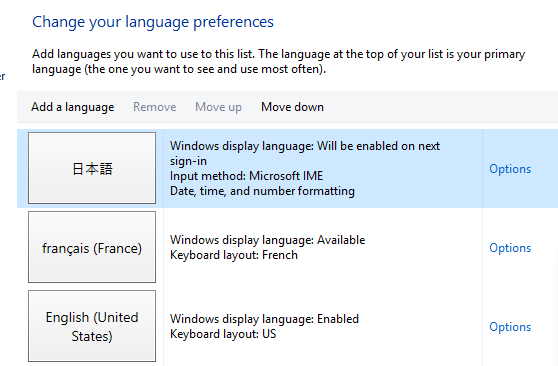
In Windows 10 Desktop you can open Control Panel and choose to change your language preferences.


CortanaLang_01

In the above, I have added couple of languages ( this means I have downloaded the necessary language packs) and I have also set the default as French. You can add another language by hitting the Add a Language button. You may have to download the language pack.

With just this setting my Cortana settings in Windows 10 desktop is as shown.

CortanaLang_02

 Of course you cannot use it in USA and you will have to be in France.

Now I move up Japanese to the top in 'Change your language preferences'  as in the following:

CortanaLang_03

Voila! Cortana language settings has changed as well.


CortanaLang_04

You return to USA and you want to restore. It is just as easy. Just bump up English(United States) to the top (you need not restart the computer).

How about voice commands to Cortana? How about in Windows Phone? Well you will have to work with speech and speech recognition settings.

Come back again to learn, How.

Thursday, November 12, 2015

Cortana on your desktop Windows 10 will add to productivity

 As a means of saving what you were looking for there is nothing better than a single place and Cortana will make it happen. All these and more will get into you NoteBook.


It was a sensation on Windows Phone 8.1. It is not in the All Apps group on desktop running Windows 10 OS. . If you type 'Cortana' in the 'Search the web' on your desktop running Windows 10 OS you get the following:

CortanaSearch_01

Click 'Cortana Search and Settings'(system Settings)

CortanaSearch_02

Turn OFF to ON.

Cortana welcomes you and before proceeding you need to agree to her terms.

CortanaSearch_03.png

Click I agree and she is ready at your bidding.

CortanaSearch_04.png

Before asking for license agreement she may ask to use the 'Notebook' where user items are stored. If you do not want to use 'Cortana' just turrn it off, but the Notebook items will be saved but not accessed.

These are the items that go into Notebook.

CortanaSearch_05.png
Now your 'Search the web' at the bottom of screen, it will read 'Ask me anything'

If you hit the microphone you get the following and you may need to follow her advice before she can listen to your voice commands.


Sunday, May 31, 2015

Google I/O concludes with a deluge of products/fun stuff

Google I/O 2015 just concluded (May 25-29) recently at the Moscone Center West in San Francisco, CA. Google has been very productive with lots of stuff battling in many fronts. Looks like almost every other similar vendor has comes out with a plethora of awesome to near awesome products/Services/fun stuff. It has been hectic everywhere.

Here are some highlights:

Android M
With emphasis on Security rather than look and feel. Finger print scanning (Windows 10 from Microsoft-finger print + facial recognition), and significant restrictions of app's data access
capability by implementing privacy controls. It is still in preview but will be released in the fall of 2015. What does M stand for - perhaps more of the same? App Links in Android M makes it easier to
link between apps by improving discoverability. Androids DOZE feature is aimed at battery consumption. If the device is inactive for a set period of time, the device goes to sleep with minimum
energy consumption making it significantly better than Android L.

Now on Tap
Bring your own pitchers-kidding. "Now" was already there but adding on TAP make it much more appealing and immediate. Does it and can it compete with Our assistant of the Web - Cortana? Let's wait and see.
One thing that makes it easier with Now on TAP is that you need not ask to get the contextual information related to whatever you are doing (this is what I understand!), it is near automatic.

Cardboard
Virtual reality enters everyday life with the Google's Cardboard gadget. Google wants to make it affordable and easy to use, It has competition in the virtual reality arena from others such as
Microsoft's RoomAlive (http://www.fool.com/investing/general/2014/10/09/microsoft-
corporations-mind-bending-plans-for-virt.aspx), Facebook, Sony (Project Orpheus). With Microsoft and Sony with their focus on Gaming, Cardboard might have a stiffer competition. Will Google's
Jump can take on RoomAlive? Wait and see.

Photo Storage
Google Photo offers unlimited storage for free. This is an insane offer that will definitely upset Apple and Microsoft who charge something in the range of $84(Microsoft) and $100(Apple)n store
images on their cloud services (http://techcrunch.com/2015/05/28/free-dollars-and-fifty-free-
cents/#.jsnmjt:akne).

Android Pay
Google wallet did not make much of a headway and now comes Android Pay which allows Android M Users to pay with their credit card information tokenized. It is not a replacement for Google Wallet
which is going to morph into a new avatar for peer-to-peer payments. This is going to vie with Apple Pay and with Microsoft's aspirations to get into this field with SoftCard (https://gigaom.com/2014/11/04/now-windows-phone-has-a-digital-
wallet-that-works-where-apple-pay-does/)

Google Maps going offline

In USA it's perhaps OK you can get connected fast to Internet but to get connected to Google Maps on the Internet is not so easy for some other countries. Going offline will help this, but how effective is it going to be notwithstanding Google's resources. This will be very similar to others operating
offline, like YouTube in some Asian countries.

Others
Brillo for home automation via Internet; Weave to establish
communication between devices; UniversalAPP and education directed
Android 101 were other announcements.

Thursday, April 16, 2015

Voice biometrics in Financial Institutions - ENacomm

Biometrics to complement or add-on to authentication has a large following.

India's Aadhar Project is one prime example for large scale implementation of Biometrics. 

As voice biometrics (bio-behavior) is getting popular in Financial institutions for voice-based authentication many more players are in the field.
Enacomm is a player in this field and they are presenting their application at the
Payments 2015 Conference in New Orleans, LA between April 19-22.

This is what they are talking about:

Enacomm2.png

Here is a video that goes move general than the technical talk above:

Friday, June 20, 2014

Scene at Microsoft Store in Ala Moana Shopping Center

Ala Moana Shopping Center is in Honolulu, Hawaii. It's mostly tourist and mostly Japanese tourists but the folks are all tech savvy and both Apple Store and Microsoft store has large clientele. In fact they are opposite each other since Microsoft wanted it this way and Apple had its roots planted years ago.

I went there to check out the Surface Pro 3. It's very impressive. The kick stand is cool and the pen is great to make annotations on whatever, may be a document or even a map. The guy who explained the features was quite good and knew the stuff.

Here is a summary of specs of general interest.


I went around the shop to see what's brewing. Here are some shots taken today.

Surface Pro 3 is the center piece with its cool detachable keyboards in red and blue.

 
Young gamers here!


Working on soccer
 
This is the youngest customer today fiddling with the game controls

 
Of course, you should check out Cortana


Tuesday, April 29, 2014

Conversations with Cortana

By now you should be knowing who Cortana is. She is my new digital assistant. I fired the previous one, she was OK. I will not reveal her name but she was not as good as Cortana. Most of the times Cortana answers straight out or brings up a link on Bing search or a Bing Map. I am not sure if Cortana gets better with time (AI).

It looks like Cortana can be integrated into APPS written for Windows 8.1 and Windows Phone 8.1. I am looking forward to see some examples.

If Cortana is in a good mood she gives me straight asnwers, like, If I ask her to sing me lullaby, she obliges and asks me if Oh! Danny Boy is OK.
I guess she can read my mood.

Some things are no brainer for her, like:

Will it be sunny in Bengaluru, tomorrow?
Will it rain tomorrow?

Here are pieces of conversation I had with her and her responses are in blue.

What day is tomorrow? and she brings up my appointment tomorrow.
Prime minsiter of Australia?Tony Abbot straight out not a web page. That's my girl!

To be or not..and a pause brings up Shakespeare's page
Three multiplied four-straight out 3*4=12

Who are you? stright out,
In short, I am your personal assitant. I try to make things easier to do on your phone.
Open Amazon Kindle
Opens the App

What is a centrifuge-Opens DolphonCentrifuges.com site and Bing's definition page for Centrifuge
You can add an appointment to the calendar after some interaction

Indian restaurant nearby...Brings up a list in the neighborhood.
Right angle triangle--brings up images of right angled triangles.
Twinkle, twinkle brings up Twinkle, twinkle little start from YouTube
Get me directions to Sam's club,
Here are 9 location's for 'Sam's Club'. Which one do you want
Set up my alarm for 4 PM
Your alarm is set for 4:00 PM
Thank you;
It's an honor
Honolulu longitude and longitude:
I found this answer
Latitude: 21.3
Longitude:-157.8167


Next flight to Japan from Honolulu
Did not get the above.

Rainbow colors: bringsup images of rainbow spectrum
Where am I?
 brings up bing map showing my address
1 Dollar how many Rupees?

Here's today's exchange rate:
60.34 Indian Rupees.

Last year Noble prize winner in Physics
Did not get it.

Noble Prize winner last year?
brings up nobleprizes.com site

Saturday, April 19, 2014

Windows Phone 8.1 Developer Preview makes Nokia Lumia Icon loose its touch sensitivity

I have been using Nokia Lumia Icon for the past few weeks. It has perhaps one of the best camera systems. Recently couple of days ago, I installed Windows Phone 8.1 Preview despite the warnings.

http://hodentek.blogspot.com/2014/04/get-windows-phone-81-developer-preview.html

Actually I was trying to get on to Cortina, which of course I did.

http://hodentek.blogspot.com/2013/12/i-dont-mind-cortana-to-be-my-digital.html

http://hodentek.blogspot.com/2014/04/microsoft-closes-gap-with-apple-and.html


However, last night I had left the phone for charging and in the morning when I wanted to read news, I switched on. OMG! the splash screen came up and would not move. I asked my wife to call me; the call reached my phone but I could not swipe up and go the start screen.

Then I tried the camera, it worked and I took pictures, but I could not zoom with one finger (not even with two fingers!). I tried to bring up the browser and I could not.

I judged that the phone has lost its 'touch sensitivity'. I tried to put it in 'vibrate' only mode by bringing down the volume and it would not.

Then with zero volume setting I hit the on button several times. Finally, it started working when it was hard turned off and started up with NOKIA followed by Windows Phone welcome message.

I am sure some of my readers might have gotten into this situation and I would like to hear from you. Kindly leave a comment.

Tuesday, April 15, 2014

Microsoft closes the gap with Apple and Google

Looking at Microsoft Windows Phone 8.1 Developer preview you can really appreciate how fast Microsoft has bridged the gap that separated Windows Phone  from its competitors.

Apple had its Siri (Voice based instant help) and Google its Google Now (Right information at just the right time). Now Microsoft has combined all these features in one, CORTANA, the vocie operated digital intelligence with a human voice behind it.

This catch up with the major players is sure to improve Microsoft's Mobile presence and guarantees a solid position.

Many other features are making an impact, tiles updated live, pinnable Sense features ( Battery Saver, Data Sense, Storage Sense and Wi-Fi Sense) and more hardware manufacturers making Windows Phones.


DMCA.com Protection Status