Not right now but in the future. She probably does better than Siri in the number of languages with voice commands, but if web search is the mode she can handle a lot more languages than Siri.
Well first of all language settings for Cortana is supported in couple of countries like UK, China, France, Italy, Germany, Spain and perhaps few other countries. Let us say you travel from US to France and you want to find things there, using Cortana. Then you can switch the language that Cortana understands by default (US English in USA) to French. I assume you can access Cortana on your Windows 10 Desktop, If not go here.
In Windows 10 Desktop you can open Control Panel and choose to change your language preferences.

CortanaLang_01
In the above, I have added couple of languages ( this means I have downloaded the necessary language packs) and I have also set the default as French. You can add another language by hitting the Add a Language button. You may have to download the language pack.
With just this setting my Cortana settings in Windows 10 desktop is as shown.
 CortanaLang_02
Of course you cannot use it in USA and you will have to be in France.
Now I move up Japanese to the top in 'Change your language preferences' as in the following:
 CortanaLang_03
Voila! Cortana language settings has changed as well.

CortanaLang_04
You return to USA and you want to restore. It is just as easy. Just bump up English(United States) to the top (you need not restart the computer).
How about voice commands to Cortana? How about in Windows Phone? Well you will have to work with speech and speech recognition settings.
Come back again to learn, How.
Well first of all language settings for Cortana is supported in couple of countries like UK, China, France, Italy, Germany, Spain and perhaps few other countries. Let us say you travel from US to France and you want to find things there, using Cortana. Then you can switch the language that Cortana understands by default (US English in USA) to French. I assume you can access Cortana on your Windows 10 Desktop, If not go here.
In Windows 10 Desktop you can open Control Panel and choose to change your language preferences.

CortanaLang_01
In the above, I have added couple of languages ( this means I have downloaded the necessary language packs) and I have also set the default as French. You can add another language by hitting the Add a Language button. You may have to download the language pack.
With just this setting my Cortana settings in Windows 10 desktop is as shown.

Of course you cannot use it in USA and you will have to be in France.
Now I move up Japanese to the top in 'Change your language preferences' as in the following:
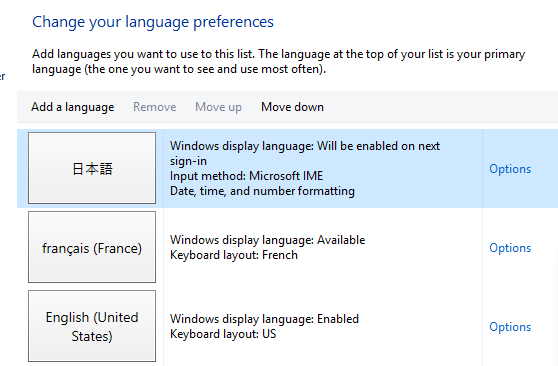
Voila! Cortana language settings has changed as well.

CortanaLang_04
You return to USA and you want to restore. It is just as easy. Just bump up English(United States) to the top (you need not restart the computer).
How about voice commands to Cortana? How about in Windows Phone? Well you will have to work with speech and speech recognition settings.
Come back again to learn, How.


