Showing posts with label Nokia Lumia Icon. Show all posts

Friday, May 02, 2014

Do not confuse Microsoft Mobile with Microsoft Mobile Services

Microsoft Mobile is hardware manufacturing company located not in REDMOND but in Espoo, Finland.

That Microsoft acquired Nokia's devices and services divison is knwn although details finalized this April 2014.

Microsoft Mobile will:
  • Design Develop
  • Manufacture
  • Distribute Mobile Phones
  • Smart Phones
  • Tablet Computers
  • Accessories
The 'Lumia' and the low end 'ASHA(Hope in Samskruta aka Sanskrit)' are owned by Microsoft.

I am not sure if 'Asha' can compete with 'Akash' which traces its DNA to INDIA?

http://hodentek.blogspot.com/search?q=akash

In any case, I wish good luck to Microsoft Mobile.

Saturday, April 19, 2014

Windows Phone 8.1 Developer Preview makes Nokia Lumia Icon loose its touch sensitivity

I have been using Nokia Lumia Icon for the past few weeks. It has perhaps one of the best camera systems. Recently couple of days ago, I installed Windows Phone 8.1 Preview despite the warnings.

http://hodentek.blogspot.com/2014/04/get-windows-phone-81-developer-preview.html

Actually I was trying to get on to Cortina, which of course I did.

http://hodentek.blogspot.com/2013/12/i-dont-mind-cortana-to-be-my-digital.html

http://hodentek.blogspot.com/2014/04/microsoft-closes-gap-with-apple-and.html


However, last night I had left the phone for charging and in the morning when I wanted to read news, I switched on. OMG! the splash screen came up and would not move. I asked my wife to call me; the call reached my phone but I could not swipe up and go the start screen.

Then I tried the camera, it worked and I took pictures, but I could not zoom with one finger (not even with two fingers!). I tried to bring up the browser and I could not.

I judged that the phone has lost its 'touch sensitivity'. I tried to put it in 'vibrate' only mode by bringing down the volume and it would not.

Then with zero volume setting I hit the on button several times. Finally, it started working when it was hard turned off and started up with NOKIA followed by Windows Phone welcome message.

I am sure some of my readers might have gotten into this situation and I would like to hear from you. Kindly leave a comment.

Wednesday, April 16, 2014

Get Windows Phone 8.1 Developer Preview now!

It is now available although it is not the final version. Get a free Microsoft Developer Account and Start a project.

You start right here by accessing this link and once there sign-in with your Windows Credentials:
http://appstudio.windowsphone.com/

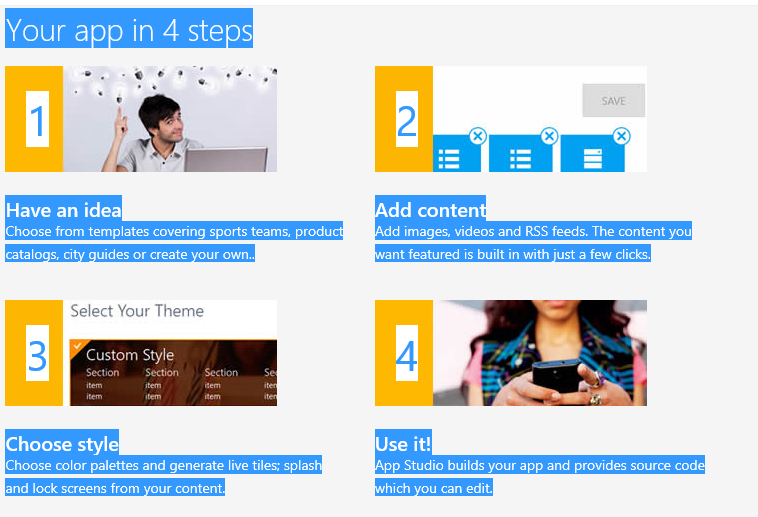
Once there you start your project as shown here:


In this screen you start creating a project.
You do not have to create a full blown project but test the water with some minimum features and save.

You will get an email to take it further.

To get the develope's preview click on OS preview for developers which will take you to this link here:
http://dev.windowsphone.com/en-us/develop/devpreview

Note that you can register
* as Windows Phone Developer
* as developer with App Studio
* or 'Developer unlock your phone'

Before you download read the contents on this page paying attention to the following warnings:

•After you install a preview update, you may void any warranty from your mobile operator and OEM.
•A preview update only includes the Microsoft portion of the update; mobile operator and OEM driver updates will be available when the official update for your phone is available.
•You cannot revert or return to a prior operating system release version after you have updated your phone to a preview update. We will move you forward to a "released state," but we cannot take you back to a prior "released state."

You will get an email with instructions to install. Open the email in your Phone (herein, Nokia Lumia Icon).


After you install you will have to agree for some license terms before your installation completes.
The updating of phone OS takes quite a bit of time and finally you will get a 'Installed successfully' message.

When it completes you get some information on New Settings:
  • Wi-Fi Sense
  • Automatic Update of Store Apps
  • Microsoft account Updates
You will also recieve a free message on your phone asking you to go to:
WindowsPhone.com/new
There are tons of things you can do with your new installation. The one I like immediately is to choose the option to connect to Wi-Fi ovr cellular as my data plan is limited.




DMCA.com Protection Status
