Tuesday, August 06, 2013

Connect to SQL Azure using OpenOffice

In my 2011 book, I have described the procedure for connecting to SQL Azure using OpenOffice Version 3.2.1. Basically OpenOffice supports this connectivity using ODBC. Follow this link:

http://msdn.microsoft.com/en-us/library/windowsazure/hh974312.aspx

Download Microsoft ODBC Driver 11 for SQL Server (windows) here:
http://www.microsoft.com/en-us/download/details.aspx?id=36434

This should let you create an ODBC connection which allows connection to SQL Servers.

Once you have this you can follow the procedure in "Microsoft SQL Azure: Enterprise Application Development,2011, ISBN:978-1-849680-80-6, Chapter 10: Recent Developments #OpenOffice access to SQL Azure"

Please note that I have not tested this with new version of Apache OpenOffice and the new ODBC driver.

The above example shows running reports using SQL Azure Data.


Lenovo Yoga 11 is history, buy Lenovo 11S

Yoga 11 is discontinued buy Yoga 11s. It is all a question of chip architecture and OS. Read the differences here:

http://hodentekmobile.blogspot.com/2013/08/differences-between-lenovo-yoga-11-and.html

Monday, August 05, 2013

Short of cash, get Apache OpenOffice 4.0 free

Aloha

Tons of features with over million downloads at the time of this post.

Download Apache OpenOffice 4.0  from here:

http://sourceforge.net/projects/openofficeorg.mirror/files/latest/download?source=frontpage


Review these features copied from the above site:

•Cross platform (Windows, Linux, Mac OS X)
•170+ Languages
•Extensions and Templates available
•Commercial support available
•New Sidebar
•Interoperability Improvements for Text Documents, Spreadhseet Documents, Presentation Documents and OOXML file format in general
•DrawObject Improvements/Enhancements
•New Color Palette
•New Gradients
•New Gallery Themes and Gallery enhancements
•Refined the Selection Handles User Interface
•Refined Selection Visualization
•Better Print Preview
•Enhanced conversion to Bitmap Graphics
•Enhanced Copy/Paste
•Enhanced Drag&Drop
•Adapt LineStart/End to LineWidth
•SVG Export enhancements
•SVG/Metafile Break improvement
•SVG Import improvements
•Picture Crop mode offers preview
•Unified visualization of ColorPalette popup
•Transparency support for pixel formats (PNG)
•Connectors support rotation
•Corrected Hatch fill style visualization
•Better gradient support in metafiles
•Calc and Chart Improvements/Enhancements
•Support relative Pie Chart Height
•New Functions: AVERAGEIFS, COUNTIFS, SUMIFS, XOR, LEFTB, RIGHTB, LENB, MIDB and RAND (reimplemented to use the Mersenne-Twister algorithm)
•Extensions Improvements/Enhancement
•New Toolbar management
•Unified menu API
•Performance Improvements/Enhancements
•Many resource leaks were fixed
•Speedup of Graphic Rendering
•Additional Language Support
•Changes that Impact Backwards Compatibility
•Module binfilter removed (legacy StarOffice file formats (.sdw, .sdc, .sdd, etc.)
•Python support updated
•Support for system C++ STL

This is not all. There are over 650 extensions and over 2000 templates.

Java is required for complete OpenOffice (OpenOffice.org) functionality.  Herein, Java version 7, Update 25 was used.

Download JRE from here:
http://java.com/en/download/chrome.jsp?locale=en

The following worked after the JRE install:

The Excel file in the previous post (http://hodentek.blogspot.com/2013/08/converting-excel-spread-sheet-to-xml.html) was saved as type XML Spreadsheet 2003(NwindEmp). This was then opened in OpenOffice's Spreadsheet document as shown.


Check it out. Why spend a bundle!!!

Mahalo


Friday, August 02, 2013

Converting EXCEL Spread Sheet to XML format using Open XML SDK 2.0

Binary encoded WORD, EXCEL, Power Point presentations can be implemented by multiple applications on different platforms, adding to portability.This decoupling will be of great value to render existing documents into a portable open format.

You can get immediately into the heart of the matter by downloading Open XML SDK 2.0 for Microsoft office from here:

http://www.microsoft.com/en-us/download/details.aspx?id=5124

These are the kinds of stuff you can ho:
http://social.msdn.microsoft.com/Forums/office/en-US/19032efe-80af-4a16-b954-1f5a6d2f2236/open-xml-sdk-v2-faq-part-1#x_Q5

The download will bring in two MSI files:
OpenXMLSDKTool.msi(106.4 MB) and OpenXMLSDKv2.msi(3.8MB)

You need to run these MSI files to work with document conversions.

Now if you have Visual Studio (VS 2012 is used for this post) then you can work with WORD, EXCEL etc after installing the MSIs as shown in the previous link.

For example, I tried to create XML from EXCEL using one of Microsoft's examples quoted here (the comment is from Microsoft,'s how to convert EXCEL to XMl module)
"
/****************************** Module Header ******************************\
* Module Name:  ConvertExcelToXml.cs
* Project:      CSOpenXmlExcelToXml
* Copyright(c)  Microsoft Corporation.

* This class is used to convert excel data to XML format string using Open XMl
* Firstly, we use OpenXML API to get data from Excel to DataTable
* Then we Load the DataTable to Dataset.
* At Last,we call DataSet.GetXml() to get XML format string 
*
* This source is subject to the Microsoft Public License.
* See http://www.microsoft.com/en-us/openness/licenses.aspx.
* All other rights reserved.

* THIS CODE AND INFORMATION IS PROVIDED "AS IS" WITHOUT WARRANTY OF ANY KIND, 
* EITHER EXPRESSED OR IMPLIED, INCLUDING BUT NOT LIMITED TO THE IMPLIED 
* WARRANTIES OF MERCHANTABILITY AND/OR FITNESS FOR A PARTICULAR PURPOSE.
\***************************************************************************/
"
When you open this file in Visual Studio,


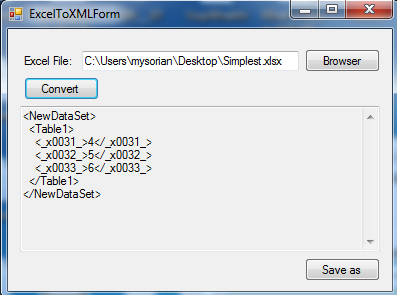
and run by hitting F5 you can display a user interface where you can insert a EXCEL file reference and generate XML as shown.


I browsed to Simplest.xlsx (Microsoft Excel 2010) and it converted as shown.

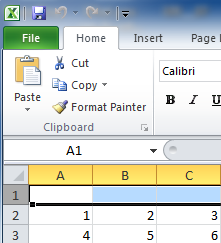
The problem with this is the conversion is not correct. The Simplest.xlsx file is the following:


If I add one more row below with values 7,8,9 I get the following.


I suppose the code needs some fix.

Even more weird was how the following EXCEL,


was converted to XML.


May be I need to go into the C# file and find out what is happening.

Look at details of code  in object browser:

Once in VS2012, Object Browser is your best friend to get acquainted with the required information:


Thursday, August 01, 2013

Learning to build Windows 8 apps on MVA

What is MVA?

MVA is Microsoft Virtual Academy and you can learn building apps for Windows 8 and Windows Phone 8 free of cost. That is right, at no cost to you (Well, that is mighty generous). Of course you can learn a whole lot of others besides Windows 8 and Windows 8 Phone.

Form factors is an important difference between these two platforms. Issues / concerns are described.


Check it out here:
http://www.microsoftvirtualacademy.com/training-courses/windows-8-and-windows-phone-8-app-development


For example, this particular course has 4 modules:
  • Comparing Windows 8 and Windows Phone 8
  • Basics of View Models
  • MVVM
  • Sharing Code
This paraticluar module (Comparing Windows 8 and Windows Phone 8) is neither about building apps for the two platforms nor it is going to show code that works for both platforms.
Code reusability is explored between the two operating systems.

Application Life cycle is explored:


Each platform has its own XAML Controls
UI reuse is not a thing that you can look forward to, but data model is the one that makes reuse easier. Data Model APs are portable (specifically read/write) across these two paltforms.

*Windows Phone 8 SQL CE
*WIndows 8 has no specific built-in database api
*MVVM helps porting code between the two platforms. Review Portable Class Libraries project template in Visual Studio 2012 Ultimate (non-express edition is needed).


The screen shots are captured from the video at the above site. The last screen shot is from Visual Studio 2012 Ultimate.

 
DMCA.com Protection Status