Friday, February 16, 2018

Microsoft Photo Companion App for iPhone: teething problems

Microsoft 'Photos Companion' iPhone app allows for easy transfer of pictures to Windows 10 PC over WiFi.


This is a good (really, great) feature as it is presently not possible to transfer pictures from, for example, iPhone to PC. iPhone6 does not have any USB ports, nor its Bluetooth is not supported when transferring to a PC.

It is good if it works all the time.

In photos, under Settings there is no Preview item, under which you are supposed to turn on Help Microsoft test the mobile import over Wi-Fi feature.

I downloaded the Photo Companion app on my iPhone 6. There was no problem.

I tried in my PC which has a Microsoft photos app. It is supposed to import from mobile over WiFi option. However this option does not exist. You can either import From a folder or From a USB device as shown here.


I am not sure if it is something to do with Build 1707_prerelease-flt.180116-1539 version of Windows 10 Pro OS.

I tried to download an update for 'photos' app, but it failed to update.

I sent error code (Code: 0x80073CF9) to Microsoft.


Use SelectionBoxItem to access ComboBoxItem in a UWP

In Part 1, you added after following a few tasks the following to a  Blank UWP project.
  • Getting the ComboBox Control
  • Placing ComboBox on the Design area
  • Adding ComboBoxItems
ComboBox 4

In this post you will write code for an app consisting of a ComboBox, a Button and a TextBox so that when you select an item in the ComboBox and click the button, the selected item appears in the TextBox.

We already have a ComboBox with three items.
We will drag a BUTTON and a TEXTBOX from the Toolbox


ComboBox_8

And drop on the DESIGN pane as shown. The XAML markup is shown in the XAML Pane as shown.


ComboBox_9

We want to Select a ComboBoxItem and then click the BUTTON. This should get displayed in the TEXTBOX.

We add a click EVENT to the button by typing-in Click inside the BUTTON code as shown and choose 'NEW EVENT HANDLER'.


ComboBox_10

It will be named 'Button_Click' as shown.


ComboBox_11

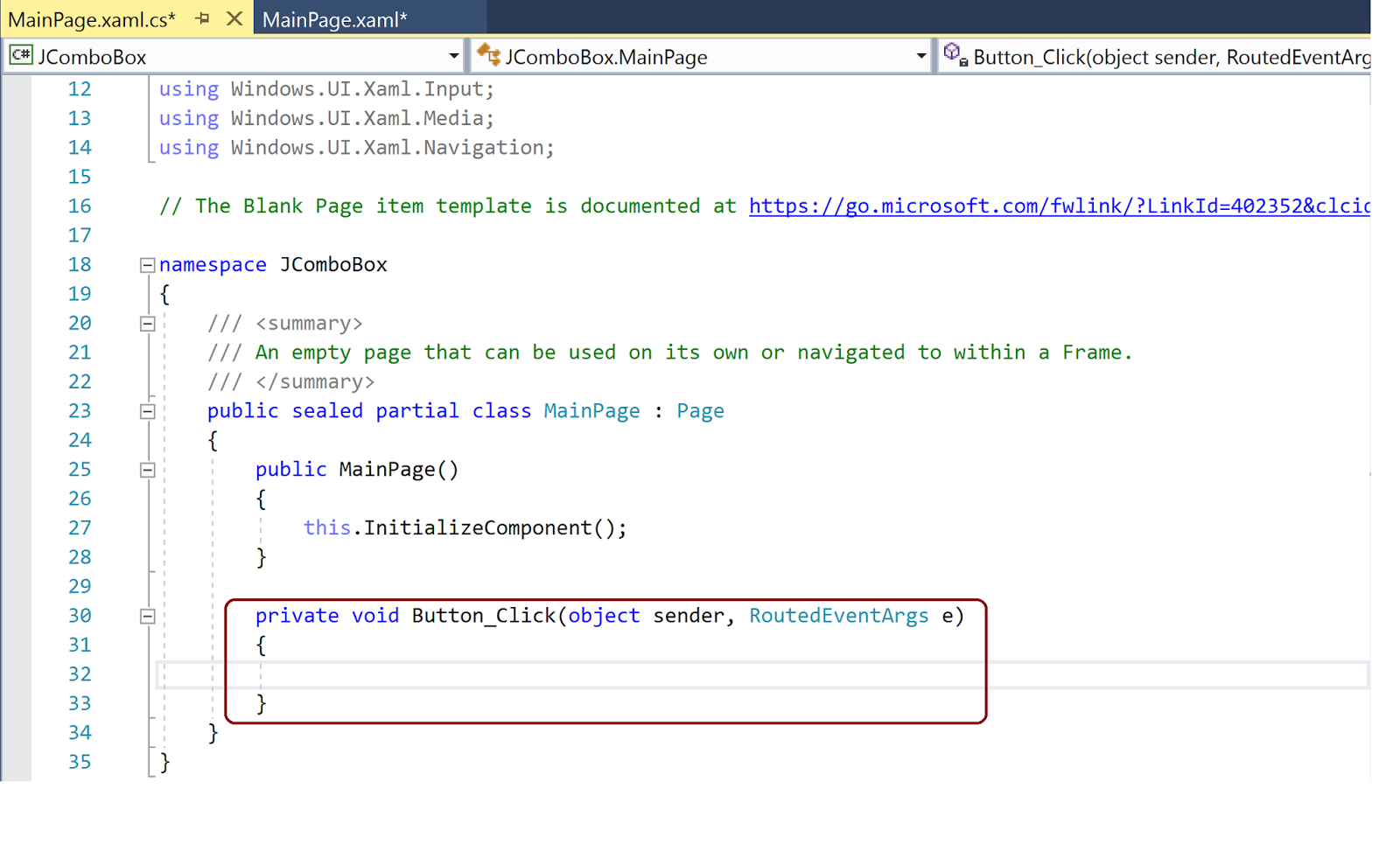
The following will be added to the MainPage.xaml.cs page.

ComboBox_12

We provide names for the ComboBox ('cbx') as well as the TEXT ('txt') box. Now we add the following code to the above newly added code as shown.
-----
 private void Button_Click(object sender, RoutedEventArgs e)
        {
            txt.Text = cbx.SelectionBoxItem.ToString();
        }
-------

Now build, deploy and run the project on Local Machine. When the App is displayed, choose an item (herein, 'BIRD') from the ComboBox and Click the BUTTON, you will see it displayed in the TEXTBOX as shown (the UI is not designed well, it should be improved).


ComboBox_15

Friday, February 09, 2018

LoRaWan protocol for IOT

LoRaWan is a long range RF protocol that helps connect 'things' (IoT) to the Internet over a long range. It's main advantages are:

  • It is Open Source and not tied to a vendor
  • It is battery efficient-very low power consumption
  • It is long range.

Battery life is something like 5 years(Wow!). It is Open Standard and uses the unlicensed spectrum as part of the Industrial, Scientific and Medical(ISM) RF band (868 MHz). In US the 925 MHz is used. The Open Standard is governed by the LoRa alliance, an Industry group with 500 or more members (Microchip, Cisco, Softbank, etc).

There is a round the world following for this technology including Comcast, Orange, SK Telecom, etc.
Download LoRa specs from here:

Is MicrosoftEdge in the new Insider Preview better?

I cannot say from all counts, as I find it not as good as either Chrome or Firefox in displaying a PDF document.

I opened this site  to review the contents of a PDF document on its site and I was unable to read it on Microsoft Edge.  The only way, I could see it was to use Ctrl and + keys but that made the content so large that you cannot fit in a page. I then copied the site address and I was able to read it in Chrome as well as Firefox as you can see for yourself from these images.

Window display maximized in all images.


PDFEdge.png


PDFFirefox.png


PDfChrome.png

Thursday, February 08, 2018

New update of Windows 10 Pro Insider Preview

I had this version of Windows 10:

Build 17025.rs_prerelease.171020-1626

This had a lot of display related problems as well as its interference with the Report Builder 3.0.


There was a recent update within the last couple of days. The new version is:


InsiderPreview_Feb2018.png

I hope this update might have fixed some of the problems.

DMCA.com Protection Status