Thursday, December 31, 2015

Wishing you all a very Happy New Year

Wishing you all the very best of everything in 2016
Hau’oli Makahiki Hou!

Aloha,

This turned out quite well this year, except for the fact a miscreant stole content from over 900 of my posts. Google could not help, they would have, if I had sent them 900 documented infractions! notices. Things should change at Google!

I think I did pretty well this year. Total number of posts have exceeded over 1000 plus, this year contributing over 200. The syndicated views have been over a million or so. But it has taken a number of years and lot of work.

The blog is more technical than political. Political or social events did appear in the blog when the issues touched my personal beliefs. The blog is somewhat slanted towards Microsoft technologies and I do hope I will move away to more Open Source and try to follow the Internet of Things and AI.

I take this opportunity to wish one and all a very Happy New Year.


Mahalo

Jay


Sunday, December 27, 2015

Creating web apps with Intel XDK, step-by-step

Intel XDK is an easy to use program that you can use to create cross-platform apps (http://hodentekmobile.blogspot.com/2014/08/cross-platform-apps-are-easy-with-intel.html). There is continuous build activity with Intel XDK and you can sign up and get the latest build. It is free and updated continuously.

It is somewhat slow, but that is my experience. I have used it so far to only look at some simple stuff and if you are interested, it may help you to review the following posts. It is written from the point of view of someone who has not done a lot of programming but still interested in building some apps.

You learn how to do a ListView app using Intel XDK here,
http://hodentek.blogspot.com/2014/09/creating-listview-type-of-cross.html

You learn how to do a TabView app using Intel XDK here,
http://hodentekmobile.blogspot.com/2014/11/creating-cross-platform-apps-with-tab.html

You learn how to do a Side Menu app using Intel XDK here in a four-part post,

Part 1:
http://hodentekmobile.blogspot.com/2015/11/develop-side-menu-app-using-intel-xdk.html

Part 2:
http://hodentekmobile.blogspot.com/2015/12/develop-side-menu-app-using-intel-xdk.html

Part 3:
http://hodentekmobile.blogspot.com/2015/12/develop-side-menu-app-using-intel-xdk_19.html

Part 4:
http://hodentekmobile.blogspot.com/2015/12/develop-side-menu-app-using-intel-xdk_26.html

Besides Intel XDK, there are lots of posts on my Mobile blog here:
http://hodnetekMobile.blogspot.com


Thursday, December 24, 2015

Enhancements in Window 10 Build 10568

I had build 10240 which developed some problems after a regular Windows 10 Update (not the build update) following a Trojan attack.

This post is for a Toshiba Laptop running Windows 10 Pro. The changes that you see in a tablet or a Windows 10 Mobile( what I have is the Preview on Nokia Icon) will be quite different. Although Microsoft has Windows 10 on all device sizes, it is really not possible to have the same kind of settings, of course the core is the same, the bells and whistles are different.

Windows 10 Build 10568

I decided to get the latest update, the November Update 10568. This has a lot of new features  as described in one of the web sites mentioned towards the bottom of this post. I wanted to see if the changes are really there, and if they are, how effective they are. The following are some of the changes that I find mostly in Settings and Display.

Enable colored title bars
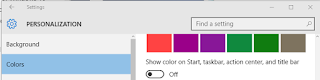


It does work as shown for Notepad.exe.
Off
On


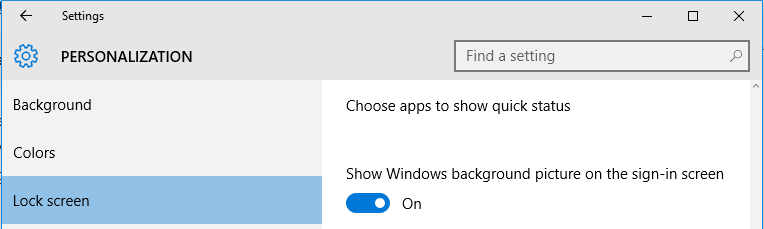
Disable Backgroupd Image on Login Screen


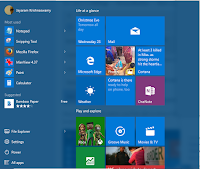
Show more tiles on Start Menu


Did not make a difference on my laptop.

Off
On

Changes to Personalization riverted back


Lock screen background settings


There are three options to choose for the image but it is sluggish.

Windows Spotlight is now back. Browse should first pick up from a default folder and then a chosen folder. It is very sluggish and does not work well
Save Locations under System / Storage has new options


Multitasking SNAP options

When a you 'snap' by dragging a window by title bar to one of the sides and beyond you will see a trasient readjustment of borders and the snap action is finished.

Before snapped

After snapped


Environmental Windows Access
System Properties | Advanced and choose Environmental Variables. Not much of a change, but the window can now be resized.

New Look

In previous versions of Windows
I do remember that it could not be resized (don't quote me)


Things that are enhanced for the Microsoft Edge are here.

More here:
There are couple of more things that are in this new build.
More details here.


Monday, December 21, 2015

Fixing the non-responsive Mail app on Windows 10

Windows 10 Mail App stops responding and probably Calendar and People apps as well. When you click on the app nothing happens. You go to settings to see if you can uninstall. You will find there is no uninstall for this. It is part of the operating system and you cannot uninstall it.

This happened on my Windows 10 Pro on my Toshiba Satellite S70 series as well as Toshiba's Windows tablet running Windows 10.

What now?

You can run the following (System File Checker) on the command-line with elevated permissions. It will try to verify and fix problems with files (http://hodentekhelp.blogspot.com/2015/05/how-to-run-system-file-checkersfc.html).

However, this did not solve the problem on both the devices.

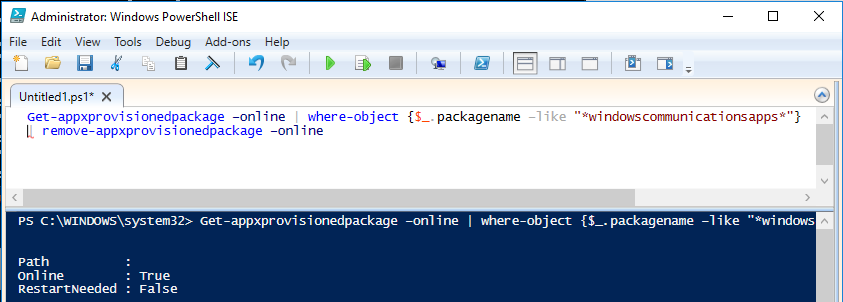
Next following this thread I launched Windows PowerShell with elevated permissions and ran the following statement (it appears the problem is due to some permissions with Windows Store) :

Get-appxprovisionedpackage –online | where-object {$_.packagename –like "*windowscommunicationsapps*"}
| remove-appxprovisionedpackage –online


Here is the screen shot of this run:

MailAppProblem

This fixed the problem on my laptop, but the Tablet is still having the same problem- non-responsive mail app.

Just before I ran the PowerShell application I had noticed that there was a new Windows Update and the Windows 10 build was 10586.

My tablet still had the build 10240 which I am upgrading to 10586. Let me see if this fixes the problem. Since these are Windows 10 programs, Microsoft should make sure they work all the time as most users may not even know what powershell is not to speak of elevated permissions, sfc etc.

Note: The build on the tablet now  is 10586  and is working.

Friday, December 18, 2015

Microsoft Edge does not support WebRTC


WebRTC provides the eyes and ears to web applications and this is going to be given when it comes to future of web.

Microsoft Edge is the odd man out when it comes to supporting WebRTC. This is not news.

webrtcorg.png
However with the ORTC APIs Microsoft has a way to talk to browsers that support webRTC.

Mozilla Firefox passes all the tests devised by WebRTC.org as shown in the following. All you need to do is launch your browser and type in the address, test.webrtc.org. You will be asked whether you are ready to share the devices like camera, audio etc. After getting an affirmative answer you will be presented with this test screen.
Webrtc_MOZ_test.png
You start the test by hitting the Start button. The various tests are run and if you wait a little while you will get this display,

Webrtc_Moz.png

As you can see most of the tests were successful except for one. This may be due to the configuration as you see this detail:

 Reflexive connectivity
[ INFO ] Gathered candidate of Type: srflx Protocol: UDP Address: 24.25.241.5
[ WARN ] Could not connect using reflexive candidates, likely due to the network environment/configuration.

With Microsoft Edge most of the test fail and the results are as shown in the following images:

 WebRTC-MSFT01
 WebRTC-MSFT02
WebRTC-MSFT03
 
I did wait for a while to see if it runs the remaining tests and it did not.

The good news however is that ORTC through its APIs, support WebRTC in Edge so that Edge can communicate with Firefox a la WEBRTC. We shall look at it in another post.
DMCA.com Protection Status