Showing posts with label cross-platform. Show all posts

Wednesday, November 28, 2018

Installing Azure Data Studio

As per previous post SQL Operations Studio has become Azure Data Studio.
You can download from this site here:

https://docs.microsoft.com/en-us/sql/azure-data-studio/download?view=sql-server-2017


You will be downloading this executable file:
azuredatastudio-windows-setup-1.2.4.exe (77,371KB)

You can double click and install. Here are some instllation screen shots.


After clicking Finish you should find the app added to your All Programs.


Because of your choice, the file will be in this folder.

C:\Program Files\Azure Data Studio\azuredatastudio.exe (64.5MB)


Saturday, January 13, 2018

Mobile Platform for the Enterprise

MobileFrame is perhaps the only enterprise grade, cross-platform mobile platform. It is ideal when you need to take your paper-based processes to a enterprise grade mobile platform.'http://www.mobileframe.com/'


MobileFrame recognized in 2017 Mobile App Development Platform Magic Quadrant

MobileFrame allows you from development to deployment of mobile apps. It's Smart Architecture uses a graphical user interface and even non-developers can instantly create and deploy sophisticated mobile solutions 100% code-free. Even complex applications including databases; synchronization and deployment complexities are easily handled in the background and are transparent to the business users but flexible enough to address changing business needs. MobileFrame is covered by the following patents: 

U.S. Patent # 7,577,911 (Code-free Mobile Computing)
U.S. Patent # 7,565,381 (Smart Synchronization)
U.S. Patent # 7,730,097 (Smart Database)
U.S. Patent # 8,751,926 (Intelligent Rendering on a Mobile Computing Device)
U.S. Patent # 9,049,174 (Maintaining Sessions in Smart Thin Client)
U.S. Patent # 9,053,444 (Smart Thin Client)

Thursday, January 11, 2018

Case for learning to code for Universal Windows Platform projects

In my previous post I described about Universal Windows Platform Projects (UWP). UWP's are for all Windows device family and not just one specific device. This  means there is a lot to gain by learning UWP.

http://hodentek.blogspot.com/2017/11/windows-10-and-universal-windows-app.html

There are indications that Windows 10 Mobile may revive with another avatar and one OS for all devices may eventually result in a 'phone' with Windows OS.

There are in fact various Microsoft Windows based Mobile devices although their market share is nothing to brag about.


This is what Satya Nadella said,

"…we have to be on the hunt for what's the next bend in the curve. That's what…anyone has to do to be relevant in the future…We're doing that with our innovation in Windows. We're doing that with features like Continuum. Even the phone, I just don't want to build another phone, a copycat phone operating system, even."

Quoted from: https://www.windowscentral.com/just-1-market-share-why-are-oems-choosing-windows-10-mobile

If you have started taking interest in UWP's here are some article on my blogs that you may like to read:

UWP project in Visual Studio 2017 Community:

http://hodentekmobile.blogspot.com/2017/12/workaround-uwp-project-with-visual.html

Coding Click-Event code for a UWP Project in C#
http://hodentekmobile.blogspot.com/2018/01/event-code-ui-design-with-xaml-in.html

http://hodentekmobile.blogspot.com/2018/01/click-event-to-change-background-color.html


Sunday, December 27, 2015

Creating web apps with Intel XDK, step-by-step

Intel XDK is an easy to use program that you can use to create cross-platform apps (http://hodentekmobile.blogspot.com/2014/08/cross-platform-apps-are-easy-with-intel.html). There is continuous build activity with Intel XDK and you can sign up and get the latest build. It is free and updated continuously.

It is somewhat slow, but that is my experience. I have used it so far to only look at some simple stuff and if you are interested, it may help you to review the following posts. It is written from the point of view of someone who has not done a lot of programming but still interested in building some apps.

You learn how to do a ListView app using Intel XDK here,
http://hodentek.blogspot.com/2014/09/creating-listview-type-of-cross.html

You learn how to do a TabView app using Intel XDK here,
http://hodentekmobile.blogspot.com/2014/11/creating-cross-platform-apps-with-tab.html

You learn how to do a Side Menu app using Intel XDK here in a four-part post,

Part 1:
http://hodentekmobile.blogspot.com/2015/11/develop-side-menu-app-using-intel-xdk.html

Part 2:
http://hodentekmobile.blogspot.com/2015/12/develop-side-menu-app-using-intel-xdk.html

Part 3:
http://hodentekmobile.blogspot.com/2015/12/develop-side-menu-app-using-intel-xdk_19.html

Part 4:
http://hodentekmobile.blogspot.com/2015/12/develop-side-menu-app-using-intel-xdk_26.html

Besides Intel XDK, there are lots of posts on my Mobile blog here:
http://hodnetekMobile.blogspot.com


Thursday, April 23, 2015

Azure App Service is ready to roll

No matter what type of App, no matter what platform, you can use Microsoft Azure App Service to develop.
Image Source: Visual Studio Magazine
Microsoft is known for its relentless pursuit of its chalked-out path, be it Windows, be it Office and be it Cloud services. With Azure App Service which debuted today you can build cross-platform/cross-device apps from Microsoft Azure.

Azure App Service draws upon all the best of breed Microsoft technologies, Azure Web Sites, Azure Mobile Services and Azure BizTalk Services and you can build apps for Web, Mobile, Logic and Apps.

You can build web apps now which are automatically scaled based on need and are fully managed. You can use prebuilt tools from an exhaustive gallery and use versioning, authentication, performance monitoring etc.

Read more here:
http://visualstudiomagazine.com/articles/2015/03/25/azure-app-service-debuts.aspx


Wednesday, February 25, 2015

Event Info 2015_4: Game Deveopers Conference 2015


Game developers Conference 2015
March 2-6, 2015
Mascone Center, San Francisco, CA
Expo: March 4-6, 2015


As a game developer you must have already visited the GDC site. If you have missed here are some details.

Developer focused Game Developers Conference 2015 begins March2. 
Hurry up, the registration closes tomorrow, Feb 25, 2015.
Microsoft, Sony, Intel are presenting the sponsored sessions:

 
Visual design highlighted sessions
 
Highlighted developer sessions
 
 
Highlighted Business related sessions


Details here:
http://www.gdconf.com/
Lots of Tutorials here:
http://www.gdconf.com/conference/tutorials.html (Monday and Tuesday)

Tuesday, November 18, 2014

Apps for the IoT with AppMethod

IoT has to be 'Universal'. Therefore, it has to be multi-platform, multi-device, device-size agnostic and more. This is why you hear more and more 'cross-platform' development. This app works on iPhone but not on Android etc. will not do. AppMethod is one such program from the veteran, Embarcadero.

Sign up here to get software that you can use to build apps in record short time.
http://www.appmethod.com/sign-up?cid=701G0000000vHaD
 
Registration is needed, but easy with few elements.


Note that the downlaoded program (file size: 3GB) is free for only one year. Read the information on
the download page above.

See overview here taken from a video on the site


Features overview
  • One-stop mulitdevice app development platform

  • Supports Internet of Things

  • FireUI Multi-device designer

  • Enterprisemobility Devices with FireDAC support

Thursday, November 06, 2014

Update your Intel XDK to November 4 release


Intel XDK is continuously evolving. The version number now is v1536 and you can download from here for the major mobile platforms:
https://software.intel.com/en-us/html5/tools


Also download product briefing here:
https://software.intel.com/sites/default/files/Intel_XDK_ProductBrief_9_14.pdf

The key benefits from the pdf are listed here:
  • Easy-to-use streamlined intutive workflow from idea, design, debug, build and deploy
  • Develop efficiently: Integrated desgin, test, and build tools for many devices
  • Deploy simpley: Across more app stores, and form factor devices
The new features in this release:
  • Apache Cordova CLI and Plugin version is updated to 3.5
  • Intel App Preview Updates
  • App Designer Updates- App Starter deprecated
  • Code editor and Web Services updated
  • Google Play games services add to featued Cardova plugins list
  • Build system has been updated
Also serveral issues in the previous version have been addressed
 
Read more here:
https://software.intel.com/html5/articles/release-notes-information-intel-xdk

Friday, September 05, 2014

Creating a ListView type of cross-platform app with Intel XDK is quick and easy

In http://hodentek.blogspot.com/2014/08/jump-start-your-cross-platform-app.html I described some details of Intel XDK for cross-platform app development. In more ways than one this is really one of the easiest platforms to use. The developer support is really good with lots of samples, videos, etc.

I just used the template for starting the project and in no time at all the app was ready and was tested on the device. In this case the app was tested on a Nokia ICON and a iPad.


I am sure it will work on iPhone as well. Sure the app is pretty trivial but the point is made that a successful cross-platform could be created using this platform.

It is true that you may require a language other than HTML5/CSS/JavaScript to create more complex programs, but if your program is small and no so complicated and falls into a familiar type then this program works quite well.

In my previous post http://hodentekmobile.blogspot.com/2014/08/creating-projects-with-intel-xdk-part-2.html   I covered the various project options that you can choose for designing your apps that can be accessed by multiple devices, iPhones, Windows Phones, iPads etc.

In this post I describe the steps to create a ListView App with the Intel XDK using the published templates.

A list view consists of a list and when you click on one of the list items, you get a detailed page related to the item. This is a very common type of application.

Download the source code for the template from github here:
https://github.com/gomobile/template-list-view-ad

The following note is from the above site:
'App Designer Ready-This template can be used for simple list view application
that has a main view with scrollable list and detail view for each list item,
this template can be used for creating applications similar to Mail app, Messages
app or Twitter* app'

After downloading the code, extract to a folder (Herein MyListView)
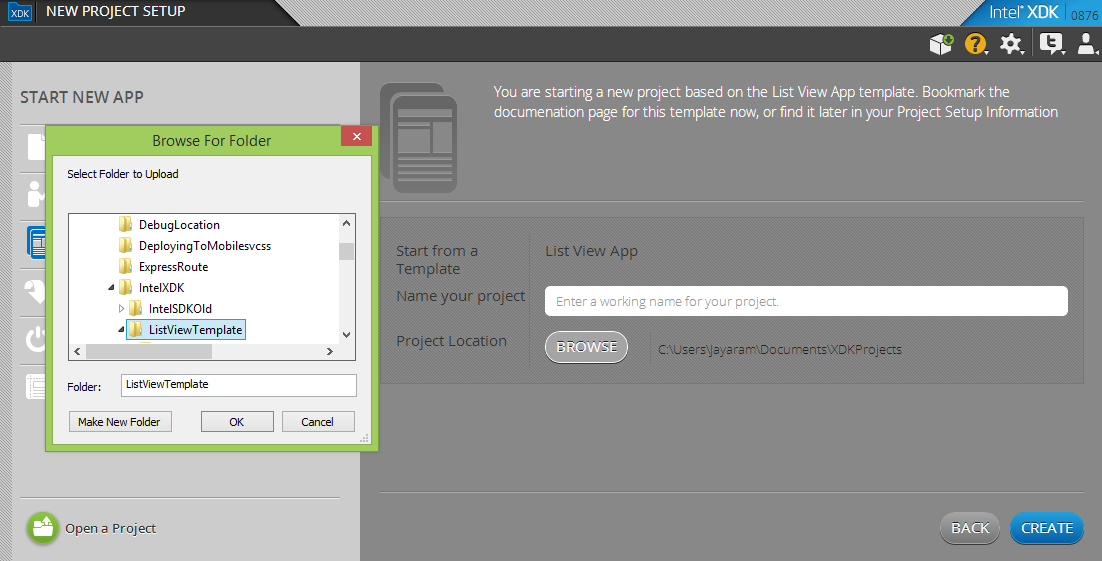
Launch Intel XDK and choose Start with a template and browse to the extracted folder location.


The extracted folder is as shown:

In the Intel XDK after browsing to the folder location click Create.
It will take a few seconds and you get a 'Success' message.

Follow the step-by-step procedure to create the app here:
http://hodentekmobile.blogspot.com/2014/09/creating-projects-with-intel-xdk.html

Tuesday, August 12, 2014

Windows Store developers: Get Microsoft Visual Studio Express 2013 for Windows Update 3

In a previous post the details of Visual Studio 2013 Update 3 was described.

http://hodentek.blogspot.com/2014/08/visual-studio-2013-update-3-is-now.html

It was mentioned that you could also download Microsoft Visual Studio Express 2013 for Windows Update 3, a program that you can use to build apps for Windows Store and Windows Phone. You need Windows 8.1 on your computer to install Visual Studio Express 2013.
You can download the file from here:

http://www.microsoft.com/en-us/download/details.aspx?id=43729

Version: 2013                                Date Published:7/30/2014

File Name:                                     File Size:
vs2013.3_winexp_ret_ENU.iso    4.3 GB

winexpress_full.exe                       1.1 MB

This download includes the latest updates. This also includes tools for Windows Phone 8 and Windows Phone 8.1

However if you already have Visual Studio Express 2013 for Windows and you just want the update then you can get it from this link.

http://www.microsoft.com/en-us/download/details.aspx?id=43721

Since Visual Studio 2013 Express for Windows Update 2 was already present on this computer:

http://hodentek.blogspot.com/2014/05/microsoft-visual-studio-2013-update-2.html
The previously mentioned link was used to download just the update. 

Version: 2013                                 Date Published:  7/29/2014         
File Name: VS2013.3.exe              File Size: 1.74 MB
                  
The following KB article provides the full details.
http://support.microsoft.com/kb/2933779

The installation took quite some time on my Wi-Fi connection.

Also note that if you had Update 3, when you launch the IDE you should be able to learn about Update 3 in the notification area at top right of the IDE. Also after launching the IDE you can connect to your Microsoft Account.

The update contains bug fixes; and some enhancements. The following site lists some of the changes.
http://arstechnica.com/information-technology/2014/08/all-caps-begone-visual-studio-2013-update-adds-mixed-case-menu-option/

I am not sure why the capitalization or otherwise of menu options should matter. It appears this one of the most requested changes by users.

By default the menu bar after Update is as shown.


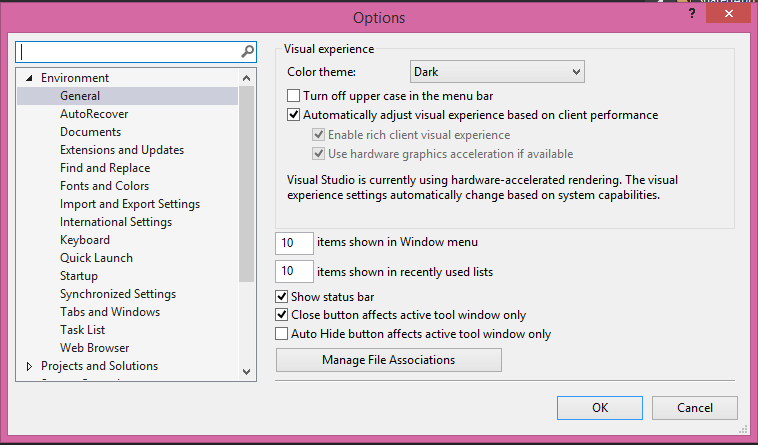
If you want to change this go to Tools | Options as shown.


Place a check mark for the first checkbox on the right panel for General. The menu bar changes as shown.


Make sure you check out the interesting on line samples that you can access to work with Azure Mobile as well as creating cross-platform apps.


DMCA.com Protection Status