Friday, December 03, 2010

Lync lassos a lot of Microsoft stuff

Microsoft most recently released Lync (17 Nov, 2010). Download a free version here (http://www.lync.com). It's a communication software consisting of Servers and Clients that helps users to connect and stay connected in new ways wherever they are with a single client interface. It is managed quite simply integrated with Active Directory.

Some major features from Microsoft documentation reproduced here:

Secure IM Messaging:
(MSN,Yahoo,WindowsLive,AOL). Presence Status such  as available/busy supported.

Conferencing:
IM Conferencing: Audio and Web Conferencing; Application Sharing; Impromptu as well as scheduling. Dial-in is also OK through PSTN. Automatic scaling (from few users to thousands) very much like a cloud service.

VOIP also known as Enterprise Voice:
IM, Collaboration etc. Full service including call answer, hold, forward, transfer etc

Remote users support:
Remote users outside company firewalls supported with Edge Servers. This also helps federation with partners and vendors

Integration:
Integration with other Microsoft products such as Outlook 2010,Exchange, Office and SharePoint 2010. Outlook will have a hear audio message button.

Easy deployment: 
Wizard driven Planning tool(Prelease version) and Topology builder

Simply Managed:
Active Directory Managed;
Control Panel Management GUI;
Command line support leveraging Windows Powershell

Servers and Clients alike need recommneded 64-Bit CPU

Thursday, November 25, 2010

Denali gets installed on Windows 7 but...

I have VS 2008 SP3 and Microsoft Visual Studio 2010 Express on my machines as well as a number of SQL Servers including 2008, 2008 R2, and Express.

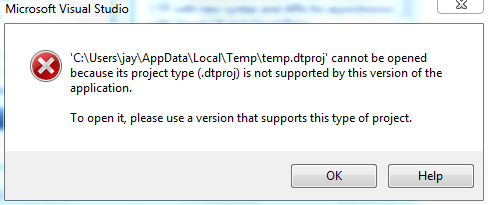
After installing Denali the integration services does not work. There are three types of templates for using SSIS with Visual Studio 2008 and none of them work. Looks like when you install Denali on a machine with SQL Server 2008 or 2008 R2, the integration services package cannot be created as the program becomes inoperative as the earlier version is not supported anymore. The option therefore is to place the program on a virtual machine.

Review the error messages for the three templates for creating a package or use SSIS import template:

With Integration Services Package :


With SSIS Project Wizard: Whatever it means?


With Integration Services Import Project wizard:

Strange things with Microsoft LightSwitch

This is the second time this happened. I try to create a Microsoft LightSwitch project and this warning pops-up.


However I know that Microsoft Silverlight 4.0 tools for Visual Studio is already installed. I do not know why this pops-up again.
 To get along with what I am doing I download and install again (this takes more than 30 to 40 minutes). The LightSwitch starts working again. This is queer.


After downloading and installing the downloaded file I tried to create a project with the same name I had used earlier. The program says it already has a program by that name. I think the first warning is not very well placed in the Beta program. You may discard it without any penalty.

Wednesday, November 24, 2010

Denali installs easily on Windows 7 Ultimate

Denali is the code name for the next version of SQL Server -SQL Server 2011 which is in CTP 1. I added a post about it a  few days ago in this blog.

You can download it from here:
http://www.microsoft.com/downloads/en/details.aspx?FamilyID=6a04f16f-f6be-4f92-9c92-f7e5677d91f9

You run the setup.exe in the folder where you unpack the contents of the download.

I have Windows 7 Ultimate on an Aspire 4810TZ-4011 notebook which also has a number of SQL Servers both Enterprise evaluation as well as SQL Server Express.

This time I installed a named instance Hodentek3\Alaska and after starting the install I went to bed and in the morning I saw success staring out of my notebook. No problem at all.

Here are some screen shots,


Monday, November 22, 2010

Houston based SQL Azure DB Manager on Windows Azure

In my previous post on Houston I had mentioned how easily Houston manages SQL Azure with its coool looking web interface providing capabilities not present in SSMS. Microsoft has taken Houston to integrate SQL Azure Services with the Windows Azure with a brand new interface. The SQL Server instance management got so much easier with this nice addition.

The new Silverlight based, Wizard driven portal integrates all of Windows Azure giving you a new database manager (cloud hoisted 'Houston'). This should be available soon.

For details listen to the Tech Ed Europe 2010 video by David Robinson here.
http://europe.msteched.com/Topic/List
COS222 - What’s New in Microsoft SQL Azure
DMCA.com Protection Status