I finally made progress connecting the Arris 1670 A router on leased from Oceanic Time Warner to access the Internet from Windows 10 on my Toshiba Satellite S70 series laptop. This post describes the details.
Review these before you read this post:
http://hodentek.blogspot.com/2015/07/upgrading-windows-81-professional-to.html
http://hodentek.blogspot.com/2015/08/updating-windows-81-to-windows-10-part-2.html
http://hodentek.blogspot.com/2015/08/wifi-broadband-connection-not-working.html
With Windows 10 installed the Wi-Fi sense works right away and you will see all the Wi-Fi sources nearby including your own.
You could click on any Wi-Fi connection and you can connect/disconnect as shown.

AfterUpdate5.png
Oceanic Time Warner replaced an existing cable modem (not Wi-Fi enabled) with a Wi-Fi enabled cable modem(Arris Touchstone DG 1670 Data Gateway). The next two pictures taken from Arris's user guide shows some details of this router(Wi-Fi) enabled.
Front Panel:

Arris1670DataGateway.png
Rear Panel:
 Arris1670DataGateway2.png
Basically it has 4 LAN connections and a Wi-Fi access point to connect to all the devices in the Home (Oceanic calls it Home Wi-Fi). It has capability for 2.5 GHZ and 5 GHz ranges. The security is WPA2-Personal with AES. The Wi-Fi router has pre-configured username and password on the box which can be changed later accessing a WebGUI.
It so happened the Windows 10 interface tried to make a broadband connection to this router which did not work effectively (connected but with limited capability). This did not allow connection to the Internet. The trouble shooting using Windows indicated it was a 651 error.
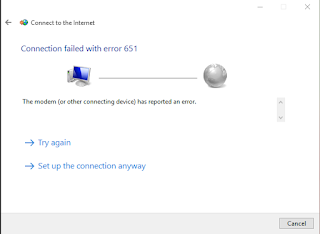 Afterupdate4.png
This error arose out of WAN Mini-port (PPPoE), an error reported by many on the Internet. The file in question raspppoe.sys appears to be working well. More over, the latest raspppoe.sys file does not support Windows 10 (private communication from raspppoe.com site).
Neither Oceanic Time Warner's nor Arris's help desk could provide any assistance.
Moreover Arris 1670A according to an old userguide (was pre-Windows 10) there was no mention that it supports Windows 10.
This is how connectivity was established.
I removed all connectivity information including the old Wi-Fi connection with the older cable modem+ LinkSys router.
I started from basic the step by configuring the Network adapters.
 DeviceManager2.png
Finally I was able to connect to the Wi-Fi from Cable modem using the following settings:
Here is how the Network Connections look:

NetworkConnections.png
Here are properties (events) of the Network Bridge:

 WiFiLANRealtek.png
This allowed accessing the Wi-Fi as shown:

FinalWifi.png
Review these before you read this post:
http://hodentek.blogspot.com/2015/07/upgrading-windows-81-professional-to.html
http://hodentek.blogspot.com/2015/08/updating-windows-81-to-windows-10-part-2.html
http://hodentek.blogspot.com/2015/08/wifi-broadband-connection-not-working.html
With Windows 10 installed the Wi-Fi sense works right away and you will see all the Wi-Fi sources nearby including your own.
You could click on any Wi-Fi connection and you can connect/disconnect as shown.

AfterUpdate5.png
Oceanic Time Warner replaced an existing cable modem (not Wi-Fi enabled) with a Wi-Fi enabled cable modem(Arris Touchstone DG 1670 Data Gateway). The next two pictures taken from Arris's user guide shows some details of this router(Wi-Fi) enabled.
Front Panel:

Arris1670DataGateway.png
Rear Panel:

Basically it has 4 LAN connections and a Wi-Fi access point to connect to all the devices in the Home (Oceanic calls it Home Wi-Fi). It has capability for 2.5 GHZ and 5 GHz ranges. The security is WPA2-Personal with AES. The Wi-Fi router has pre-configured username and password on the box which can be changed later accessing a WebGUI.
It so happened the Windows 10 interface tried to make a broadband connection to this router which did not work effectively (connected but with limited capability). This did not allow connection to the Internet. The trouble shooting using Windows indicated it was a 651 error.

This error arose out of WAN Mini-port (PPPoE), an error reported by many on the Internet. The file in question raspppoe.sys appears to be working well. More over, the latest raspppoe.sys file does not support Windows 10 (private communication from raspppoe.com site).
Neither Oceanic Time Warner's nor Arris's help desk could provide any assistance.
Moreover Arris 1670A according to an old userguide (was pre-Windows 10) there was no mention that it supports Windows 10.
This is how connectivity was established.
I removed all connectivity information including the old Wi-Fi connection with the older cable modem+ LinkSys router.
I started from basic the step by configuring the Network adapters.

Finally I was able to connect to the Wi-Fi from Cable modem using the following settings:
Here is how the Network Connections look:

NetworkConnections.png
Here are properties (events) of the Network Bridge:


This allowed accessing the Wi-Fi as shown:

FinalWifi.png


