Monday, November 30, 2015

New Microsoft Software-as-a-Service: PowerApps

 Mobile First, Cloud First --> Repeat this mantra three times, breathe deep each time

That is what Microsoft is doing by developing PowerApps. This is presently in limited preview (by invite only) being developed by a small team at Microsoft's Cloud and Enterprise Group. Microsoft believes that there is a huge bundle to be made.


PowerApps service can used for creating,sharing and managing mobile business apps on iOS, Android and Windows devices. It is really apps development for dummies kind of thing. Developer need not be a coder and it is best suited and used by those who have a business need but no programming skill. This app is supposed to provide a quick fix for app creation in these days of skilled developer scarcity without having to worry about security and other details.

 
Basically PowerApps,

  • Turn data into apps
  • Mobilize your systems - Sharepoint, SQL Server, Oracle databases, SAP and Custom business Systems
  • If you have Microsoft Office Skills you can create apps
  • Professional developers can use Azure App Service
  • App sharing is as easy as an email
  • Device neutral- smartphones and tablets from Apple, Android and Microsoft

Read more here:
https://powerapps.microsoft.com/en-us/
https://powerapps.microsoft.com/en-us/blog/introducing-microsoft-powerapps/
http://www.zdnet.com/article/microsoft-takes-wraps-off-powerapps-mobile-app-creation-service/

Saturday, November 28, 2015

Fixing App tiles that disappeared from Winows 10 on x32bit laptop

I am not sure what the problem is and if app tiles disappear you are not exactly pleased because your laptop became less than a Windows 7.

I searched for this problem on Bing and sure enough it had been noticed by others. Coming immediately  on the heels of a Windows Update, it was quite discouraging.  Finally there was a post here that claimed to solve the problem which I pursued. Here is my experience.


In order to use this procedure you need to start Powershell (Preferably with administrative privileges). When you get the Powershell prompt type in the following statement and enter.

$manifest = (Get-AppxPackage Microsoft.WindowsStore).InstallLocation + '\AppxManifest.xml' ; Add-AppxPackage -DisableDevelopmentMode -Register $manifest

Windows PowerShell
Copyright (C) 2015 Microsoft Corporation. All rights reserved.

 Deployment operation progress: C:\Program Files\WindowsApps\Microsoft.WindowsStore_2015.21.25.0_x86__8wekyb3d8bbwe\Appx
    Initialized
Add-AppxPackage : Deployment failed with HRESULT: 0x80073D02, The package could not be installed because resources it modifies are currently in use.error 0x80004004: Unable to install because the following apps need to be closed
Microsoft.WindowsStore_8wekyb3d8bbwe!App.
NOTE: For additional information, look for [ActivityId] 527897a4-2a3c-0000-8a0c-79523c2ad101 in the Event Log or use
the command line Get-AppxLog -ActivityID 527897a4-2a3c-0000-8a0c-79523c2ad101
At line:1 char:94
+ ... fest.xml' ; Add-AppxPackage -DisableDevelopmentMode -Register $manife ...
+                 ~~~~~~~~~~~~~~~~~~~~~~~~~~~~~~~~~~~~~~~~~~~~~~~~~~~~~~~~~
    + CategoryInfo          : NotSpecified: (C:\Program File...ppxManifest.xml:String) [Add-AppxPackage], Exception
    + FullyQualifiedErrorId : DeploymentError,Microsoft.Windows.Appx.PackageManager.Commands.AddAppxPackageCommand

-------
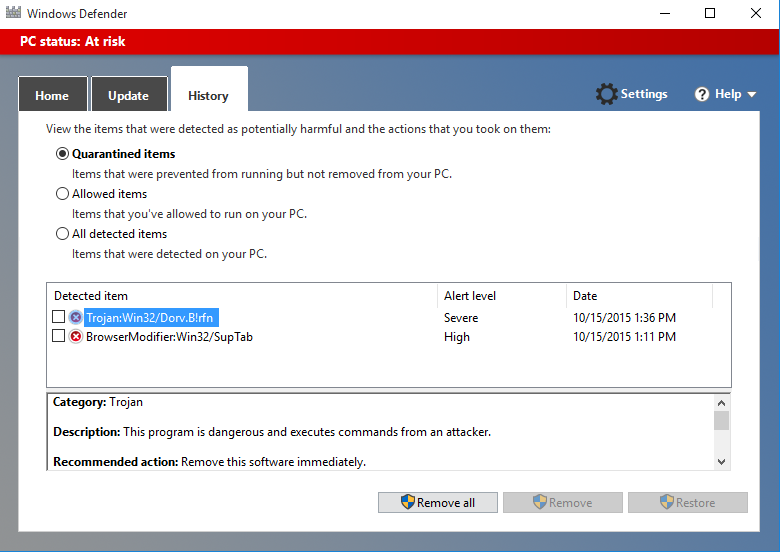
Stopped the Windows Store and tried again. Since it did not solve the problem, I restarted the computer and the app tiles did not show up. I ran the statement once again, and it looked like the procedure ran successfully and the shell prompt returned. I restarted the computer one more time and I could see that tiles had come, but after a brief pause disappeared. The Windows Defender came up and displayed the presence of a Trojan. Unfortunately the display showed two identical line items for the Trojan with one removed, the other quarantined. I ran a full scan and chose the remove it. It appears it removed the quarantined Trojan.
Here are Windows Defender screen shots:


I chose to remove the trojan.
 
 I tried this removal action couple of times like this one here:

 Well finally it might have been removed.


Friday, November 27, 2015

What! Computer for $5!

Raspberry Pi ()has come up with a computer for $5.

Well, even the other Raspberry PIs were not very expensive($20 ~$30). It also attests to the fact that IoT is catching on. It has become so cheap that some magazine (MagPi) gave it away to its readers bundled with the issue.

Image source of of Raspberry Pi Zero with MagPi is here.

According to a pcworld.com article (IDG News Service)  it uses a 1 GHZ ARM processor from Broadcom (BCM2835). It has 512MB RAM with the OS loaded on the micro-USB card. It has Micro-USB sockets for data and power including a mini-HDMI socket as well. It has a 40-pin GPIO and the circuit-board may require soldering by customers.

Here is a PDF document  for BCM2835 Processor.

Here is the YouTube video:

Tuesday, November 24, 2015

A brief look at IBM MobileFirst Platform

The ever increasing role of mobile devices in both personal and corporate spheres has pushed companies to come up with a wide range of ideas. There are many perceived challenges and each company has its own set of strategies based on the mobile user needs and company resources.

IBM MobileFirst covers all platforms from desktop to cloud. IBM's purchase of Worklight in 2012 and the Cloudant database as a service in 2014 were all instrumental in structuring the IBMFirst Mobile Platform .

Here is a screen shot of the slide show. It is good mix of IBM Bluemix, Worklight Platform and Cloudant (Database as service).
IBMMobile06.png


IBMMobile11&13.png

The above slides are from a slide-show by Derek Baron on IBM MobileFirst Platform

IBM's MobileFirst platform takes into consideration the needs and addresses them by its unique platform features.

How is the app doing/ does it deliver what the user wants?
    App management-Single console to manage app versions and security; Push updates to hybrid apps by passing app stores
    Operations Analytics- Diagnose device, app and version for app performance; Measure app user behavior; Monitor security issues
    In-App Feedback and Crash analysis- Troubleshoot and diagnose, bug track
    Sentiment Analysis-App store review analysis, automated analysis
 
What about mobile app security?
    User authentication-existing or 3rd party security systems (Certificate-based, touch ID, LDAP Server etc); Multi-factor authentication; Disable app version, specific user or device using console
    App Authenticity-intellectual data, back-end data
    Encrypt local data-user identity to encrypt data
    Application scanning-hunt for code vulnerabilities; offer remediation

Device's context based personalization is highly desirable
    Location engagement- rules correlating local events with other data sources
    Location Analytics - customer/employee behavior and movement patterns
    Geo-spatial enabled query- Complex Geo-spatial queries and advanced relations
    Push notifications across device platforms
App experience; storing data or integrating data
    Cloudant NoSQL DB-distributed data store
    Back-end integration-HTTP, SAP,SQL,JMS,Custom; Server-side code in Java or     JavaScript
    Use open standards (REST, OAuth)
Offline sync - Disconnected experience, simplify replicating offline

Watch the IBM MobileFirst Video here:


Get free trial here:
http://www.ibm.com/mobilefirst/us/en/

Monday, November 23, 2015

End of support for SQL Server 2005

It is sunset time for SQL Server 2005 as it reaches end of life  (EOL). While EOL may be an extreme word to use, it is going to be End of Support (EOS) by Microsoft beginning April 2016.
SQL Server 2005 was the beginning of a new era for SQL Servers and according to information available on the Internet, SQL Server 2005 is still used extensively tied up with Windows Server 2003.
There are a couple of upgrade options and probably most go for either SQL Server 2012 or SQL Server 2014. Perhaps it may be better to go the whole 9 yards and get SQL Server 2016 which is in CTP right now.

The good news (for me) is that SQL Server 2005 will continue to stay for few more years and I can still sell my book.


https://www.packtpub.com/networking-and-servers/beginners-guide-sql-server-integration-services-using-visual-studio-2005

DMCA.com Protection Status