Friday, February 16, 2018

Use SelectionBoxItem to access ComboBoxItem in a UWP

In Part 1, you added after following a few tasks the following to a  Blank UWP project.
  • Getting the ComboBox Control
  • Placing ComboBox on the Design area
  • Adding ComboBoxItems
ComboBox 4

In this post you will write code for an app consisting of a ComboBox, a Button and a TextBox so that when you select an item in the ComboBox and click the button, the selected item appears in the TextBox.

We already have a ComboBox with three items.
We will drag a BUTTON and a TEXTBOX from the Toolbox


ComboBox_8

And drop on the DESIGN pane as shown. The XAML markup is shown in the XAML Pane as shown.


ComboBox_9

We want to Select a ComboBoxItem and then click the BUTTON. This should get displayed in the TEXTBOX.

We add a click EVENT to the button by typing-in Click inside the BUTTON code as shown and choose 'NEW EVENT HANDLER'.


ComboBox_10

It will be named 'Button_Click' as shown.


ComboBox_11

The following will be added to the MainPage.xaml.cs page.
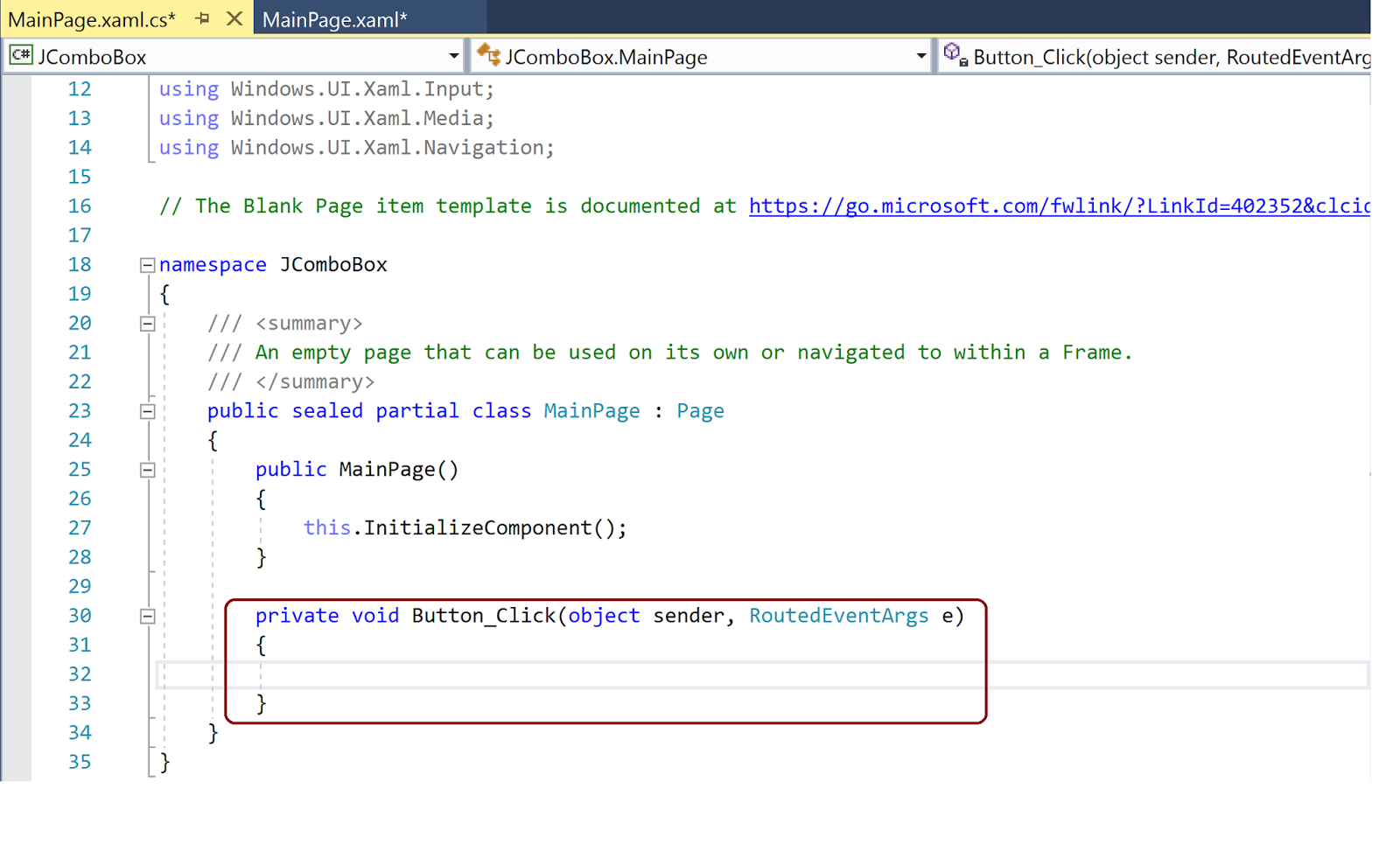
ComboBox_12

We provide names for the ComboBox ('cbx') as well as the TEXT ('txt') box. Now we add the following code to the above newly added code as shown.
-----
 private void Button_Click(object sender, RoutedEventArgs e)
        {
            txt.Text = cbx.SelectionBoxItem.ToString();
        }
-------

Now build, deploy and run the project on Local Machine. When the App is displayed, choose an item (herein, 'BIRD') from the ComboBox and Click the BUTTON, you will see it displayed in the TEXTBOX as shown (the UI is not designed well, it should be improved).


ComboBox_15

Friday, February 09, 2018

LoRaWan protocol for IOT

LoRaWan is a long range RF protocol that helps connect 'things' (IoT) to the Internet over a long range. It's main advantages are:

  • It is Open Source and not tied to a vendor
  • It is battery efficient-very low power consumption
  • It is long range.

Battery life is something like 5 years(Wow!). It is Open Standard and uses the unlicensed spectrum as part of the Industrial, Scientific and Medical(ISM) RF band (868 MHz). In US the 925 MHz is used. The Open Standard is governed by the LoRa alliance, an Industry group with 500 or more members (Microchip, Cisco, Softbank, etc).

There is a round the world following for this technology including Comcast, Orange, SK Telecom, etc.
Download LoRa specs from here:

Is MicrosoftEdge in the new Insider Preview better?

I cannot say from all counts, as I find it not as good as either Chrome or Firefox in displaying a PDF document.

I opened this site  to review the contents of a PDF document on its site and I was unable to read it on Microsoft Edge.  The only way, I could see it was to use Ctrl and + keys but that made the content so large that you cannot fit in a page. I then copied the site address and I was able to read it in Chrome as well as Firefox as you can see for yourself from these images.

Window display maximized in all images.


PDFEdge.png


PDFFirefox.png


PDfChrome.png

Thursday, February 08, 2018

New update of Windows 10 Pro Insider Preview

I had this version of Windows 10:

Build 17025.rs_prerelease.171020-1626

This had a lot of display related problems as well as its interference with the Report Builder 3.0.


There was a recent update within the last couple of days. The new version is:


InsiderPreview_Feb2018.png

I hope this update might have fixed some of the problems.

Universal Windows Platform: ListView and SelectionChanged event - Part 2

In my previous post (UWP: XAML's ListView Control and its SelectionChanged event - Part 1) you learnt the following:

Part 1
  • Progressively build a ListView Control 
  • Place ListViewItems inside a ListView's ItemTemplate
  • You will place three named ListView items
In this part you wil learn how to write code to change the properties you set for the ListViewItems by the SelectionChanged event.

The following image shows the app after a successful run. This displays how the app is displayed at this stage:

              
JListView_23

This next image shows the effect of the SelectionChanged event.


JListView_28

You could set the FontSize properties in design as shown.To start with all the ListViewItem's FontSize was 15px and FontFamily Segoe UI (defaults). Clicking the ListViewItem for 'Dog', you can change its size in the property box (now focus is on 'bird').


JListView_15

As shown in the next image, you insert 'SelectionChanged' inside the ListView. If you just type the letter S, you should get a selection list in which you will find 'SelectionChanged'.


JListView_17

Place the "=" sign after it and you should get the "New Event Handler" and when you click this you will create the ListView_SelectionChaged event.


JlistView_18

In the code behind (MainPage.xaml.cs), the new event is displayed as shown


JlistView_19

Part 2 is continued here.
DMCA.com Protection Status
