Page loading and latency are two of the important parameters in web traffic. If your page does not load under something like 4 sec, the surfer will go elsewhere. SPDY is all about reducing the page loading and improving latency. SPDY is a Google trade mark and it is still in experimentation.
Read this White paper to get a feeling for what is brewing:
http://dev.chromium.org/spdy/spdy-whitepaper
SPDY modifies the HTTP rather than replacing it and functions at the Session level. It functions as a tunnel for HTTP and HTTPs requests. HTTP 2.0 which in the works takes SPDY as a starting point.

Source: white paper
How is the speed achieved?
Latency reduction is acheived through compression, mulitplexing and prioritization (Basic features). The multiplexing is carried over one client connection for subweb resources instead of HTTP fetching one resource per connection.
Well how does HTTP with SPDY compares with HTTP?
Well web pages are complex constructs with images; style sheets; media etc fetched through connections slow and fast. It appears SDPY would work faster than HTTP in most cases.
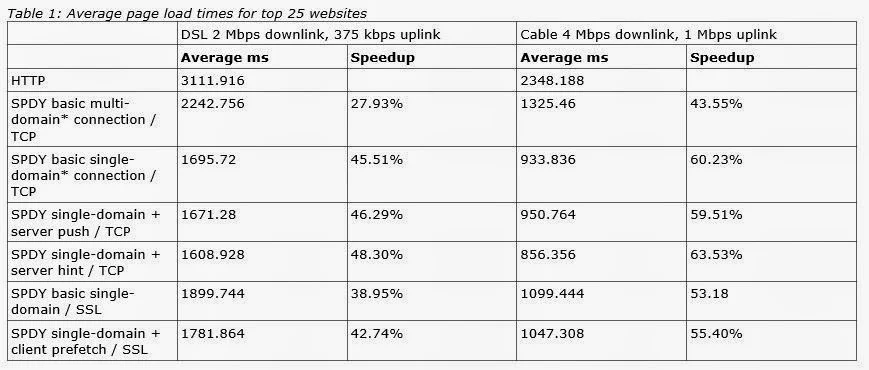
Here is the performance comparison table from Google whitepaper:
Microsoft is also looking at SPDY and here is link to Microsoft research on comparing HTTP with SPDY and HTTP:
http://research.microsoft.com/pubs/170059/A%20comparison%20of%20SPDY%20and%20HTTP%20performance.pdf
Here is a performance chart for a popular web site (from Microsoft's PDF above):

Well we want to surf faster and with our Smartphones to get the same experience like the one on desktop something has to change.
Read this White paper to get a feeling for what is brewing:
http://dev.chromium.org/spdy/spdy-whitepaper
SPDY modifies the HTTP rather than replacing it and functions at the Session level. It functions as a tunnel for HTTP and HTTPs requests. HTTP 2.0 which in the works takes SPDY as a starting point.

Source: white paper
Basic Features(Google white Paper)
- Multiplexed Streams
- Request prioritization
- HTTP Header compression
How is the speed achieved?
Latency reduction is acheived through compression, mulitplexing and prioritization (Basic features). The multiplexing is carried over one client connection for subweb resources instead of HTTP fetching one resource per connection.
Well how does HTTP with SPDY compares with HTTP?
Well web pages are complex constructs with images; style sheets; media etc fetched through connections slow and fast. It appears SDPY would work faster than HTTP in most cases.
Here is the performance comparison table from Google whitepaper:

Microsoft is also looking at SPDY and here is link to Microsoft research on comparing HTTP with SPDY and HTTP:
http://research.microsoft.com/pubs/170059/A%20comparison%20of%20SPDY%20and%20HTTP%20performance.pdf
Here is a performance chart for a popular web site (from Microsoft's PDF above):

Well we want to surf faster and with our Smartphones to get the same experience like the one on desktop something has to change.


