SQLite is the right relational daatabase with zero configuration for mobile apps. There is a recipe in Microsoft documentation on using a SQLite database in a UWP app. This should be quite straight forward given a recipe but there are problems. Probably because of a plethora of versions of just about everything.
This post is not about a successful follow up of the recipe to its successful end, but steps in the way of achieving, trying to document as much as possible, firstly to find where things did not happen as expected, secondly to make sure it works, at least for me.
The computer is Windows 10 Version 1803, build 17133.73
SQLite for Universal Windows Platform added via Extensions and Update
The Solution for the app, UWPDataTest:
Universal Windows project-UWPDataTest
DataAccessLibrary -DataAccesLibrary

UWPDataTestPost_0
Microsoft.NETCore.UniversalWindowsPlatform used in the DataAccessLibrary(version 6.0.8)

UWPDataTestPost_2
Installed Microsoft.NETCore.UniversalWindowsPlatform

UWPDataTestPost_2a
DataAccessLibrary referenced in UWPDataTest

UWPDataTestPost_3
Using DataAccessLibrary in MainPage.xaml.cs

UWPDataTestPost_4
Using DataAccessLibrary in app.xaml.cs

UWPDataTestPost_5
DataAccess class made static.

UWPDataTestPost_6
Cannot add using Microsoft.Data.SQLite to class library. Data is not an option. If you add it and try to build you get build errors.

UWPDataTestPost_7
Build errors: DataAccessLibrary.dll could not be found. The DataAccessLibrary build has errors.

UWPDataTestPost_8.png
Error persists after upgrading the SQLite version from within VS Studio 2017.

UWPDataTestPost_9.png
Microsoft Visual Studio 2017 Community edition used.

UWPDataTestPost_10.png
I am not sure where the sqliteSample.db is in the computer. It does not seem to be present anywhere, although search is not guaranteed to work always.

UWPDataTestPost_11.png
The problem at present seems to be related to the absence of SQLite on the computer. Perhaps there is an independent source for the database.
Another possible source of error could be the Insiders Preview build may not support the SQLite added.
In VS2015 I did not face any problem, https://hodentekmsss.blogspot.com/2017/03/querying-sqlite-database-using-rsqlite.html
This post is not about a successful follow up of the recipe to its successful end, but steps in the way of achieving, trying to document as much as possible, firstly to find where things did not happen as expected, secondly to make sure it works, at least for me.
The computer is Windows 10 Version 1803, build 17133.73
SQLite for Universal Windows Platform added via Extensions and Update
The Solution for the app, UWPDataTest:
Universal Windows project-UWPDataTest
DataAccessLibrary -DataAccesLibrary
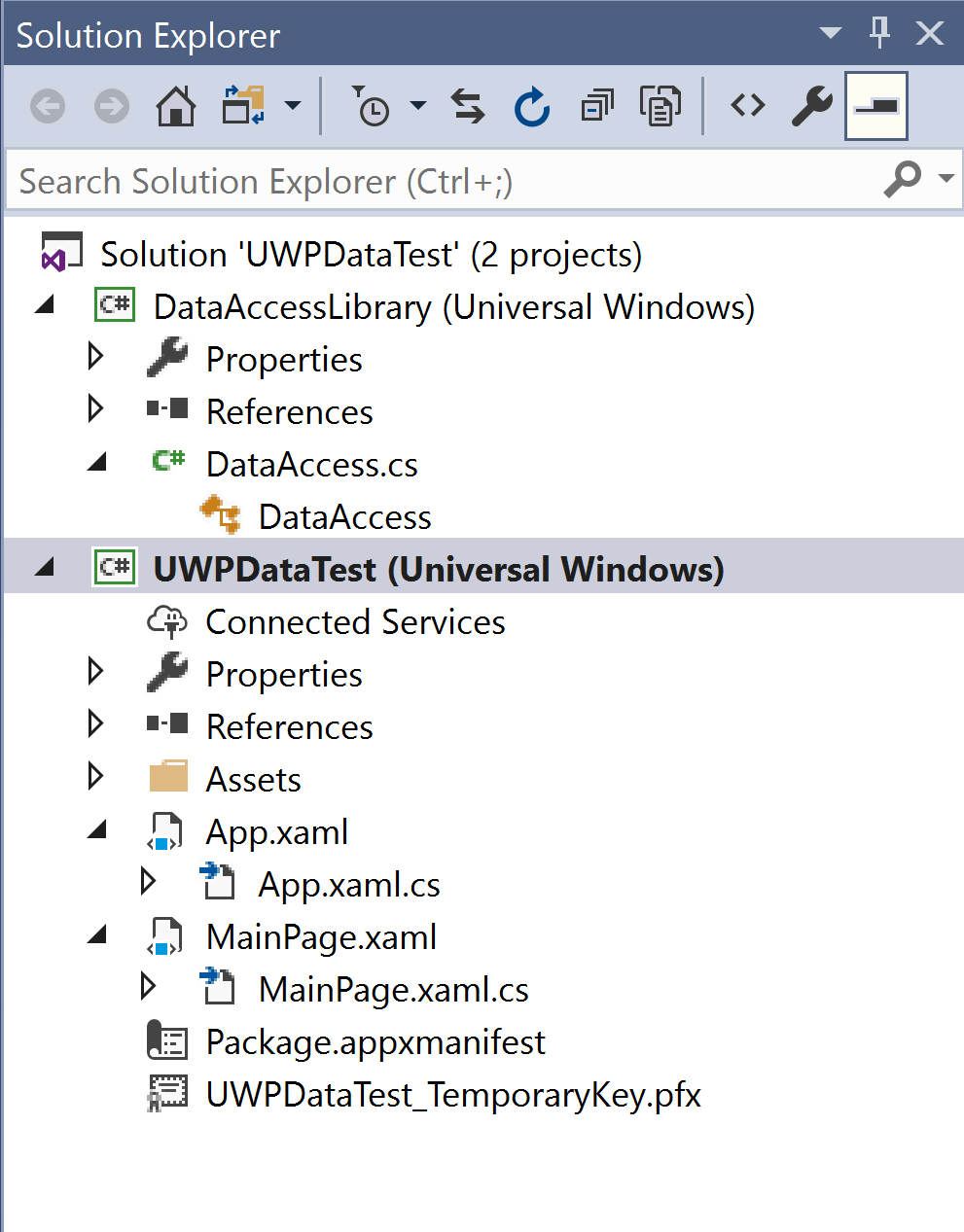
UWPDataTestPost_0
Microsoft.NETCore.UniversalWindowsPlatform used in the DataAccessLibrary(version 6.0.8)

UWPDataTestPost_2
Installed Microsoft.NETCore.UniversalWindowsPlatform

UWPDataTestPost_2a
DataAccessLibrary referenced in UWPDataTest

UWPDataTestPost_3
Using DataAccessLibrary in MainPage.xaml.cs

UWPDataTestPost_4
Using DataAccessLibrary in app.xaml.cs

UWPDataTestPost_5
DataAccess class made static.

UWPDataTestPost_6
Cannot add using Microsoft.Data.SQLite to class library. Data is not an option. If you add it and try to build you get build errors.

UWPDataTestPost_7
Build errors: DataAccessLibrary.dll could not be found. The DataAccessLibrary build has errors.

UWPDataTestPost_8.png
Error persists after upgrading the SQLite version from within VS Studio 2017.

UWPDataTestPost_9.png
Microsoft Visual Studio 2017 Community edition used.

UWPDataTestPost_10.png
I am not sure where the sqliteSample.db is in the computer. It does not seem to be present anywhere, although search is not guaranteed to work always.

UWPDataTestPost_11.png
The problem at present seems to be related to the absence of SQLite on the computer. Perhaps there is an independent source for the database.
Another possible source of error could be the Insiders Preview build may not support the SQLite added.
In VS2015 I did not face any problem, https://hodentekmsss.blogspot.com/2017/03/querying-sqlite-database-using-rsqlite.html


