Showing posts with label Blogger. Show all posts

Saturday, May 12, 2018

What is wrong with this image?

I am not sure where Google gets it data for the analytics of its own pages on the Blogger but I fail to see why it is so differently displayed. Is there some kind of filtering at some point.

Here is an example from my site http://hodetenk.blogspot.com


Read more here:
http://hodentekhelp.blogspot.com/2018/05/are-these-blogger-stats-to-be-believed.html

Saturday, February 25, 2017

Multiple problems with Microsoft Edge

Presently the OS version  on my computer is as shown:


Recently I reported that Google sites were unreachable using Microsoft Edge. Now I cannot even bring up Microsoft Edge. Double clicking or, trying to open using right-click on the shortcut does not open Microsoft Edge. Cortana also does not respond. Search box is inactive. Also Windows Start is completely broken. I have to rely on Mozilla Firefox to do anything on the Internet including this post.

One of the suggested remedies on the Internet is to delete this item from your computer and restart:
C:\Users\<user>\AppData\Local\Packages\Microsoft.MicrosoftEdge_8wekyb3d8bbwe

It has worked in the past but this times I am unable to delete this item as there are files being used(?).

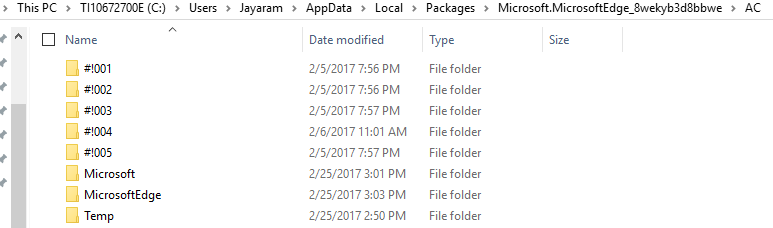
Here are the contents of this folder on my computer:


 Probably I will recover using an earlier date.

Thursday, August 25, 2016

Blogger has a problem with the html tag 'pre'

For quite sometime I have had problem displaying HTML code in my blog as the Pre tag did not render correctly. Here I am trying to see what is happening, if any in rendering the Pre tag. I decided to show only screen shots of either the HTML tab in my blog post, or the Compose tabbed page of my blog so that the browser effects are properly seen.

When you want to create a new post in Blogger, this is the HTML code you get and the 'Compose' page is empty.


Pre_00
Now I enter a single line-'This is a test' in the Compose tabbed page.

Pre_01

The HTML markup shows this:


Pre_02

Now I add a 'Pre' tag as shown.


Pre_03

The following is the content of the 'Compose' page.

Pre_04
So far no problem, good.

I now go back to HTML pane. Looks OK, but it has added another repeating line at the top.


Pre_05

Not a big difference. I refresh the browser and everything back to as it was before refresh.
I just draw a line in 'Compose'.


Pre_06

The HTML after this appears as shown. It has added 'Pre' tags as shown. Why 'pre' tags which not just 'p'.

Pre_07

I just added a 'div' tag and I am going to place a 'Pre' tag inside the 'div' tag.


Pre_08

This is the 'compose' page.

Pre_09

I added some 'pre tag' inside the div tag


Pre_10
The compose  now appears as shown.

Pre_11
I add another div and within div I add a pre tag. In the pre tag I add special characters (HTML markup) as shown.


Pre_12

The Compose page after the above appears as shown.

Pre_13

The pre tag did not work as intended for html tags.
I revert to the HTML to see if the blogger's processor has added any thing by itself. It does some time. No change.


Pre-14
I add a dotted line in HTML code.


Pre_15

There is an expected change as shown.


Pre_16

I revert to HTML and I see it has changed.


Pre_17
This time it accommodated the dotted line inside the 'div'. I modify the page with 'code' tags as shown. Some recommendation from some of the Internet sites is to enclose it in 'code'


Pre_18

The 'Compose' page now appear as shown.
The extra &gt; in the last line appears to be an error while typing.
 Page_19

It is getting worse!

I refresh the page and nothing is changed in 'Compose'.

I host the html page on the local IIS Server and the response is as shown.


Page_20

The conclusion is  'Pre' tag is not working in the Blogger as it is supposed to.


Wednesday, August 19, 2015

Install Firefox for Windows 10

You may ask what about Microsoft Edge. I found it was near impossible to work with my blogs using the Microsoft Edge. Simply put, I could get the images to the interactive page on the blogger but it would not bring the image to the blog. Sometimes the image all of a sudden disappears. Sometimes Copy from Notepad and paste to Blogger does not work (Ctrl C, Ctrl V would work).

As it could not address my immediate need I downloaded Mozilla Firefox for Windows 10 from here:
https://www.mozilla.org/en-US/firefox/channel/#firefox

It worked as required for my blogging. I am sure Microsoft Edge may be better in many ways. For example it could open a PDF file in the browser, etc.
Here are some screen shots of Mozilla.


Download and install were effortless

 I will check out other features in due course.


Here is the version information: 


Sunday, February 08, 2015

Copyright infringement on Blogger


Google support for alleged violation of copyright infringment takes you to filling up this form on this page:
https://support.google.com/legal/contact/lr_dmca?product=blogger

However, you are required to report violation of a single specific URL.
This means if your blog has some 900 posts and all of them are plagiarised you need to fill up 900 forms. This is not helping at all.

I am sure Google advertisers are hurt if proper action is not taken by Google.  If the whole blog is violated then Google should provide a means to report the violation as in my case:

My blog is: http://hodentek.blogspot.com and the Blogger blog which has violated the copyright is:
http://hodentekhyperloop2.blogspot.com/

I have not given permission to the  site owner (hodentekhyperloop2)
 

Tuesday, December 30, 2014

2014 - mixed year

2014 was a mixed year. I lost my brother Dr. Vijaya Raghavan Krishnaswamy, a neuro-surgeon by profession. He left a void that cannot be filled.

I did not complete the book I was writing.

Regarding the blogs I did quite well with a record number of posts.
                                                 Year   Posts
Hodentek.blogspot.com           2013   94
                                                 2014   246

HodentekHelp.blogspot.com.  2013.  17
                                                 2014   56

HodentekMsss.blogspot.com   2013   34
                                                  2014  48
 
HoentekMobile.blogspot.com  2013   13
                                                  2014   56

I started a new blog in 2014- http://hodentekPlus.blogspot.com.

I also found that a certain person was pilfering (http://hodentek.blogspot.in/2014/12/domain-name-service-dns-and-dns-changer.html) entire content from blog, my hardwork of about 10 years. I complained to Google without any success. I suppose this is not on Google's priority. Google wants every post that is stolen with proof of content stolen. There were over 900 posts in my blog and you can imagine the work involved.
 

Monday, November 17, 2014

Documenting the copywrite violation by the hodentekhyperloop2.blogspot.com

Previous post I described the content being lifted from my site in entirety and placing on another blogger account.

Here are more details showing both the content on my site and on the plagiarizing site. This is a requirement to file a complaint with Google. This is clearly an abuse by the website http://hodentekhyperloop2.blogspot.com/ 


This is on http://hodentek.blogspot.com ( I am the blogger)


This one is on the site (http://hodentekhyperloop2.blogspot.com/    )  which has lifted all my content

 
Looks like any click on this site goes to some AdSense.
 
I will give just one more example.
This one from my site.


Also any link under 'Popular posts' (right hand navigation) opens an advertiser page in addition to the clicked item's content on hodentekhyperloop2.blogspot.com

For example clicking on Apache(1) opens the following page:
http://www.dnsrsearch.com/index.php?origURL=http%3A//www.needhouseloan.com/&r=
And this has been set up as a random advertisement and most of them have .in in the url indicating it is originating from India.
 
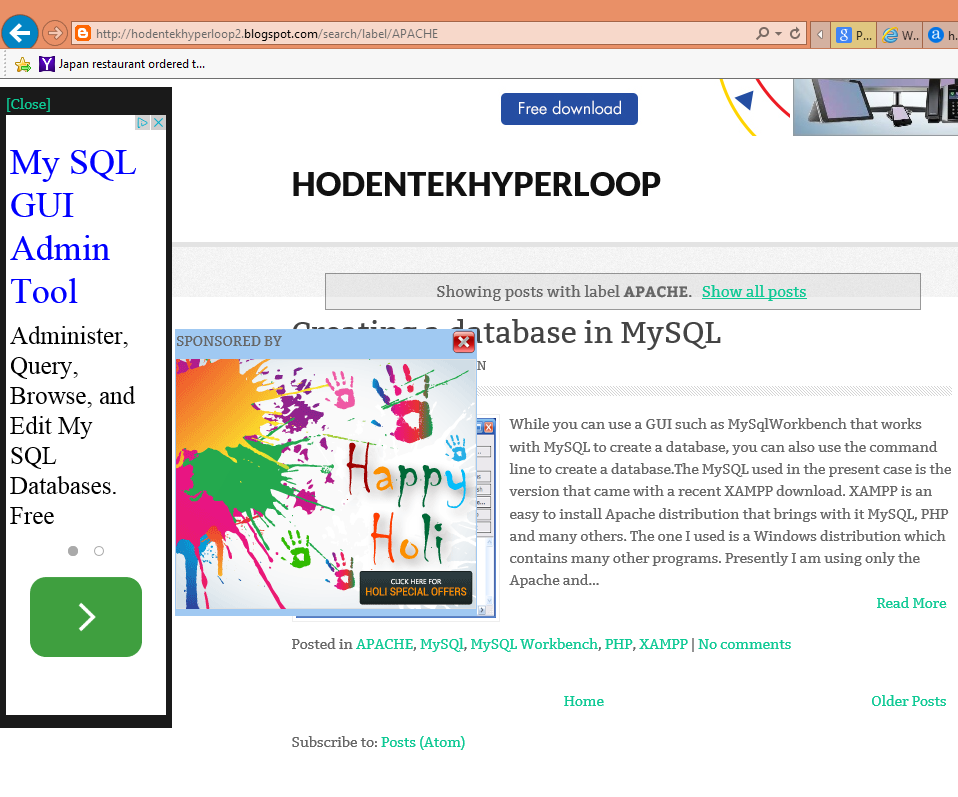
Here is the page displayed in hodentekhyperloop2.blogspot.com
when I clicked on Apache(1) in the navigation on the right hand side for archived items on the blog.
 
The click on Apache(1) also popped up this extra browser window.


Monday, August 26, 2013

Good job Bing, Well done!

Bing translator is awesome

I just added an HTML gadget to my blog which serves up the Bing Translator. It looks great. I tried to see how well it translates the languages with some of the languages that I am somewhat familiar with  (Portuguese, French, German, Japanese and Hindi) and found it pretty good. Of course certain things are language specific and idioms are not easy to translate. Translations to western languages are perhaps more successful than into non-European languages.  I am sorry to say, the run of the mill translating jobs will slowly disappear. The bright side is editing jobs will increase.

You have an option of some 41 languages to choose from to read my blog. Just click the drop-down control on the Translate with Bing and choose the language. It can be set to change manually or set automatic in which case it will open in the browser's language.

With just a click you can add this functionality to your blog, get it from here,
http://www.bing.com/widget/translator/

Here is an example of my blog translated into Japanese.

While most of the translated material is some what verbatim and therefore does not have the  natural touch, the meaning is easily discernible.

Note how 'walk in the park' is translated verbatim into 'Koen de Sanpo'.
DMCA.com Protection Status