Sunday, November 02, 2014

Real-time analysis of IoT on Microsoft Azure with Stream Analytics

Simply put, it is about collection of data from various devices (different types, different protocols, different complexity, etc) in real-time and aggregating and processing this incoming stream of data to provide useful information. This can enormously improve efficency and make the business stand out. Presently businesses may be implementing custom solutions for addressing such data handling and analysing scenarios.

This is going to get more streamlined, easy and cost-effective using the recently introduced Azure Stream Analytics. Azure Stream analytics has all the well known advantages of Azure Cloud; fully managed; real-time stream computation; highly resilient; and easy to implement and easy to get started. It can, not only help larger corporations who want to dissociate themselves from custom solutions but also help small businesses who cannot afford a custom solution.

All it takes are a few click to author a streaming job using a simplified SQL-like language and monitor the outcome. According to Microsoft, stream rates of kB/sec to gb/sec are accomodated. There are no custom codes to write as most of it is declarative (language).

An assoiciated product, the Azure Event Hub to which Stream Analytics connect to feed all the collected data from varied devices. The streaming nature of data is compromised neither during this 'injesting' process nor during the computational phase of the analytics.

The advertised key capabilities are the following:
  • Ease of use -declarative query model, customer insulation from computautional complexity
  • Scalability -handle millions of events/sec
  • Reliable, repeatable and quick recovery-guarantees zero data loss
  • Low Latency -Optimized for sub-second latency with an adoptive pull-based model
  • Reference data- treated very much like the incomimg stream
The following scenarios of usage are mentioned:
  • Financial Services; Personalized stock trading and alerts
  • Real-time fraud detection
  • Identity protecction real-time
  • Web click stream analytics
  • Telemetry log analysis
  • Event archival for future reference
Here is a schematic of the stream analytic process (with blog author superposed lines in yellow).


Read more here (as this post is a condensed version):
http://azure.microsoft.com/en-us/documentation/articles/stream-analytics-introduction/

Saturday, November 01, 2014

You missed TechEd Europe 2014 !

OK. It was held in the beautiful city of Barcelona, Spain from October 29 to 31.


There were so many sessions that will fill pages and pages and huge expo. However the content of those sessions are available on Channel 9. Look for Content Catalog here (you may need to filter and look for what you want). You may want to customize the catalog for your use.

http://teeu2014.eventpoint.com/topic/list


Microsoft Azure goes Down Under

Driven by business winds Microsoft Azure has spread to Down Under. The Australia Azure Geo will be avaialble in the regionable centers of New South Wales and Victoria, the 18th and 19th regions covered by Microsoft Azure (Oct 27, 2014).

There is quite a bit of business waiting in Australia to go over to the cloud not to speak of interest from the Government, the CSIRO, the banks, etc

Go tap this source for more:
http://www.microsoft.com/en-au/news/


What you really need is a Microsoft Band

What is data to business, health & fitness is to you. It is no wonder that all vendors are in a rush to provide you with 'health and fitness' related resources and help. Of course there have been a plethora of devices that you wrap around your wrist to keep you informed of your 'fitness'.

Microsoft Band stands out among them with many outstanding features as it has incorporated many more sensors to watch and monitor you.

Although health is central; you have many other things to take care of like business, friends, family and your social contacts. Microsoft has made it a point to take care of all these in its Microsoft Band.

In reality the wrist wrap-arounds gather all the intelligence from your body and send it out to your phone, I mean the Smart phone, be it iPhone, Android, or Windows Phone(mPhone-my abbreviation). Microsoft is cross-platform and that means it can communicate with all these phones.
To use a Microsoft Band you do not need to go and buy a Windows Phone, your iPhone or Android is OK.

Let me first of list out the activity related features taken directly from Microsoft site:

24-hour heart rate monitor:
Gives you a better understanding of your calorie burn, sleep patterns, and peak and resting heart rate so you can perform at your best.

Run:
Whether you’re on the treadmill at the gym or outdoors in the rain or sun, you can view your run summary on your band with personalized metrics in the phone app including pace splits and heart rate.

Steps tracker:
Set a goal and track your progress. Microsoft Band calculates the calories you’ve burned and the distance you’ve traveled each day.

Built-in GPS:
Measures the distance you’ve run and tracks your pace and route. Save your favorites to retrace your steps and challenge yourself later.

Calorie tracking:
Count the calories you burn each day. View daily or weekly stats, set goals, and receive a virtual "high-five" when you reach them.

Sleep tracking:
When activated, Microsoft Band tracks the length and quality of your sleep. Analyze the sleep charts in your app to gain insights about your slumber.

Guided Workouts:
Fun and challenging workouts from fitness partners like Gold's Gym, Shape, and Men's Fitness with exercise prompts on the band and much more in the app.

Goal setting:
Challenge yourself by setting daily step and calorie goals. Microsoft Band notifies you when you meet them so that you can stay motivated.

UV monitor:
Get a quick read of the UV Index while you’re out and about.

Here is a list of many other things you can do with this Band.

Text Messaging:
http://www.microsoft.com/microsoft-band/calls
Calls:  incoming call and voicemail notifications
http://www.microsoft.com/microsoft-band/calendar
Calendar: Syncing with your phone
http://www.microsoft.com/microsoft-band/email
Email:
http://www.microsoft.com/microsoft-band/smart notifications
Smart notifications: Customize your notifications
http://www.microsoft.com/microsoft-band/watch mode
Watch mode: Only interested in time
http://www.microsoft.com/microsoft-band/facebook
Facebook & Facebook Messenger: Your know what these are

Twitter:
http://www.microsoft.com/microsoft-band/twitter

Cortana: The great personal assistant who can find what you want as she listens to you
http://www.microsoft.com/microsoft-band/cortana
Real-time weather wth 5 day forecast: no problem
http://www.microsoft.com/microsoft-band/weather

Finance: Create portfolio and watch ticker tape
http://www.microsoft.com/microsoft-band/finance

Starbucks:Easy coffee drinking experience
http://www.microsoft.com/microsoft-band/starbucks

Timer and stop-Watch: that too (Swim or dive)
http://www.microsoft.com/microsoft-band/timer and stopwatch

Don't want to get disturbed:OK
http://www.microsoft.com/microsoft-band/not disturb mode
Personalize colors and designs:
 http://www.microsoft.com/microsoft-band/personalization
Great dispaly:
 http://www.microsoft.com/microsoft-band/display
Bluetooth: Ok with 4.0
http://www.microsoft.com/microsoft-band/bluetooth 4.0

Well this is really impressive list. What you do not see here is the great Windows Technology and the over hanging Microsoft Azure Cloud services ready to take you to the next level.
Great battery life and a price that cannot be beat.
Don't miss the videos on this site:
http://www.microsoft.com/microsoft-band/en-us#

Missing items:
Glucose monitor
spy camera
mosquito repellent
pet trainer

I encourage you to add....

Mahalo

Thursday, October 30, 2014

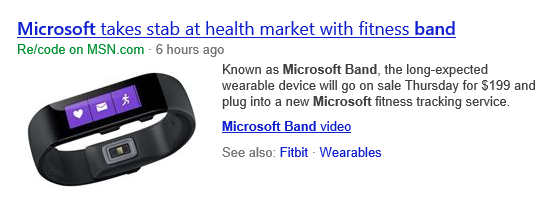
Microsoft Band is released


Microsoft Band is released today ending the speculation about a wearable device.

It has aced the other vendors with many notable features:
  • Longer battery life
  • Integration with Windows Phone, iPhone and Android through Bluetooth
  • Health and Fitness targeted
  • Integrated with Cloud
  • Reasonable price - a first for Microsoft
  • Cortana for those who own a Windows Phone
  • Probably more number of sensors than in a comparable wearable
The following are my speculations
  • Integration with Internet of Things (?)
  • CortanaOS and CortanaAndroid siblings in the offing
Probably I will be wearing one soon.
I tried out the MSN/Bing Health and Fitness app and the part I can use with Nokia Icon is cool. Some newer Windows Phones have the Motion Data support and they can measure the full app.

However to go with the Band Microsoft has released a new app which you can download from the Windows Store, Microsoft Health which has the same logo as the device.


Of course you need to have the band to use this app as you see here:

 
Do not miss this video on my other blog:


DMCA.com Protection Status