Showing posts with label Visual Basic. Show all posts

Friday, July 24, 2015

Windows 8.1 and Windows Phone 8.1 apps with Visual Studio 2015 Community


In my previous post I made a premature remark regarding Windows Phone apps. I remarked, "For developing Windows Phone applications you may need to install a different version of Visual Studio.
"
I was wrong.

Well, it turned out that some of the software support is not installed by default and you need to install them clicking on the link you find for many of the templates like 'Windows, Python, F#, etc.".
I tried to install support for Visual C++ under other languages and the following was displayed.


MissingTools.png

I clicked Install to install the necessary components.

MissingTools_1.png

Well you need to close the IDE which allowed you to come to the above. Click Continue. The following features will be installed.

MissingTools_2.png

Clacking Next brings up the next window. Note that you need an additional 2GB space.

MissingTools_3.png
 
Now you are ready to update your tools. Click Update. Here is an intermediate state of installation.
 
 
MissingTools_5.png

The install is completed.

The next time you launch VS 2015 Community you will see the following:


MissingTools_6.png

This effectively adds all Windows 8.1 and Windows Phone 8.1 templates for all languages including JavaScript.

This installation updates Visual Studio 2015 Community in Control Panel|.| Programs.

Here are some more details:

Visual Basic templates now available include the new and classic as shown.

VB_win01.png

These are the Windows 8 related templates (Windows 8, Windows Phone 8.1, Silverlight). Note that the scroll is only halfway. There are many more templates.

VB_win01_W8.png
 
These are the Windows Classic Desktop templates.
VB_win01_Classic.png
 
to be continued..


Tuesday, August 21, 2012

Do you wish to work with Metro Style Apps?

Step 1: Install Windows 8 Enterprise.

Step 2: Download and Install VS2012 Express

Download from here to your Windows 8 Downloads folder.

http://msdn.microsoft.com/en-us/windows/apps/br229516.aspx

Double click the executable in your download shown here:


Installation starts


You can proceed after agreeing to license terms.


You should get a Developer License. Read info on this modal window


It's easy to get a license.


From here you can Start a new project, Open an existing project etc.


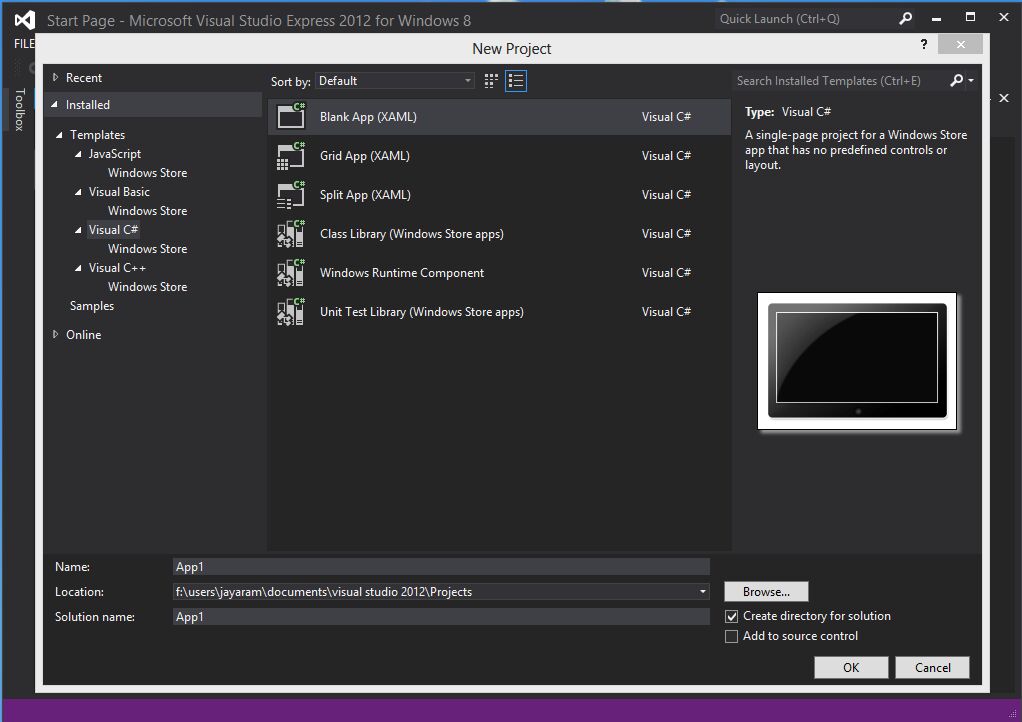
You can use C# to develop your project.


These are the templates available out off the box. You can choose to develop with any of these.


If you prefer you can use JavaScript and HTML5


Or you can use Visual Basic if that is your strength.


OK, You can use C++


In each of these languages you have the choice to start from a Blank or use prefab templates.

I tried here to create an extremely simple APP using JavaScript that has ,

A splash screen


A button which when clicked changes the text in a textbox


A tool-tip that shows some text when you hover over the text box


A logo for the APP. The image for the logo (Copy right of Microsoft) I copied from the Windows 8 Screen and used it. The name of the APP is AppJayAug20. It's only on my local machine in test environment.


The default.html which has most of the stuff is here.


That's all folks.

Mahalo


DMCA.com Protection Status