In the previous post the details of downloading the free Oracle SQL Developer 4.1.1 and the Java SDK8 were described for a Windows 10 on a x32bit machine. As to requirements please refer to
this link. Although Windows 10 is not in the list of OSs, it seems to work without a problem, at least so far.
You do not need to install the Oracle SQL Developer tool as the executable (sqldeveloper.exe) is in the download. Java8 SDK was downloaded and installed with the x64 bit SQL Developer on Window 10 on x32 bit laptop. However Oracle SQL Developer Tool 4.1.1 already had JDK8 and there was no need to install JDK8 separately.
Launch the SQL Developer by double clicking the executable. It starts off with the following:

SQL Developer411.png
There may be a message to restore previous connections and this was ignored.
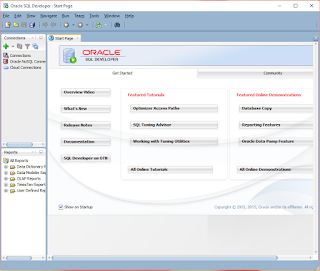
The Oracle SQL Developer start page is displayed as shown.
SQLDevGui.png
At the top is the main menu and the toolbar is below the main menu. In the pane on the right you have a number of useful links including videos, featured tutorials and featured online demonstrations. You should make it a point to visit these links.
In the pane on the left at the top is the Connections pane where you establish connections. There are three links as shown.

Connections.png
Right click Connections to open the following:
 Connections2.png
From here click New Connection... to open the following:
 SelectDBConnection.png
It likes like as it stands you can only connect to an Oracle database. You may have bring in connection information for third part databases. Click Cancel.
Right click Oracle NoSQL Connection to open the following:
 ConnectNoSQL.png
Click Cancel.
Right click Cloud Connections and click New Cloud Connection... to open the following interface:
 ConnectionCloud.png
This is obviously to the Oracle Cloud. You must have some kind of authentication to get to the service.
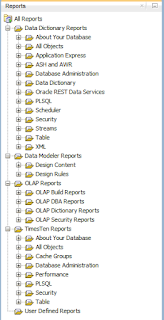
The Reports pane at the bottom of the Connections pane has all diffrent reports that you can generate.
ReportsDetails.png
Video: Some major features
this link. Although Windows 10 is not in the list of OSs, it seems to work without a problem, at least so far.
You do not need to install the Oracle SQL Developer tool as the executable (sqldeveloper.exe) is in the download. Java8 SDK was downloaded and installed with the x64 bit SQL Developer on Window 10 on x32 bit laptop. However Oracle SQL Developer Tool 4.1.1 already had JDK8 and there was no need to install JDK8 separately.
Launch the SQL Developer by double clicking the executable. It starts off with the following:

SQL Developer411.png
There may be a message to restore previous connections and this was ignored.
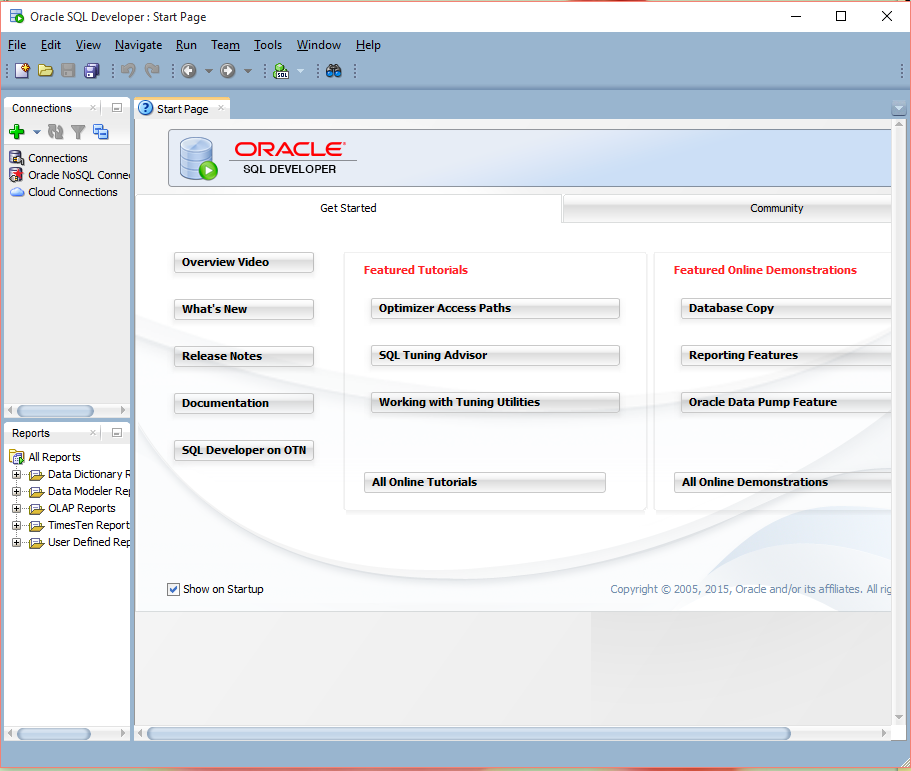
The Oracle SQL Developer start page is displayed as shown.
SQLDevGui.png
At the top is the main menu and the toolbar is below the main menu. In the pane on the right you have a number of useful links including videos, featured tutorials and featured online demonstrations. You should make it a point to visit these links.
In the pane on the left at the top is the Connections pane where you establish connections. There are three links as shown.

Connections.png
Right click Connections to open the following:

From here click New Connection... to open the following:

It likes like as it stands you can only connect to an Oracle database. You may have bring in connection information for third part databases. Click Cancel.
Right click Oracle NoSQL Connection to open the following:

Click Cancel.
Right click Cloud Connections and click New Cloud Connection... to open the following interface:

This is obviously to the Oracle Cloud. You must have some kind of authentication to get to the service.
The Reports pane at the bottom of the Connections pane has all diffrent reports that you can generate.

ReportsDetails.png
Video: Some major features


